This topic has been closed for replies.
Correct answer erico98524548

Vic,

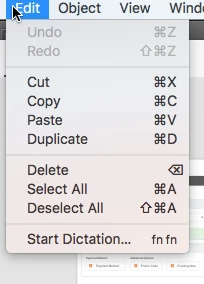
I was unable to use either function regardless what action was taken.  ie. after I drew a rectangle: the undo function was still disabled.  An old fashioned reboot this morning has seem to resolve my issue.

Thanks for your quick response.  

12 replies

mustLearnMore
Participating Frequently
March 4, 2021

This issue comes about after adjusting the opacity slider on an element in the fill or stroke pop-up. The only solution is to restart the app, which is a very common necessity. Adobe have been aware of this for  YEARS, and still haven't fixed the issue.

Participant
March 31, 2021

Adobe XD has become completely useless to me, and I cannot rely on it anymore. The bug that has existed for FOUR years still hasn't been fixed. UNDO and REDO functions -> inactive; restarting/ rebooting doesn't help. I do not recommend Adobe XD unless you want to waste your time (like me at the moment)

stefanf95757781
Known Participant
February 5, 2021

Same problem...after a while Undo Ctrl+Z does not work anymore.
I don't need to reboot the whole system but only Restart Adobe XD. Just installed the lastest update but the problem is still there.

Maybe this is related: also I cannot change/edit Adobe XD guideline positions once they are created.

Both problems I have for the first time since I stared using Adobe XD in early 2020.

stefanf95757781
Known Participant
February 5, 2021

(update: my guidelines were locked with ctrl+shift+.)

Macadamus
Participant
January 29, 2021

Still a very common issue even after all these latest updates. It is becoming so annoying that it is almost not workable anymore. Having to reboot every 10 mins to get CTRL-Z working again. Having this issue for more than 2 years, really thinking of leaving Adobe alltogether for this. Adobe has to take this bug serious and FIX IT! or loose loyal customers.

Participant
December 18, 2020

Still seeing this issue on multiple XD files, cannot seem to figure out what triggers it. 


XD version 34.4.12.3, creative cloud sync 4.3.71.1

MacOS Catalina 10.15.7


Participant
December 24, 2020

Same here still getting this bug and my XD is up to date

Participant
September 21, 2020

This was posted in 2016 and is STILL an issue. Why has this not been fixed Adobe? Restarted the software and it's working now. How does it take so many years to fix something that's so broken? I just lost 4 hours of work and unlike in the past, I can switch to Figma.

Participant
November 29, 2020

Having the same issue here. My MacOS is Big Sur and I've updated the XD to the latest version. Finally switching to Figma now.

Participant
April 17, 2020

I am STILL seeing this bug in adobe acrobat. Undo and Redo not working. No way to fix it. 

How is a 4 year old bug still causing havoc like this to acrobat users worldwide? 

PLEASE fix this problem.


Additionally, the 'Add note to replace text' tool is automatically set to 'locked' which means I have to go into the comment preferences and unlock it before I can delete it. 

Participating Frequently
August 7, 2019

Hello,

I'm facing the same issue right now, and it happened suddenly!
I restarted my Mac several times, and restarted Adobe XD too and it is still not doing Copy/Paste or Undo/Redo.

Could anybody help please? I'm not being able to work anymore!

Thanks

Sandra

HARSHIKA_VERMA
Community Manager
Community Manager
August 7, 2019

Hi Sandra,

We're sorry to hear you're having trouble using Copy/Paste or Undo/Redo in Adobe XD on mac. We'd like to know a few more details like:

  • Could you please share the OS and XD version of your machine?
  • Is it happening with all the files or with a specific file?

We'd also like to confirm if you've tried the suggestion mentioned by Preran and share the results with us.

Thanks,

Harshika

Participating Frequently
August 7, 2019

Hello Harshika,

My Adobe XD version: 21.2.12.3

My MacBook Pro specs:

MacOS Mojave 10.14.6

MacBook Pro (15-inch, 2016)

Processor: 2.7 GHz Intel Core i7

Memory: 16 GB 2133 MHz LPDDR3

Graphics: Radeon Pro 455 2 GB

                Intel HD Graphics 530 1536 MB

I tried to un-install XD and re-install the older version, it didnt work; so I re-installed the "21.2.12.3" again, and now the "Copy-paste" is working sometimes on some components but it is still not working some other times and on other components... The "undo/redo" is not working at all.

yes, this is happening with all files.

Also i noticed now that even the "Save" is not working continuously.

yes I tried Preran suggestion and it didn't work.

Thanks

Sandra

Bradley Adkins
Participant
July 8, 2019

I notice that happens when I open a Sketch file in XD. The Undo and Redo option becomes disabled.

HARSHIKA_VERMA
Community Manager
Community Manager
July 8, 2019

Hi Brad,

Thank you for reaching out with your observation. I'd like to know the few more details like:

  • The OS and XD version of your machine.
  • Are you able to copy and paste smoothly?

Awaiting your response.

Thanks,

Harshika

Participant
June 21, 2018

¡Hi!

We continue to have this issue. It is not always possible to reboot the system as I run several other programs. I prefer to continue working risking myself to not being able to undo my last changes. It also affect functionality on copy/paste with shortcuts (CTRL+C, CTRL+V). It simply does not paste the item.

Running version 9.0.12.19 over Windows 10 Pro 1803.

Participant
June 15, 2018

Same issue here: I cannot press the undo or redo buttons.

Document is 1.7mb, 44 screens, XD v7.0.12

MacBook Pro (Retina, 15-inch, Mid 2014)

Processor 2.2 GHz Intel Core i7

Memory 16 GB 1600 MHz DDR3

Graphics Intel Iris Pro 1536 MB

I have a few symbols created that won't update/propagate either. Feels like the file could be corrupt? Creating a new copied file helps for a bit, doing some testing now.

Participant
July 23, 2018

Same problem here. I am unable to do an UNDO or REDO with the latest Adobe XD update. This is not getting resolved with multiple reboots as well and my symbols dont update as well across canvases.

I use a Macbook Pro and my Adobe XD CC is 10.0.12.9, Creative Cloud Sync 3.0.3.6

Please advice!

Thanks,

Anantha

sd67410255
Participant
August 22, 2018

I'm having the same issue - worked to start with, now it's not feasible. Really frustrating. Such a basic facility that should function correctly.

@VickMitnik the friendly assistant who replied to the OP seems to have disappeared... anyone out there with a fix that doesn't involve a reboot?!