

New Participant
July 28, 2021
Answered

Unlinked error on main component in main document in XD 42.1 version

  • July 28, 2021
  • 10 replies
  • 7538 views

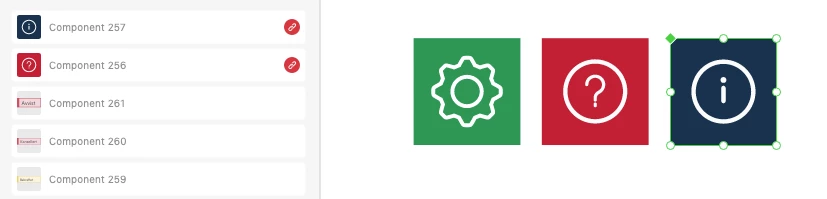
There are main components in my document that come up with a red link ikon, even though its located in the same document. Why? 
 

<Title renamed by moderator>

This topic has been closed for replies.
Correct answer Randy Edmunds 2

A fix was released in v44.1. Please upgrade to this release and let us know your results.


Thanks,

Randy


10 replies

Randy Edmunds 2
Adobe Employee
Randy Edmunds 2Correct answer
Adobe Employee
October 5, 2021

A fix was released in v44.1. Please upgrade to this release and let us know your results.


Thanks,

Randy


New Participant
September 28, 2021

I also face the same issue

New Participant
September 22, 2021

Exact same issue over here. I noticed it yesterday even though I only updated to the latest build today. After the update, it's much worse. Some components can be made local and some can't. I don't even have the option to delete some of these.


My master component library is now insisting that all of my components can't be used because they're not local to the file. But I built everything in this file from scratch. I just finished making new components yesterday, updated to the latest XD version today (44.0.12.7), and this morning all of those components are broken. This is a show stopper. I've been using XD from the very beginning but I never experienced this level of broken-ness with an update before.

Cocoshoou
Participating Frequently
September 22, 2021

I installed CC and XD yesterday and this morning I created components in a doc, published them and used them in an other doc. I closed for break and when I opened again the components had a red link. I can't even locate them.

I contacted the support and while chating I created new components. At some point he told me to shut XD, sign off/on of CC to make them work again. Worst, the new one I was created also had a red link. Nothing is resolved.

Randy Edmunds 2
Adobe Employee
Adobe Employee
September 22, 2021

Thanks for your feedback!


Since you installed yesterday, then you're probably running v44 -- is that correct?

Regarding the doc where you created your Components, was it a Local or Cloud doc?


Do you have any nested Components?


Thanks,

Randy

Cocoshoou
Participating Frequently
September 22, 2021

I'm running 44.0.12.7

They're all cloud documents. And they are nested components in the second doc.


I created icons on the first doc. In the second doc, where they are unliked now, they're nested to make buttons components.

Known Participant
September 13, 2021

Does Adobe have an ETA on when this will be fixed? 

Randy Edmunds 2
Adobe Employee
Adobe Employee
September 15, 2021

There is a change coming in v44 that should fix case for Components that show Link to same doc/library.


But, we're still try to reproduce some other cases. Please let us know if you have a reproducible recipe for getting into this situation when creating a new Library. Thanks in advance.


Regards,

Randy


Known Participant
September 22, 2021

I don't create new libraries all the time. That isn't remotely how I work. Adobe's libraries are buggy and take time to sync, cause load issues, and multiple components, because you don't have a simple MERGE function. I have a central design system I built into a couple libraries. If I'm going to rebuild this library, it's in Figma. I understand that Adobe's core user are people pretending to be UI designers, but you also need to think about the people who need this for production work. Right now, I'm recommending my team and every designer I know to move away from this poorly implemented program. 

Do better.

Also you're last updated added groups, but those groups didn't translate when moving components from a library. Utterly useless. Thanks.

Known Participant
September 10, 2021

I am having the same issue. But my local components say they're linked to one of my libraries they haven't been anywhere near. 

HARSHIKA_VERMA
Community Manager
Community Manager
September 13, 2021

Hi All,


We have highlighted this issue to our Product team and they are investigating on the workflow. We will get back to you if they need information from your end. 


The best you can help us with is to share a video of your workflow showing the behavior so that they can try replicating their end and check the root cause of the issue.


Thanks,

Harshika

Known Participant
September 13, 2021

It's happening on a lot of documents now, so it is hard to isolate. Including one of my libraries. I'm coping components to a blank document breaking then copying back. I'm doing this becasue XD doesn't let you duplicate a master. You don't let us organize components within a library. Libraries are slow and require constant updating. 

Who thought it was a good idea to break everyones workflow. For a program that does UX/UI design, Adobe may want to think about doing some user research before breaking everything. 

New Participant
September 3, 2021

Having this issue also, its a major concern.

New Participant
September 3, 2021

For me the components are inexplicably breaking in the master library document in which the component  has been created. It's causing chaos.

HARSHIKA_VERMA
Community Manager
Community Manager
August 12, 2021

Hi there,


Sorry to hear you're experiencing issue with linked component in XD. We would like to confirm if this is the main file with main component in which you're getting red error. 


  • What happen when you hover to the red error, does it show any error message? 
  • Please share the version of XD and the OS of your machine.
  • Does that happen with this specific file?


We will try our best to investigate the issue and help you.


Thanks,

Harshika

New Participant
August 9, 2021

Hi, I am working on XD with a number of main components, but as soon as I did the last update of the program, they started to break. When I need to edit a main component and I change between its states, the green rhombus (indicating that it is a main component) changes to a red link icon (as if the component came from another file, and as if it were broken link). I need to know what is going on because the file I am working on defines the design system of other files as it is a large project.


I am attaching two images of the same component. This text field was a main component, but as soon as it went to a state 2 that defined an action for me, it changed to another type of broken link component.


Please, I need a quick answer, because as I told you, it is a big project and it can affect my work flow.


Thanks a lot!

HARSHIKA_VERMA
Community Manager
Community Manager
August 12, 2021

Hi Pablo,


We are sorry for the trouble. We would like to confirm if this is the similar issue as mentioned here: https://community.adobe.com/t5/adobe-xd/unlinked-error-on-main-component-in-main-document-in-xd/td-p/12310919


If so, we would request you to please share the asked details and we will try our best to investigate the issue.


Thanks,

Harshika

New Participant
August 12, 2021

Yes, it is a similar problem, main components created in that file, which later became components with the red link icon. In fact, they sometimes become just copy components. I don't know if it's a bug in the program.


  • What happen when you hover to the red error, does it show any error message? Nothing happens
  • Please share the version of XD and the OS of your machine. XD Version is 42.1.22 and i am workin o macOS Catalina 10.15.4
  • Does that happen with this specific file? Yes, currently just happen in this file and other linked with this.


Additionally, I work this file in the cloud with other partners and the same thing happened to them.

Their versions are:

  • macOS big sur 11.4  ---  XD 42.1.22
  • macOS Mojave 10.14.6  ---  XD 42.1.22
New Participant
July 28, 2021
Hi, can you please help me with a problem I have today? Suddenly (I think after updating the library) a few components that are master components of a cloud document got misconfigured and they now appear in the components panel with a linked icon in red saying that the library is missing, when they are master components of that opened document.
Thanks
Community Manager
July 29, 2021

Hello,


Thank you for reporting the issue. It is bit confusing that how master component turned into broken linked component.

Could you please provide clear details or short clip of Published document with its all assets and explain in more brief.


Regards,

Anita Subedi