


hsukaanqi
Participating Frequently
March 25, 2020
Answered

Variable Font Issue in XD Windows

  • March 25, 2020
  • 14 replies
  • 24894 views

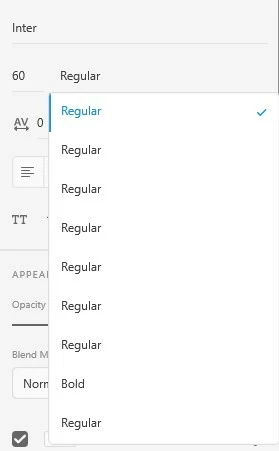
Whenever I use a Variable Font, eg. Inter, in XD in Windows 10 the corresponding weights doesn't show up instead it shows up a list with Regular weight repeated. I haven't face this problem in Mac OS. Please help.
 

Correct answer S23859558538x

Hi All,


I would like to inform you all that these variable fonts are not supported yet. Though it's on the team roadmap and yes the best answer would be to install separate font weights separately for now.


We will let you know if we have more updates on this in the future.


Thanks,

Harshika


Does Adobe XD support variable fonts yet?

14 replies

New Participant
July 4, 2020

Hi eveyone,


It happened on my computer as well. I think there was some font conflict. Hence it took only regular font-weight or whichever was installed at first. 


In order to fix this issue one has to remove fonts from windows. Follow this link for step by step process https://www.windowscentral.com/how-manage-fonts-settings-windows-10-april-2018-update


Then activate the fonts from adobe creative cloud font library https://fonts.adobe.com/fonts


This has solved my font issue in my xd. Hope this helps.

New Participant
July 12, 2020

Hi. I tried another way: Just installed the fonts that are NOT in the Static folder as the fonts in the Static folder are clearly the same font. I tried downloading the font from FontSquirrel but it is the same font as in Google Fonts. Just try installing the fonts (variable) that are NOT in the Static folder when you download the fonts. This worked for me.

Rishabh_Tiwari
Community Manager
Community Manager
July 20, 2020

Hi there,


Thanks for reaching out and sharing the solution. I am sure it will help other community members. Feel free to reach out to us in case if you have any questions or issues in the future.


Regards

Rishabh

Participating Frequently
June 3, 2020

Hi, there!

I had the same issue and finally I realized that's a Google's font problem.

In my case was "Manrope" font, I unziped the file and the 6 font files, have the same weight, date and time. After that, I reviewed each file, and actually are the same.

So, the solution it's so simple: Download the font file from other source like FontSquirrel.

I hope that's works for you!


New Participant
June 19, 2020

Many thanks. Its really helped me. Whats wrong with google fonts... 

New Participant
June 19, 2020

Hi, I insist... If is Google Font problem... Why Illustrator work correctly?

Try Quicksand font.  Google's QuickSand is pretty font, but Fontsquirrel's doesn't... they are different, Illustrator uses it right way but XD doesn't.


Please XD team, check this for us, you'll give us a great gift!

New Participant
April 28, 2020

I have the exact same issue but reinstalling the font weights separately didn't work. Even though Windows 10 displays the fonts as 'Regular', I can use the weight variables in Illustrator and Photoshop. I'm only having issue with Adobe XD

Rishabh_Tiwari
Community Manager
Community Manager
April 29, 2020

Hi Maria,


Sorry to hear about the trouble. Could you please check if the font-weight appears as a separate font in Adobe XD instead of showing under that specific font. Also please share the font details.


Regards

Rishabh

New Participant
May 3, 2020

Hi,

I have the same issue. Cant use any variable fonts. Adobe XD show only "Regular" and the font-weight doesn't seem to change on choosing any. But it works fine on Photoshop and Illustrator.


Installed a new font

Jost from google fonts. Tried installing both the variable and individual files, nothing worked.

Here is the font link https://fonts.google.com/specimen/Jost


Same problem with other variable fonts too. I'm not able to work because of this.

hsukaanqi
hsukaanqiAuthor
Participating Frequently
March 25, 2020

OK, seems like it's not an XD Issue, it's Windows 10 Issue. Even in Windows 10 Font Dropdown, it shows the same. Solution is to install separate font weights separately.

HARSHIKA_VERMA
Community Manager
Community Manager
March 26, 2020

Nice to hear you are able to fix the issue and thanks for sharing the solution. This will definitely help our customer who will face the similar issue.


Thanks,

Harshika

New Participant
October 3, 2021

This soloution is not working for me.