


Participating Frequently
January 19, 2023
Question

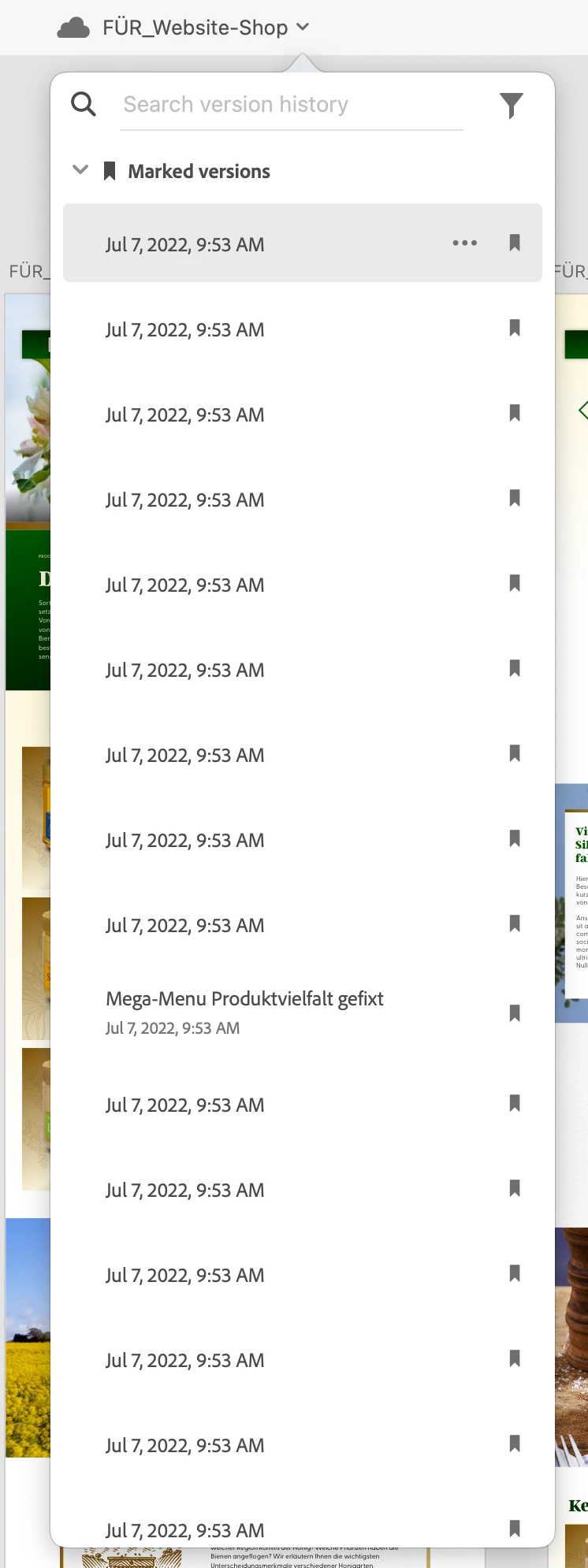
Version history of my document is all from the same date

  • January 19, 2023
  • 1 reply
  • 1647 views

Today as i opened my XD-document i had to discover that the whole version history is named by the same date all of a sudden. And indeed, every version I open looks the same! Is it somehow possible to restore my marked versions? What could be the reason that this happened?!
 

    This topic has been closed for replies.

    1 reply

    Myra Ferguson
    Community Expert
    Community Expert
    January 19, 2023

    If you go to the Creative Cloud Website, open your XDC file there, and click on the clock icon for the Timeline, does it show the same dates and times there?


    Here's more information on version history in Adobe XD:

    S_DarsowAuthor
    Participating Frequently
    January 23, 2023

    Hi Myra, thanx for the quick response … the timeline that i can see on the Creative Cloud website is different. Here i can see different dates and if i open them they show different states of the document. Never tried to reach my data this way. So far, so good … but why is that happening? How can i reach the correct timeline using the XD app?

    HARSHIKA_VERMA
    Community Manager
    Community Manager
    January 23, 2023

    Hi @S_Darsow,


    Thanks for trying the suggestion shared by our expert. Would you mind confirming if it's happening with every file or with this specific file? Please share the version of XD and the operating system you're working on.


    We will try our best to investigate the issue.


    Thanks,

    Harshika