


Participating Frequently
August 6, 2021
Answered

XD : Unable to update library components in Xd documents

  • August 6, 2021
  • 3 replies
  • 4036 views

Hi everyone,


I'm currently facing a huge problem with the use of my libraries in Adobe Xd. I first got a loading problem of my libraries in Adobe Xd which is now resolved, but now I'm facing another problem much more annoying.

I have created a Xd library few months ago, library that is shared in the Creative Cloud so I can use it in other Xd docs. I can update my library itself, but I can't update any components in the documents that use this library. Each time I try to update my component (see screenshot, where I have 3 components updated in the library, that I want to update in the documents that use my components through the library), an error message pops up saying "Unable to update the component due to an error" (translated from french, so might not be as exact as the original english version, even if this error message isn't helping at all!)
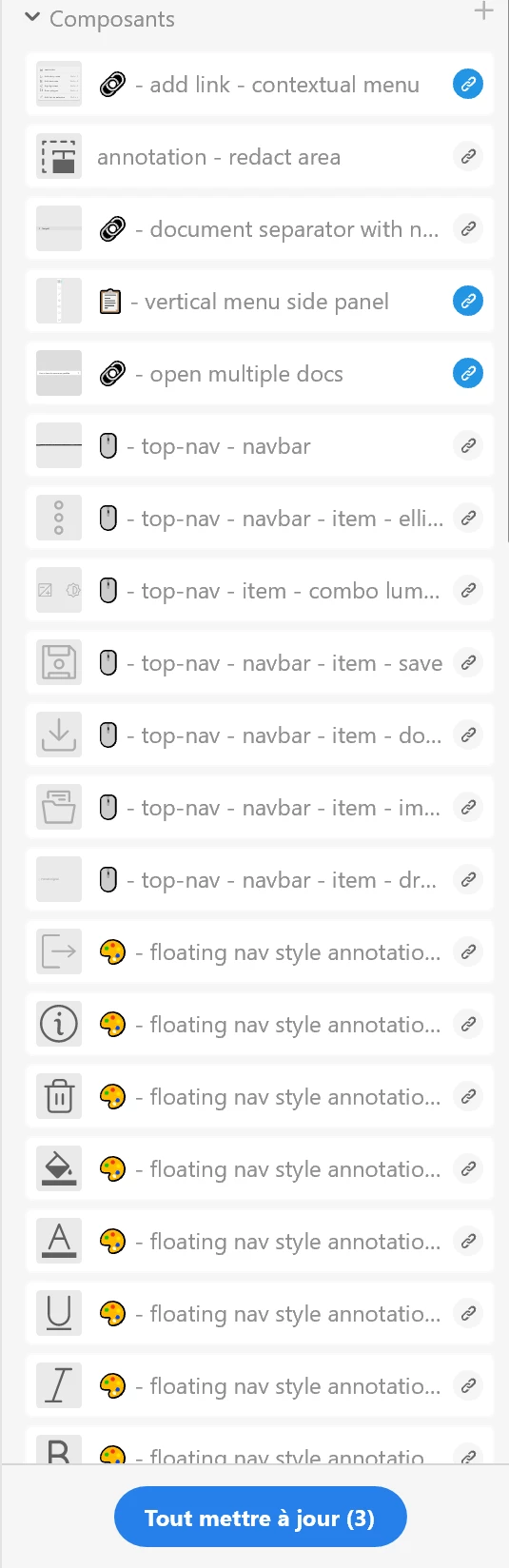

 

I already tried to relaunch Creative Cloud, Xd apps, my computer, even delete the folder "libraries" from the installation folder of adobe, etc, but nothing worked. I am pretty desperate as I cannot apply any updates to my documents that use my library...


If anyone has already encountered this problem or got an idea on how to solve it, please let me know what I need to do!

Thanks in advance for your help


{Title renamed by MOD}

This topic has been closed for replies.
Correct answer MoonRat18373865

Hi Marie!

I just had a similar problem:

  1. When clicking on the update button or the banner, I could see the progress bar rapidly going from 0 to 100, and then nothing.
  2. Right before this happened I just changed the groups and subgroups of all my components to tidy up a little bit (some groups have been renamed, some have been moved, and some have been deleted)
  3. What fixed it for me was to unpublish the library and publish it again. 


I know Adobe is trying to make all of this go a little bit smoother, but I am kind of getting annoyed of all these bugs everywhere when competitors solutions are way cheaper and better integrated...

3 replies

Participating Frequently
August 25, 2021

Any other ideas ? The problem isn't solved, and I can't work anymore on adobe with this problem.

I'm now considering to leave adobe Xd...

MoonRat18373865
MoonRat18373865Correct answer
New Participant
August 5, 2022

Hi Marie!

I just had a similar problem:

  1. When clicking on the update button or the banner, I could see the progress bar rapidly going from 0 to 100, and then nothing.
  2. Right before this happened I just changed the groups and subgroups of all my components to tidy up a little bit (some groups have been renamed, some have been moved, and some have been deleted)
  3. What fixed it for me was to unpublish the library and publish it again. 


I know Adobe is trying to make all of this go a little bit smoother, but I am kind of getting annoyed of all these bugs everywhere when competitors solutions are way cheaper and better integrated...

Randy Edmunds 2
Adobe Employee
Adobe Employee
August 6, 2021

How are you trying to update your components?


If you are using the "Update All (3)" (translated to English) button at the bottom, then try updating each Component individually using "Update" from context (right-click) menu of each Component.


If that still doesn't work, I suspect that you may have Nested Components from a different source document which also have pending updates. Try opening each source file directly and apply any pending updates first.


Hope this helps,

Randy


Participating Frequently
August 9, 2021

Hi Randy,


I already tried to update components individually but got the exact same error.


And yes, I have nested component, but not from different files. They are all in the same document, and I'm still unable to update them 😞

Randy Edmunds 2
Adobe Employee
Adobe Employee
August 11, 2021

Sorry, I can't think of anything else to try. It's possible that your component was corrupted in some way, so it may be easiest to recreate the component. If you find a reproducible recipe to cause that to happen, please share it with us so we can fix it!


Regards,

Randy

Rishabh_Tiwari
Community Manager
Community Manager
August 6, 2021

Hi there,


We're so sorry to hear about the trouble. Please ensure that you have updated XD to the latest version which is 42.1. In case if it's already up to date, please try the steps shared below:


  1. Sign out of XD and CC Desktop app.
  2. Close CoreSync and all Adobe related processes from the Task Manager/Activity Monitor.
  3. Reboot the computer.
  4. Sign back in on the CC Desktop app and launch XD from there and check if this solves the issue.


In case if it still doesn't work, we'll need to test this on a live session, please contact us using this link https://helpx.adobe.com/contact.html


Regards

Rishabh

Participating Frequently
August 6, 2021

Hi Rishabh,


Many thanks for your quick answer.

Unfortunately nothing solved the problem, and yes I already had the latest version of Adobe Xd.


I just looked at your link to plan a live session but didn't manage to find any contact form where I can make my request. Do you have any other way to contact you ?