



KatieH UX
New Participant
November 25, 2020
Question

XD : Unable to Update Library through update button in XD

  • November 25, 2020
  • 17 replies
  • 8463 views

I am unable to update my library using the UPDATE action in XD. The update button is there - as well as the banner, but when I click "UPDATE"  nothing is happening. I am unable to figure out what is the cause - file size, server issue? Any suggestions?
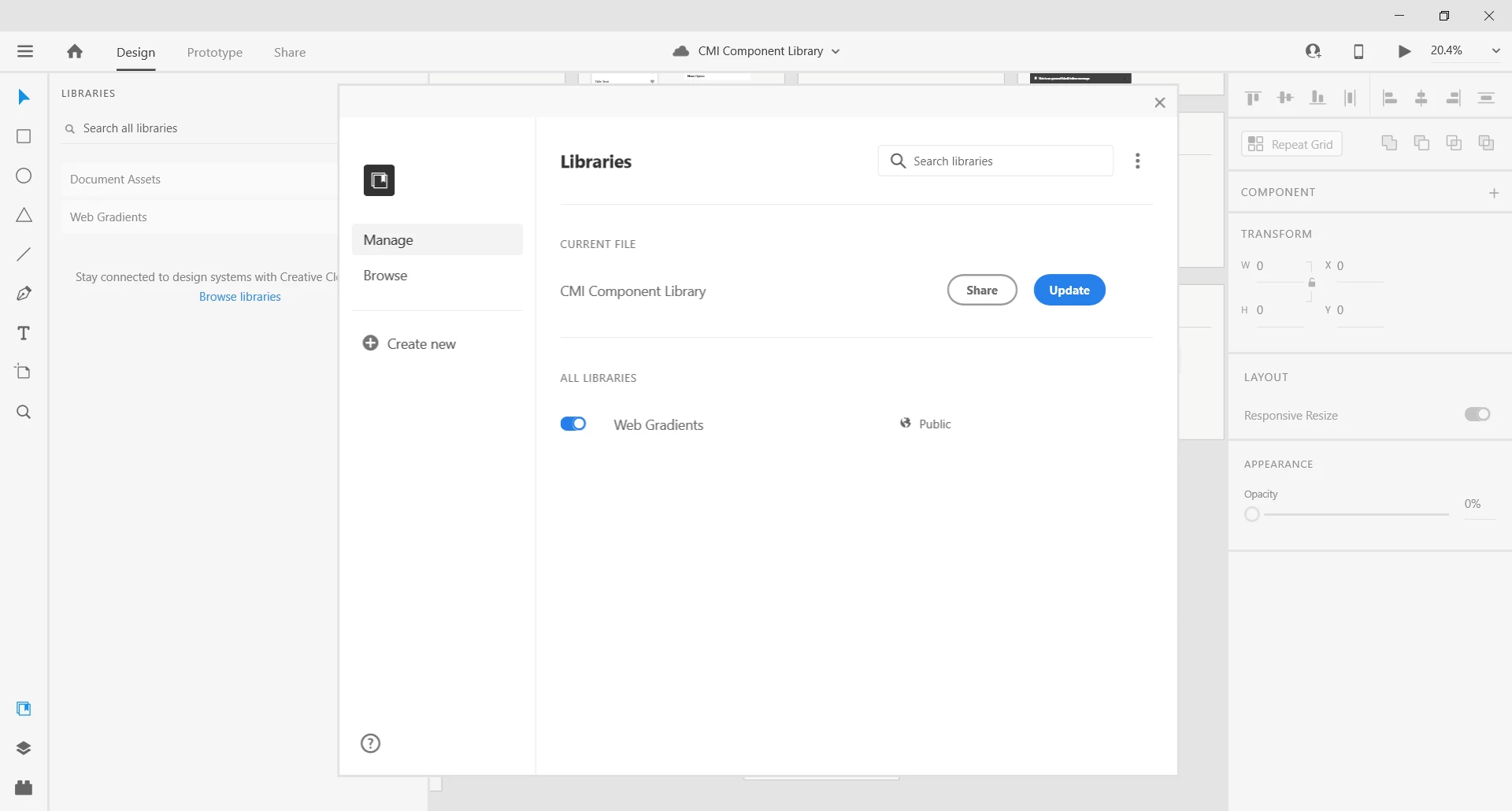


{Title renamed by MOD}

This topic has been closed for replies.

17 replies

Inspiring
June 12, 2023

I'm having the same issue 2.5 years later. Its sad to see Adobe prioritizes its bug fixes so low that they are never addressed and a sub-par products continues to be sub-par. 

New Participant
May 6, 2022

Not sure if this is the same issue I had. I tried updating a CC library from Adobe XD and could not. What worked for me was uninstalling all Adobe programs and Adobe Cloud program using cc cleaner tool.


Then reinstalling Adobe Clound and installing Adobe XD again. I think the cc cleaner tool does a lot so if you use it use it at your own risk. It removes all adobe files I think so if you have work you want saved I would make sure it is backed up. 

New Participant
March 9, 2022

I am also experiencing this issue. It has completely broken my workflow and now I am unable to continue building our atomic design system and have to just copy and paste components. So dissapointing that this issue has not been addressed in over two years. 

New Participant
February 23, 2022

Faced this issue today.


Here is my solutiuon:

  • Browse library file versions history and find a stable one (with updates possible)
  • Open that file and publish it as a library
  • You will be asked to replace all components from your currently published library
  • Agree and then update linked components from library in working files

Thanks God this proccess is automatical.


I still have a blue notification at the bottom after every update. Looks like that happened earlier.


For Adobe, maybe this will be helpfull:

Before that happened, I tried to update quite an old component in my current library. Since that version of XD where hover states were introduced.

You should consider investigation since with an atomic design approach and the number of components – this will become a nightmare. 

New Participant
November 30, 2021

Same issue here.


I don't have nested libraries. Just one library and when I try to update any of the components nothing happens. The changes are saved, but the files that use the library do not update them.


In addition, the notification that I need to update the library does not go away.

Participating Frequently
November 17, 2021

For me the issue has been going on for years, and basically what I resort to doing is asking colleagues whose computer works to update the library using the same account for me.


Basically on Windows no matter if it's new library or old one, I always get the "Update" prompt, and trying to update the Library doesn't do it, it just immediately gives me back the Update prompt.


It's been going on for years, version and after version, even Windows versions after another 🤣😭 and that issue has never been solved.


I have spent many times hours calling the Adobe customer service about it, they made me do all kinds of things like creating a completely new Windows user account and all these kinds of steps, and they could never find what's wrong nor bring any fix.


So if you face the same issue, I suggest you just give up, XD is just never going to be working for you... 

New Participant
November 12, 2021

Well I have read through this issue since KatieH UX first posted. I updated XD(45.0.62.17) recently and since yesterday I am having the same issue! It boggels the brain that it has not been sorted yet.
Can someone help?!

Known Participant
November 12, 2021

LuiTee, 

This probably isn't the kind of answer you're looking for, but my ultimate solution has been to move my UX team to Figma. After 4 years of frustration with XD, we can no longer tolerate the level of lost hours spent fixing and refixing the thing that Adobe breaks with nearly every major release. There is no doubt in my mind that nearly 50% of my design hours have been spent in devising workarounds and re-doing work to fit the latest paradigm shift.


Our hope is to be entirely Adobe-free within a year; replacing PhotoShop and Illustrator with Affinity products and XD with Figma. After 2 weeks of dabbling, I can honestly say that every thing we use XD for can be done far better and easier in Figma. There is definitely a solid learning curve as many similar functions are handled in new ways, but for our organization, it is clearly the correct path. 


I wish you and everyone here the best as you sort out the right solution for your design needs. 

Known Participant
November 12, 2021

I completely agree with what LuiTee has said about how frustrating it has been using Adobe XD and the Adobe Library. If I am honest, it never worked for my team in the six months that I use the application, the Library just does not work, but the scary thing about the situation is, Adobe does not seem to have a fix for this.
 
I managed to speak to my manager last month, and we also decided to move are team over the Figma, this month has been a big push to move away from Adobe XD, and maybe in the future Adobe all together. 
 
All the best trying to deal with this issue, I hope you find a fix.

Known Participant
September 24, 2021

Potential Solution - Here's what worked for me.

After receiving a few responses from Adobe (followed by dead silence), I took matters into my own hands.

As referenced in my earlier responses in this thread (under the name Cubelodyte), I posited that the issue was related to recursion between 2 or more libraries. 


Here was the setup - 

We had 2 libraries: Icons and Major Components.

Many of the major components in the MC library were built with nested icon components from the Icons library. 


Solution: Combine the 2 libraries into one so that no library contains any reference to components in another library.


Other Potential Contributing Factors - Nested Components Shared Between Non-library Project Files

I had been building nested components for years before they became officially supported as "a thing" in XD. I called them compound components (or compound symbols -- that's how long I've been using them). This means that many components that ultimately became library components were being shared from file to file in the Cloud without the governance of the Cloud Library architecture. In fact, many of them were shared between local files before the Cloud rolled in and put a fog over nearly everything I had created over my first 2 years of using XD.

Somewhere around the introduction of  Libraries and the new feature "Nested Components" was the point at which many of my components became delinquent and started causing all manner of disruption in the files that shared them (broken links, components that are no longer used in a document but cannot be deleted or made local, etc.). 


Hypothesis:

Premise - Sharing components between XD project files has never worked completely.

There has always been a function for re-linking broken component links and it has never worked. The introduction of the Cloud and Libraries has probably fixed all of this (As of this week, XD officially prevents any sharing of components except via libraries). I suspect that anyone who begins creating new design systems and new libraries using XD and Adobe Cloud will have no issues. It is only those of us who are carrying forward legacy design project collections that experience the growing pains of system improvements that are not truly backward compatible. 


Therefore - These issues will not present themselves in a fresh, clean design system based on the lastest XD release.


Since I was not willing to toss aside 4 years worth of design work, I tested this hypothesis by bringing all the components of our Icons library into the Main Components library. I used the "Make Local" function to create component instances inside the MC library and then eliminated the Icons library altogether. Since doing so, I have had no further issues with the infinite update.


Note 1:

The solution outlined above is not for the faint of heart. Any project file included direct references to icons in the Icons library had to be manually updated to use icons from the the MC Library. This meant first finding all the broken link components, making them local, and then replacing them with their counterparts in the MC library by dragging from the Assets panel onto the existing instances in the document. 

This process is very time-consuming. For most applications, this would only be necessary if the legacy document is current enough to need updating any time the official component is modified. 


Note 2:

Although the libraries had been in a perpetual state of "you need to update", they were, in fact updating successfully enough that changes were propogating to the project files that used them. 


Participating Frequently
November 22, 2021

May I ask how did you find if a component in a nested component was from this document or broken? Is there a user-friendly way to find that out?


I have so many components, it's going to be difficult to find those...

Known Participant
November 23, 2021

We too have an enormous number of components.

Sadly, to my knowledge, there is no direct way to do this in the interface. 


The 2 best tools for tracking down origins are the Assets filter on the assets panel and viewing the icons in the layers panel. 


In the assets panel, you can click the filter icon to show only components from specific libraries or choose "local".

In the Layer panel, the components will have a "link" icon if they came from another library and a "diamond" icon if the came from local.

Beyond that, it was a highly manual process.

Sorry I don't have better news. 


Known Participant
September 24, 2021

This is a joke adobe, and it been hapening to me for the past 2 months without a fix, I had to move my team over to Figma as a last resort. Good luck getting this to work.

New Participant
September 24, 2021

Facing the same issue here 😞

Version: 44.0.12.7 x64, Creative Cloud Sync 4.21.0.14

New Participant
May 24, 2021

Hello,

I am having the same issue with the latest update 40.1.22. on Win 10. Already lost a full day in contact with Customer Support and trying different solutions, which didn't help. On top of the bug with the update button, I also got a recovered version of the affected library. It auto generates even if I delete it. At this point in time, our team is stuck and unable to progress on our project. 

New Participant
May 26, 2021

Update: 
Nothing helped from the list below:
- relogging into Adobe Account
- reinstalling both the app and the cloud
- reinstalling both the app and the cloud with the help of Customer Support's Cleaner app
- Reinviting to the library and the files

After the last intervention from Customer Support, Adobe Xd doesn't recognize that I am invited to the library and instead of 'Update' I have a 'Publish' option.

New Participant
June 21, 2021

Hi All,


We are sorry for the frustration. We would like to know if you're still experiencing the issue with XD 41 version. 


We'll try our best to help.


Thanks,

Harshika


Yes, it still happens. But removing font errors for missing fonts solves
the problem.


--
Christian Pino | UX Designer
<Personal Info removed by moderator>