Participant
February 10, 2020
解決済み

[Crash/Load]-Adobe XD freezes during the zoom operation.

  • February 10, 2020
  • 返信数 18.
  • 14608 ビュー

Hi,

XD seems to be freezing whenever I try to zoom in. I am required to restart the program everytime this happens.

Looking forward to the bug being fixed.


Thank You.


<The Title was renamed by moderator>

このトピックへの返信は締め切られました。
解決に役立った回答 HARSHIKA_VERMA

1. Adobe XD is updated. Windows 10.

2. Yes, I have two monitors but using the main one for XD.
3. Wacom is updated. Also, Nvidia drivers are also updated.

The bug is still there.
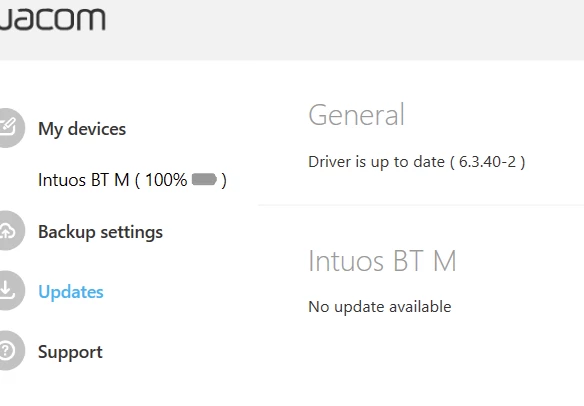


Thanks for sharing the information asked by Rishabh, Serhii.  As far as I know the bug was fixed with XD 31 version. If you're still running into the same issue. We would need some more specific information so that we can reopen the logged bug.


  • Does it always freeze on zoom (or only sometimes)?
  • How was the zoom command given (using mouse wheel, the touchpad, the zoom dropdown, the zoom tool or a specific keyboard shortcut (like Ctrl+1 etc.))?
  • I am unable to find the logs with the name in the screenshot. Could you please try uploading the logs again to the shared location such as Creative Cloud or Dropbox and then share the url with us over a private message?


We will try our best to help.


Note: Please share the url of the post over a PM for reference.


I am also merging the post with the similar discussion happened in past. 


Thanks,

Harshika

 

返信数 18

Participant
March 28, 2023

I still have that same freezing issue upon zooming and saving to cloud on XD version 56.1.12. Bug has not been fixed??

Rishabh_Tiwari
Community Manager
Community Manager
March 28, 2023

Hi @Xtremax Pte Ltd Account 1 ,


We're so sorry to hear about the trouble. Would you mind confirming the version of the OS? Also, is it happening with a specific file or multiple files? Have you noticed if this is happening with a file or files with some particular types of assets? All this information will help us identify the issue's root cause.


Thanks

Rishabh

Participating Frequently
March 30, 2021

How is this still an issue a year later? I'm on Win10 using a Wacom tablet, and it always freezes when it zooms in quickly (i.e. on quicker taps). Program freezes but ironically I can save and close.


I'm always onto of updates and use latest version of XD, but this issue has plagued versions since the original post. I've even done a clean install and still this issue persists.

Inspiring
August 19, 2021

Can somebody please please please fix this issue that has been in every release from day dot...


Rishabh_Tiwari
Community Manager
Community Manager
August 20, 2021

Hi there,


We're so sorry to hear about the trouble. Please ensure that you have installed the latest Windows updates as in some cases we have observed that installing the latest updates solves the issue. Please try that and in case if it still doesn't work, please share system logs https://helpx.adobe.com/in/creative-cloud/kb/cc-log-collector.html and Spin Dump file as these logs will help us investigating. To collect the spin dump file, please try the steps shared here:


Mac
  • Launch Activity Monitor
  • Select Adobe XD process (might show as “Not Responding”)
  • Click on the gear in the upper left of the Activity Monitor
  • Select “Spindump”
  • This will generate a text file


Win
  • Launch Task Manager
  • Select the Adobe XD process
  • Right click on the Adobe XD process
  • Select “Create dump file”
  • This will generate a binary file


Regards

Rishabh

Participant
March 30, 2021

Hi


Is there any solution to this? Can't do any prototyping as the application freezes every couple of minutes!!


I am version 38.0.12


Thanks

Josh

Known Participant
February 11, 2021

Running version 36.0.32 and this bug continues to happen exactly as before. 


Symptoms have also been consistent across versions of XD and computers:

- Canvas seems to stop responding/rendering

- Shortcuts still work (ctrl/cmd + s still seems to save the file)

- restarting the application solves it

- quick or reptitive zoom operations seem to cause it more frequently but it also "just" happens at random with even a single zoom operation


Participant
November 9, 2020

Hi guys like above. I didin't look how to solve it byt after last few up[dates it\s getting more often to freez.
You can save documnents etc. by using keyboard shortcurts. Close program and lunch it again.
I inly fouynd topics where are no solutions to my problem.


Jacek

Rishabh_Tiwari
Community Manager
Community Manager
November 9, 2020

Hi there,


Sorry to hear about the trouble. Could you please share the information asked here: https://community.adobe.com/t5/adobe-xd/crash-load-adobe-xd-freezes-during-the-zoom-operation/m-p/10923656?page=1#M23645


Regards

Rishabh

Participant
November 10, 2020

Hello can you specify little bit more? In link I can many, different request from "Adobe". Thank you.

Participant
September 16, 2020

Please stop trying to add more things that XD can do and fix the extreme crashing that started in the summer updates. I can't save enough to keep up with the crashes. Crashes on zooms, copy and paste seem so 90's psd. I don't care about flows etc... Just make a program that works. - Thank you.


{Renamed By MOD}

Rishabh_Tiwari
Community Manager
Community Manager
September 16, 2020

Hi there,


Thanks for reaching out and sharing the feedback. Could you please share a few more details like:


  1. The version of XD and the Operating System.
  2. Is it happening on a specific file or multiple files?
  3. Please collect and share system logs: https://helpx.adobe.com/creative-cloud/kb/cc-log-collector.html


We're here to help, just need more information.


Regards

Rishabh

Inspiring
September 30, 2020

I'm having the same problem as everyone else. I'm on Windows 10 home running the latest XD using an external monitor. Everything on my computer is up to date. The issue happens all the time. I'd like a solution urgently. This has happened 3 times in 30mins of using XD.

Serhii Hubernachuk
Inspiring
August 5, 2020

My XD freezes almost every time I'm zooming in. And I've noticed that it's more often if I'm using stylus Wacom. But the same with the mouse. No matter if it a cloud document or local. Also seems like if I'm zooming carefully, it works ok. Not sure.

I tried to save logs but the tool is bugy, it couldn't upload the file and if I cancel the uploading, the folder where it should save is empty.


Rishabh_Tiwari
Community Manager
Community Manager
August 5, 2020

Hi Serhii,


Sorry to hear about the trouble. Could you please share a few more details like:


  1. The version of XD and the Operating System.
  2. Do you use an external monitor along with a primary screen?
  3. Please ensure that the Wacom driver is up to date as per the manufacturer's website.


We're here to help, just need more information.


Regards

Rishabh

Serhii Hubernachuk
Inspiring
August 5, 2020

1. Adobe XD is updated. Windows 10.

2. Yes, I have two monitors but using the main one for XD.
3. Wacom is updated. Also, Nvidia drivers are also updated.

The bug is still there.


Participant
July 9, 2020
is anyone having issues with the new Adobe XD update? Adobe reported a bug with the new update where the application freezes when performing certain actions such as zoom - I have to force quit and reopen the application about twenty times a day. I already tried uninstalling and reinstalling on my desktop. Trying to resolve as quickly as possible! Any suggestions would be great. 
 
{Renamed By MOD}
Rishabh_Tiwari
Community Manager
Community Manager
July 10, 2020

Hi Jennifer,


Sorry to hear about the trouble, we'll try our best to help you with it. I'd request if you can share a few more details like:


  1. The exact version of XD and the Operating System.
  2. Is it happening while working on a specific file or multiple files?
  3. Do you have an external monitor connected along with a primary screen? If yes, will it be possible for you to test this on a primary screen?
  4. If you have a Windows Operating System, please ensure that the graphics card driver is up to date as per the manufacturer's website.


Regards

Rishabh

Participant
May 28, 2020

Same issues with me adobe XD freezes and keyboard stop to work. Happening randomly, while working in prototype/ adding microinteracrions or zooming in/out.  It is very annoying. Using on windows 10.

SeveronJ
Participant
May 13, 2020

Sadly, I haven't found a way to consistently cause the freezing issue, but every day I work from home I get this bug throughout the day fairly consistently. This has been going on for months. I didn't report the bug at first because I figured it would be a known issue and would be addressed in due time.


The only help I can provide atm to tracking this issue down is it always happens during a zoom in or out through left-clicking.  If I zoom out, I hold down the ALT key and click to zoom out.


I tend to do things extremely quickly so perhaps the speed of clicks/switching tools/modes is maybe something at the root of the issue.


I never have issues on my Mac, it's only at home.


Attached is my DXDiag if it could help.  All software/drives are up-to-date.

HARSHIKA_VERMA
Community Manager
Community Manager
May 18, 2020

Hi there,


sorry for the trouble. I understand it could be frustrating. I am not able to see any attachment in the post. It would be helpful if you can generate the log files from the above mentioned link and share it with me so that the team can investigate on it. Please share the screenshot of your about XD info.


We will try our best to help.


Thanks,

Harshika