


After Effects Preferences Refresh in Beta 26.0x40
We're excited to share an update to the After Effects Preferences, starting with After Effects Beta 26.0x40. We've reorganized and refreshed the preferences to make it easier to find the settings you need, when you need them.
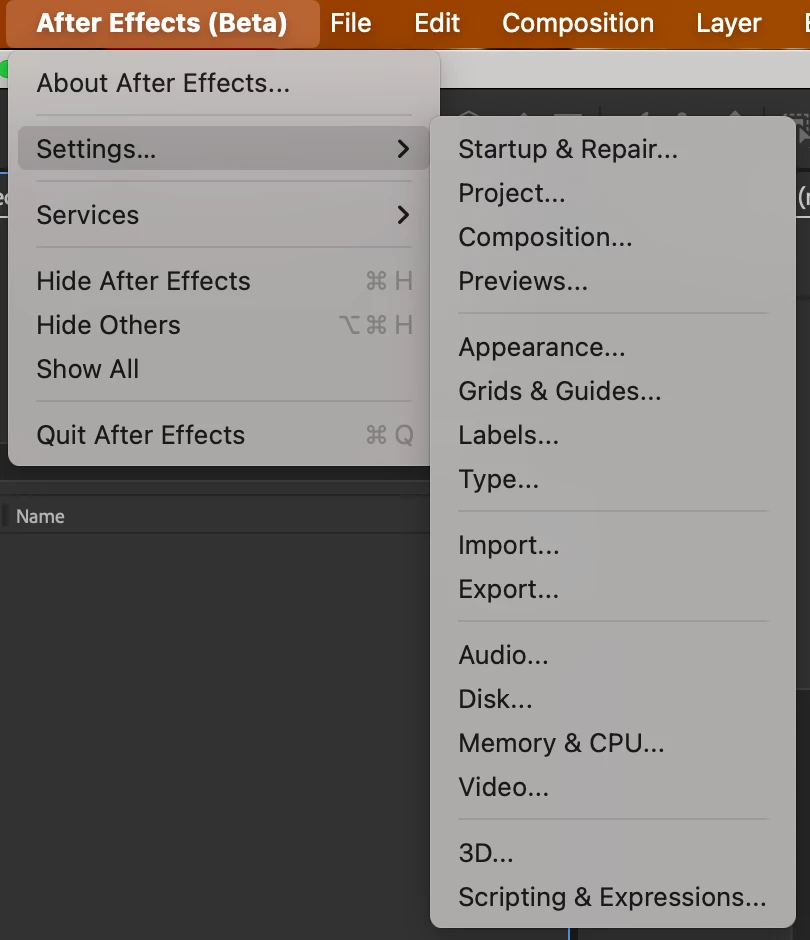
What's New
The preferences have been thoughtfully reorganized into logical groups that reflect your workflow:
Project & Workflow
- Startup & Repair - Configure how After Effects launches and handles project recovery
- Project - Manage workspace preferences, Dynamic Link settings, new project templates, solids folders, and auto-save options
- Composition - Fine-tune composition behavior, layer creation settings, double-click actions, mask preferences, and more
- Previews - Control preview quality, caching, and playback settings
User Interface
- Appearance - Customize themes, UI scaling, colors, hardware acceleration, and visual display options
- Grids & Guides - Configure grid spacing, guide snapping, and safe margins
- Label Colors - Manage your project organization color scheme
- Type - Set typography and text layer defaults
Import & Export
- Import - Control footage interpretation, still image duration, and import behavior
- Export - Configure output preferences and audio block duration for rendering
Performance
- Audio - Set up audio hardware, channel mapping, and audio block duration
- Disk - Manage disk cache location and settings
- Memory & CPU - Optimize RAM allocation and multi-frame rendering settings
- Video - Configure video output and preview hardware
Feature Control
- 3D - Control 3D camera behavior and 3D cache
- Scripting & Expressions - Manage scripting preferences and security settings; customize expression editor styling
New Preference: Synthetic Layer Length
We’ve added a new preference called Synthetic Layer Length in the Composition preference panel. This gives you control over the default duration for newly created synthetic layers—including text layers, shape layers, solids, cameras, lights, and null objects.
You now have two options:
- Use Composition Length (default) - Synthetic layers match your comp duration, just like the still footage preference.
- Set Custom Duration - Define a specific default length for synthetic layers, perfect for motion graphics workflows where you want precise control
This small addition streamlines your workflow by reducing the need to manually trim many layer types after creation.
Scripting Access
The existing preferences command IDs have not changed and will remain functional, rerouting to the appropriate new preference panel. Should you wish to directly target the new preferences panel with app.executeCommand(), here are the new command IDs to use.
|
Preference panel |
ID |
|
Startup & Repair |
3201 |
|
Project |
3202 |
|
Composition |
3203 |
|
Previews |
3204 |
|
Appearance |
3205 |
|
Grids & Guides |
3206 |
|
Labels |
3207 |
|
Type |
3208 |
|
Import |
3209 |
|
Export |
3210 |
|
Audio |
3211 |
|
Disk |
3212 |
|
Memory & CPU |
3213 |
|
Video |
3214 |
|
3D |
3215 |
|
Scripting & Expressions |
3216 |
We Want Your Feedback
We'd love to hear your thoughts:
- Are the new categories working well for you?
- Is anything harder to find than before?
Please share your feedback and suggestions in the replies below. Your input helps us continue improving After Effects!


 AdChoices