




Expression & Scripting Access for Dropdown Text and Keyframes in After Effects Beta 26.0x40
Hello, motionkind! Now in After Effects (Beta) build 26.0x40 and later, we are introducing two improvements for expressions & scripting.
- Quickly find the keyframe or marker before or after a given time, without writing lengthy, repetitive logic.
- Read the current text and the full list of dropdown menu items, so you no longer need to keep duplicate strings in your expressions just to show the text from a dropdown menu.
previousKey() and nextKey() in JavaScript expressions
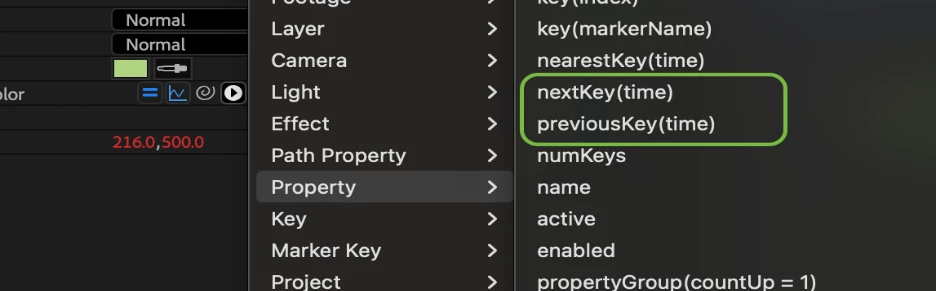
This Beta build introduces new expression methods to quickly get the keyframes or markers before or after any given time:
- Property.previousKey(time): Returns the keyframe or marker at or before time. If none exist before time, returns the first keyframe or marker.
- Property.nextKey(time): Returns the keyframe or marker after time. If time is after the last, returns the last keyframe or marker.
These new methods are only available in the JavaScript expression engine, so make sure to set the engine to "JavaScript" in File > Project Settings > Expressions.
We hope these new methods help you reduce repetitive code, especially when triggering animation via markers and keyframes.
Expression examples for previousKey() and nextKey()
Get the time since the previous keyframe (useful for triggers, overshoot, etc.):
const prev = thisProperty.previousKey(time);
time - prev.time;
Time to the next keyframe (useful for anticipating transitions):
const next = thisProperty.nextKey(time);
next.time - time;
Trigger keyframes at each layer marker:
const animDuration = key(numKeys).time - key(1).time;
const animTime = time - marker.previousKey(time).time;

const animRemap = linear(animTime, 0, animDuration, key(1).time, key(numKeys).time);

valueAtTime(animRemap); 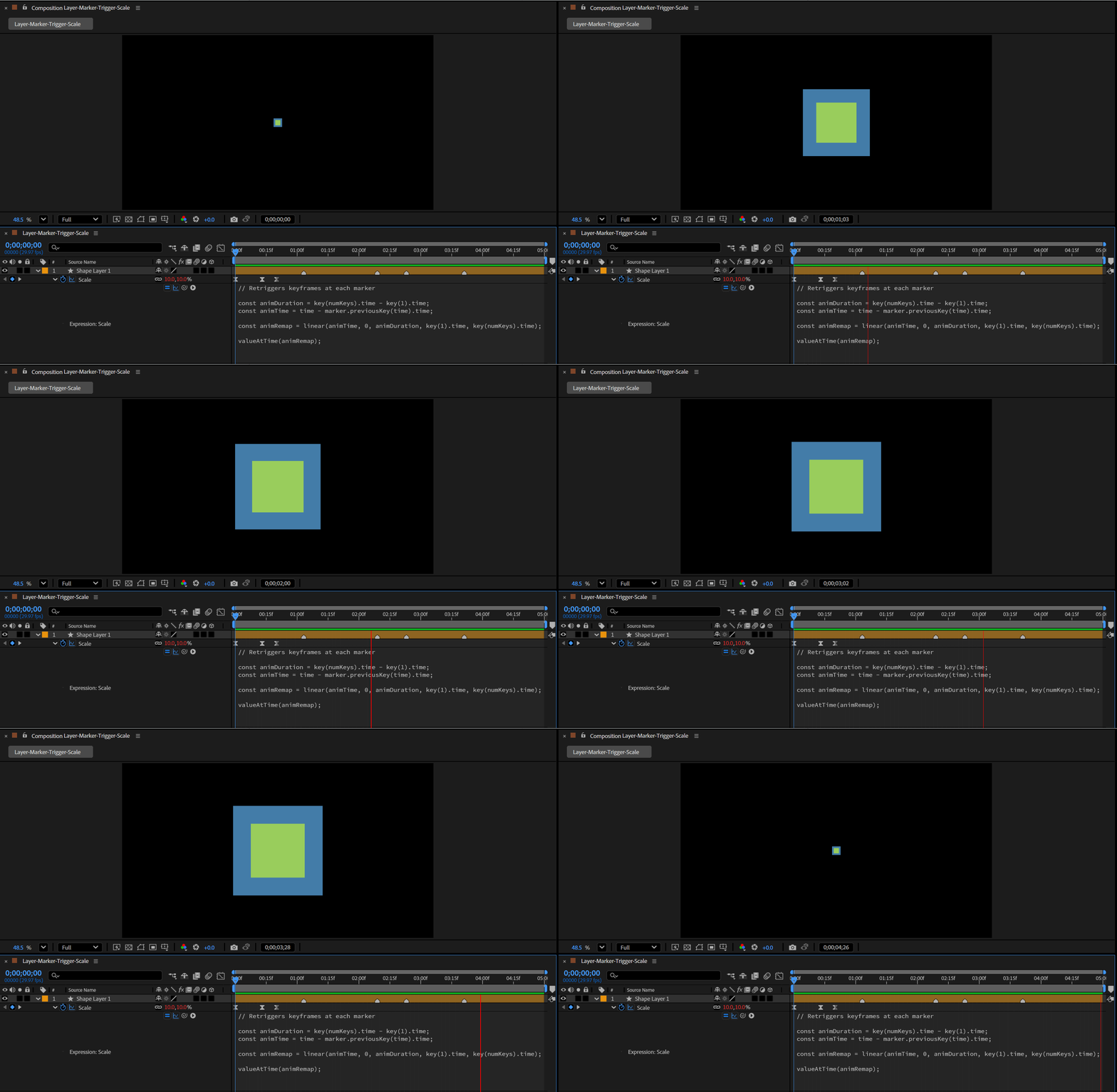
Use neighboring keys to control a property (e.g., auto fade-in between keys):
const prev = thisProperty.previousKey(time);
const next = thisProperty.nextKey(time);

const t0 = prev.time;
const t1 = next.time;
const u = (time - t0) / Math.max(1e-6, (t1 - t0));

linear(u, 0, 1, 0, 100); // 0% at prev key, 100% at next key
Reading text strings from dropdown menus
In the latest Beta, you can now read both the current item’s text string and the full list of text strings from any dropdown menu property. This gives you access to the strings of both customized Menu properties of Dropdown Menu Controls and dropdown menus of other effects and layers.
Importantly, note that expressions and scripting use different syntax to access the text strings, to maintain consistency with existing syntax.
For JavaScript expressions, the new APIs are:
- Property.text: This will give you the currently active text string of the dropdown menu at the current time.
- Property.textAtTime(time) This will allow you to get the text strings from a dropdown menu at any given time (replace time with the time you need), just like .valueAtTime(time).
- Property.items: This will give you an array of all the strings in the dropdown menu.
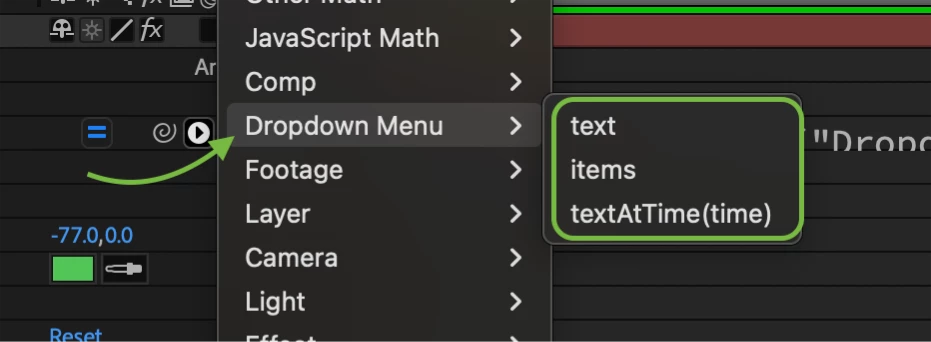
These are only available in the JavaScript expression engine.
Expression Examples (modern JavaScript expression engine)
Show the current dropdown text directly in a Text layer:
effect("Dropdown Menu Control")("Menu").text;
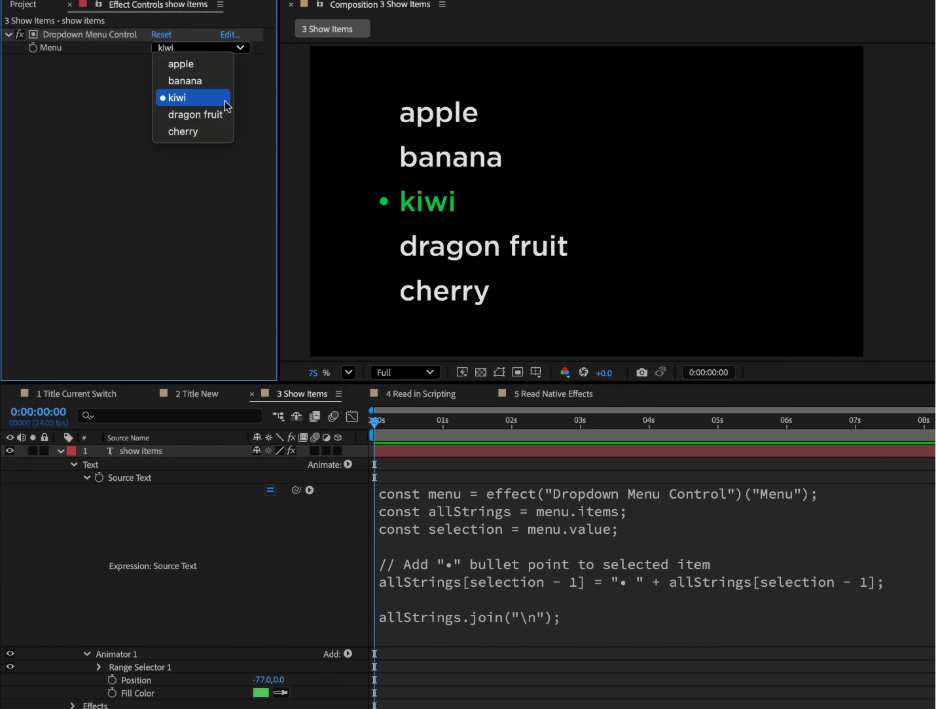
Use the array returned by items to display choices:
const menu = effect("Dropdown Menu Control")("Menu");
const allStrings = menu.items;
const selection = menu.value;

// Add "•" bullet point to selected item
allStrings[selection - 1] = "• " + allStrings[selection - 1];

allStrings.join("\n");
For ExtendScript scripting, the new properties are:
- Property.valueText: The text of the current selection. Naming corresponds to Property.unitText.
- Property.propertyParameters: The array of all item strings in the dropdown. Naming corresponds to Property.setPropertyParameters.
Scripting Example
// Given an existing Dropdown Menu, alert the
// text of the current item and then all items.
var activeComp = app.project.activeItem;

if (activeComp && activeComp.selectedLayers.length > 0) {
    var theLayer = activeComp.selectedLayers[0];

    var dropDownFx = theLayer.property("ADBE Effect Parade").property("Dropdown Menu Control");

    var menuProp = dropDownFx.property("Menu");

    var currentTextString = menuProp.valueText;

    var allStrings = menuProp.propertyParameters; // array of strings

    alert("Selected: " + currentTextString);

    var lines = "";

    for (var i = 0; i < allStrings.length; i++) {
        lines += (i + 1) + ". " + allStrings[i] + "\n";
    }
    alert("Options:\n" + lines);
}
Notes & tips for accessing dropdown menu strings
- These APIs only apply to dropdown menu properties of effects and layers.
- In dropdown menus, you will see "(-" represents a divider item. You can use this in your own custom Dropdown Menu Controls to add your own dividers to organize long lists.
- The text of Layer Control dropdowns is not accessible with the new methods. If you need the selected layer's name, you can use the .name property of the layer returned by the Layer Control.
- If you share projects or Motion Graphics Templates, we recommend continuing to use the index of dropdown menus when driving expression logic (versus matching the strings), since indexes will be more reliable. The text in some dropdowns can change with the application language, which will result in broken expressions.
We need your feedback
- Are there scenarios where these new methods or properties don't behave as you'd expect?
- Do these fit into your existing workflows?
- Are there related features or enhancements you'd like to see?
We hope you'll enjoy using these new APIs in your projects. Please let us know how they're working for you or how you've utilized them in the Beta builds. Thank you for your feedback!
 AdChoices