


Jim Acquavella
Adobe Employee
Adobe Employee
April 9, 2020
Question

Feature Focus: Tapered Shape Strokes

  • April 9, 2020
  • 8 replies
  • 2924 views

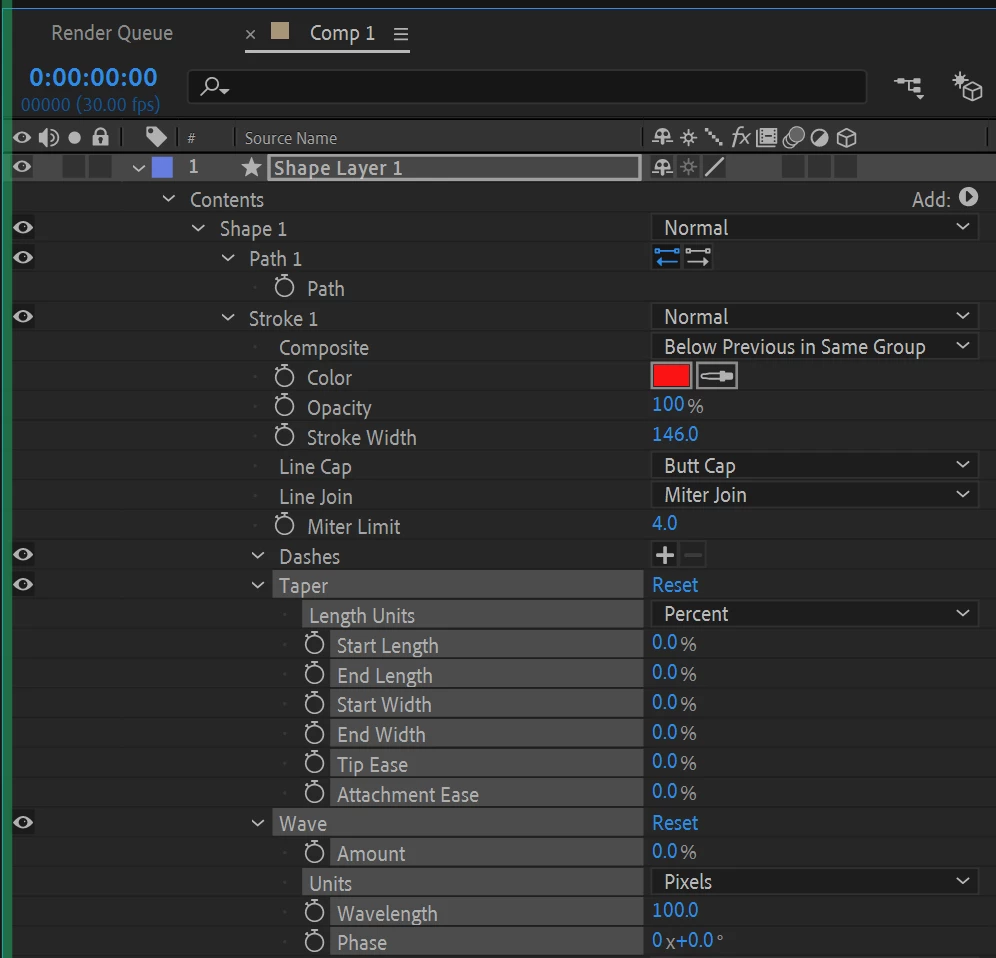
When creating a shape layer stroke, there are new parameters to create tapered or wavy strokes. See the new parameters selected below and please provide feedback on their usability, animation capabilities, and performance. 


This topic has been closed for replies.

8 replies

Participating Frequently
April 19, 2020

Would be nice if we were able to split the taper intensity/influence 
between inner edges and outter edges,
like how is done in Adobe Animate's Art Brush:

With something like that, we will have a powerful tool to do Smear animations, like these:


It could work as two "influence" percentage sliders,
one for the inner edges and one for the outter edges.
And, it could go farther than "100%".

Or, it could mimic a scale property, like this:


Participating Frequently
April 20, 2020

Still thinking about how Adobe Animate deals with tapers...

What if we had a "Taper Expression" input that could output a taper like this?


The logic behind it would be to receive and produce pathProperty values,
Where the point values would determine where the taper variations would be applied.
And the inTangents and outTangents values would determine the taper width for each of those points.

Being an expression, the user could hardcode it or link it to any other existing path.
------------
For reference, this is a similar concept i made last year:


It's a textLayer's repeater that reads the Y position from multiple pathProperty.pointOnPath 
and translate them into the values  -100% to 100%.

gregorys98276579
Participant
April 18, 2020

thank you so much ! I dreamed about this for a long time 🙂

I can't wait to have it in the official version.

Participant
April 18, 2020

It has some issue with closed shape. The round joint breaks into the penultimate corner.


Jim Acquavella
Adobe Employee
Adobe Employee
April 18, 2020

Please file a quick bug and supply this project!

Participant
April 18, 2020

Sorry, I think I did something wrong. I tried to send bug report but I posted a new topic instead - https://community.adobe.com/t5/after-effects-beta/tapered-shape-strokes/m-p/11060416 
And I wasn't able to attach my project.

SteveKirby
Known Participant
April 15, 2020

👏This is a huge improvement over the earlier, always-pointy version that we discussed here.  I'm stoked that you folks are listening and adopting user's suggestions so dynamically. We've needed this kind of thing from Adobe for a long, long time.


I'm pretty happy with what I can do with these tapers now. I think my next request would be that the Start Width and End Width properties could go up beyond 100%.  At the moment (17.1.0.54) you really have to think and plan ahead with your base Stroke Width being the widest you'll ever want.  Trying to get a taper just right can mean a bit of back-and-forth between the Stroke Width and the Taper Widths.

RyanSummers
Participating Frequently
April 14, 2020

Love that this work is being done – one wrinkle that feels weird is switching between pixels and percentage right now. Start Length and End Length zero out while the rest of the parameters stay the same. It feels like flipping between the two should almost be like working with Frames or Timecode where the equivalent parameters for either option show up?

Jim Acquavella
Adobe Employee
Adobe Employee
April 21, 2020

Look for improvements coming soon to preserve shape taper length values when changing the units between Pixels and Percent.  Should be available in the next day or two.  Thanks for your feedback!

timaging
Inspiring
April 13, 2020

well I can tell you that I slide every slider and never saw the results you have there. Maybe it's because I'm using a square shape? Lots of glitching when I'm making adjustments. There also didn't appear to be a way to grow the shape on like a trim path, but with that said I didn't try to apply trim path either. 

Jim Acquavella
Adobe Employee
Adobe Employee
April 13, 2020

The intention is the you would apply Trim Path in order to animate the shape and works best when using taper units as pixels.  We have some bugs related to rounded shapes and are addressing those now.  Stay tuned...

timaging
Inspiring
April 13, 2020

sounds good. I'm seeing it working better on circles and the star tool. Getting some pretty good results, although I do have a gradient applied to the fill, and the stroke when used with a trim path seems to follow that path. I can think of a workaround though, so not too big of  a deal. 


I'm sure this next request might be for future builds but I can see alot of people wanting to make this have that 2d spashy paint type effect. Not even sure how that would work with this but would be cool-


Dave


timaging
Inspiring
April 12, 2020

not super intuitive but I got it to work. This will benefit from some presets and it still feels like it's a long way from done. First thing I wanted to do on the square was use a round cap and it didn't work. the UX on this needs some tweaking. I'm going to put my mind to it and see if I can come up with something. 


Jim Acquavella
Adobe Employee
Adobe Employee
April 13, 2020

Can you provide more details?  In order to see the rounded end caps, your tapered stroke must have a non-0% width, otherwise, it tapers to a point.  Here's an example of a tapered and rounded stroke using a Start Width of 20%, Start Length of 100% and a Line Cap set to Round Join.


timaging
Inspiring
April 13, 2020

not sure if this is a bug or just a limitation, but if I switch between pixels and percentage, it zeros out the numbers that I was working on.

Participant
April 11, 2020

This is a really great addition, and is fun to play around with!


One issue I noticed is that if you create a tapered stroke, animate the wave properties, and then switch the Stroke type from Solid to Gradient, it will remove all the Wave property keyframes but retain the Taper property keyframes. That same happens if you have animated Wave properties on a Gradient Stroke and then change it to Solid. I could see this being a frustrating issue.


Jim Acquavella
Adobe Employee
Adobe Employee
April 13, 2020

Thanks for the feedback, this is a bug!  I'll have this fixed soon 🙂