


Jenkmeister
February 21, 2025
Question

Paste Text and Match Formatting, now available in AE Beta 25.2.0.117

  • February 21, 2025
  • 3 replies
  • 1875 views

A new option for pasting text from one text layer to another text layer is now available in AE Beta 25.2.0.117.


The Paste Text and Match Formatting menu option, available under the Edit menu as well as in the right-click menu when editing a text layer, will paste the copied text into a text layer using the font and style as set in the destination text layer. The existing Paste option will continue to paste text using the copied font and style.
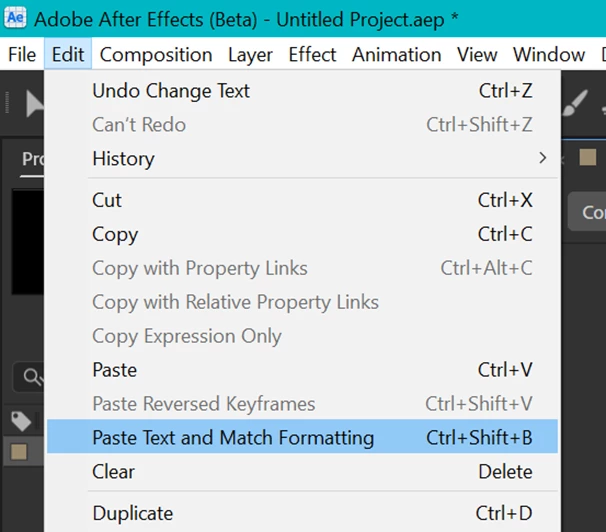
 

From the Edit menu, choose Paste Text and Match Formatting when editing a text layer.
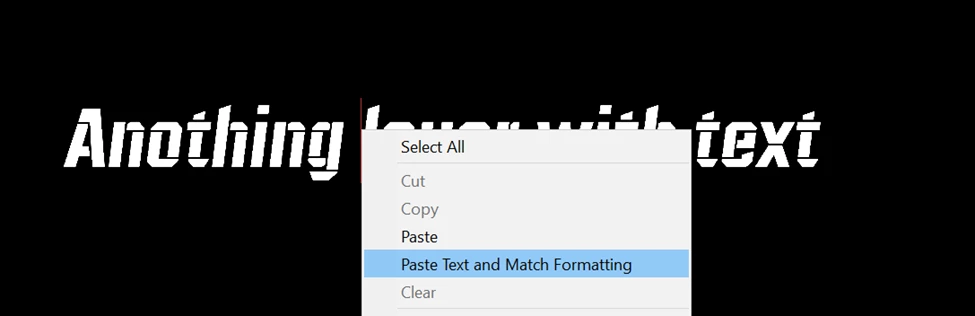
 

Right-Click in a text layer while editing and choose Paste Text and Match Formatting.


Please try it out and let us know how it works for you.

3 replies

Jenkmeister
April 22, 2025

As a note, this Paste Text and Match Formatting feature shipped with the 25.2.2 update (last week). Paste Formatting Only is still in development. I will follow up when it is available in Beta builds.

Jenkmeister
July 1, 2025

Paste Text Formatting Only is now available in AE Beta builds starting with 25.4x65.


To use, first Copy at least one character from the text you want to source the formatting from. Then select either the text layer or the text characters you want to apply the formatting onto. Either right-click and select Paste Text Formatting Only, or from the EDIT menu, select Paste Text Formatting Only. You can also apply the formatting to multiple text layers at once - just select them all and use the new menu item. 


Let us know how this works for you!


_nicdean
Community Expert
Community Expert
July 3, 2025

Great update! Couple notes from my testing:


#1.

Currently to copy formatting, we have to drill down and highlight characters with the Text tool. We should be able to copy format by selecting the overall Text Layer (without highlighting string).


#2.

If user copies anything after the Text formatting (Shape Layer, Mask, Effect, etc) , the formatting is removed from clipboard memory. User then has to go back and copy original Text Layer again. Instead of destructive process, I suggest the MRU methodMost-recently used text formatting should be saved in user Prefs file. Then it can be recalled anytime in future. MRU format can be overwritten when user copies a different string.


#3.

"Paste Text Formatting Only" doesn't currently work for mixed formats. It just uses the 1st character style. Pasting a style to the whole layer of text at once would be great.


#4.

Lastly, a consideration. Text formatting is often tied to specific Paragraph settings. Should there be a way to paste Paragraph settings at the same time? 


_nicdean
Community Expert
Community Expert
March 3, 2025

Hey, this is a great direction! Please check the Style Bandit plugin: https://aescripts.com/style-bandit/

I built it to Copy/Paste text formatting between Text Layers.

  • The most-recently copied text style is saved to a .json and can then be pasted across comps, projects, AE versions, etc.
  • This plugin released in 2023 and added features as the text scripting API has expanded.
  • 2,000 users


There are many cases where I want to copy + paste the text style only, and NOT the Source Text contents. Consider adding a built-in "Paste Style" option. I'll happily sunset the plugin once this is a native feature to AE. Thx

Jenkmeister
April 4, 2025

Thanks! We are looking at Paste Formatting Only functionality and hope to add it into Beta once it is ready. 

_nicdean
Community Expert
Community Expert
April 4, 2025

Yessss! I would love Paste Style only. For what it's worth, here's my input on pasting text formatting behavior.

  • Style Bandit copies text formatting from the 1st character and pastes that style to ALL characters of a secondary layer. This works great the majority of the time.
  • I can see benefit to copy/pasting mixed styles. This is more complicated to solve (do we paste by character index, paste by percentage, etc.)


Personally I prefer the 1st version, but mixed fonts in the origin Text Layer is something to consider.

Todd_Morgan
Legend
February 24, 2025

Works!! But AE crashed after that when closing app