

Exit
  • Global community
    • Language:
      • Deutsch
      • English
      • Español
      • Français
      • Português
  • 日本語コミュニティ
  • 한국 커뮤니티
1

Adobe After Effects Composition Preview Not Showing

Explorer ,
Oct 10, 2024 Oct 10, 2024

Hi, does anyone know how to solve this issue regarding Adobe After Effects? I've updated my drivers, reinstalled them, deleted caches and even purged and check for every solution possible. This issue happened just this morning when I updated Windows. 
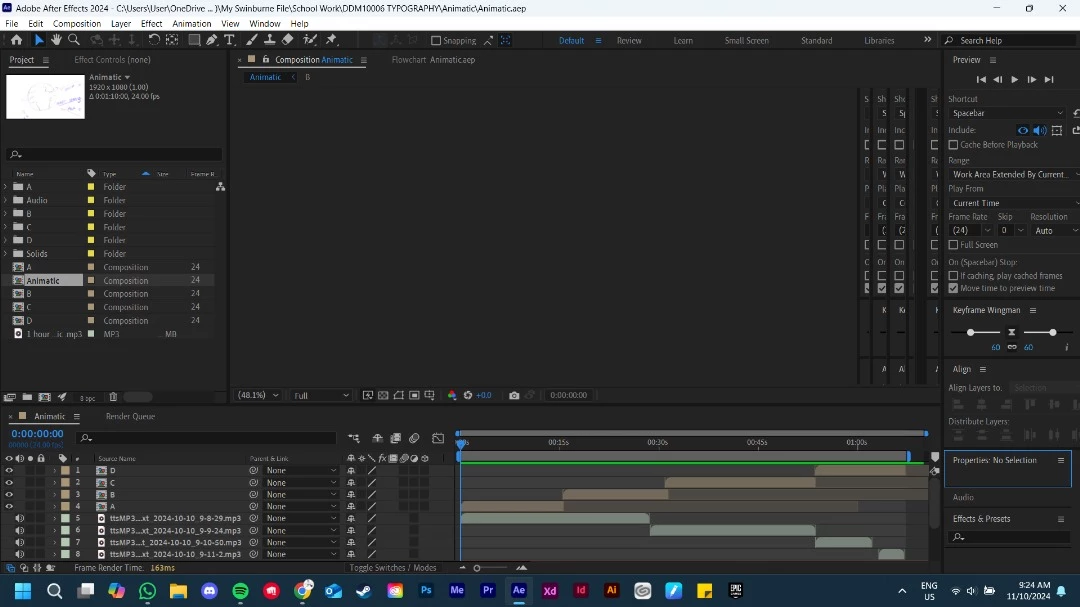
Comp Preview Issue.jpg

Bug Needs More Info
TOPICS
Performance , Troubleshooting
1.4K
Translate
Report
Community guidelines
Be kind and respectful, give credit to the original source of content, and search for duplicates before posting. Learn more
community guidelines

correct answers 1 Pinned Reply

Adobe Employee , Oct 11, 2024 Oct 11, 2024

After an AE update, an OS update or a GPU update, there may be a need to rebuild the GPU kernel shaders that AE users. Normally a dialog will pop up and tell you that's happening, but if it hasn't, just give AE a few minutes of sitting idle and it should complete the process and the comp viewer will come back.

Status Needs More Info
Translate
9 Comments
Adobe Employee ,
Oct 11, 2024 Oct 11, 2024

After an AE update, an OS update or a GPU update, there may be a need to rebuild the GPU kernel shaders that AE users. Normally a dialog will pop up and tell you that's happening, but if it hasn't, just give AE a few minutes of sitting idle and it should complete the process and the comp viewer will come back.

Status Needs More Info
Translate
Report
Explorer ,
Oct 11, 2024 Oct 11, 2024

Alright I'll give it a shot thank you, But during my time waiting for a response I found another issue with AfterEffects as well. It works on an extended display but not on my main display. The preview and audio would play normally on the extended display whereas putting the screen back to my main display ( laptop screen ) causes the preview to be stuck while the timeline moves. 

Heres a pictures of this issue 

kevin_mancha_1403_0-1728662857025.png


Translate
Report
Community Expert ,
Oct 11, 2024 Oct 11, 2024

@leroacha 


What is the Display Resolution set to?

Translate
Report
Explorer ,
Oct 11, 2024 Oct 11, 2024

Both my main and extended display are 1920x1080 and the framerate/hrtz are 144 and 60 respectively. This wasnt an issue before the update as I was fine with it previously

Translate
Report
Adobe Employee ,
Oct 11, 2024 Oct 11, 2024

Assuming you're using an NVIDA card, you could try deleting the computed shaders from C:\Users\[username]\AppData\Roaming\NVIDIA\ComputeCache


and then restart AE and see if that helps.

Translate
Report
Explorer ,
Oct 11, 2024 Oct 11, 2024

@jenkmeister Alright Ill give it a shot

Translate
Report
Explorer ,
Oct 11, 2024 Oct 11, 2024

I've deleted the computed cache and its still the same 

Translate
Report
Explorer ,
Oct 11, 2024 Oct 11, 2024

I've disabled the extended screen for the time being and the issue still persists but this time its just a gray screen. Same issues as before timeline is moving when playing the comp with audio running in the back but nothing is shows up 😭

leroacha_0-1728671443143.png


Translate
Report
Explorer ,
Feb 04, 2025 Feb 04, 2025
LATEST

Have you found a solution to this?

I've repeatedly been running into the same issue the last past weeks. Cleaning the database, emptying the cache and restarting AE ist a temporary fix only for the preview to stop reacting or turn black the moment I change or add something in the composition.

Translate
Report