
Participating Frequently
May 6, 2025

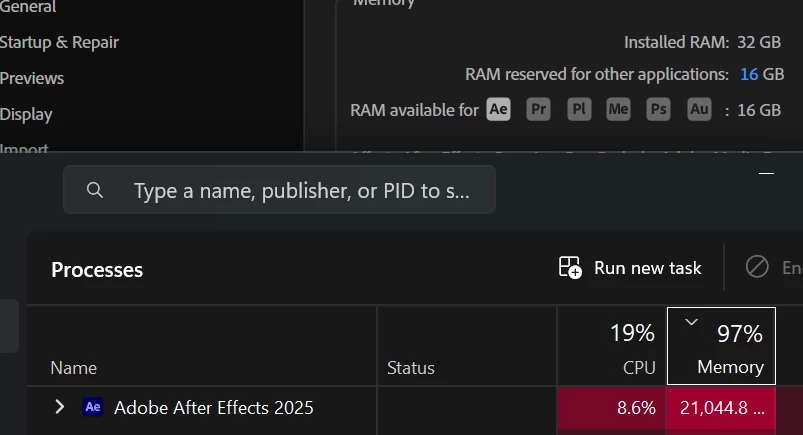
AE Will eat all my ram, even more than allowed,
  • May 6, 2025
  • 3 replies
  • 241 views


like you can see in this screenshot, i allowed AE to use 16gb out of the 32 i have but it uses more than that,

Furthermore, even when i go to edit clear memory and disk cache, there's nothing to clear as i havent launched a preview, i've only just opened my comp in AE and havent started a preview (i also have disabled "cache frames when idle").

what's going on?

Also my CPU keeps getting used at around 10%, still while doing nothing at all not a preview nothing.

3 replies

Jenkmeister
May 6, 2025

Help Menu -> Enable Logging

Restart AE

Reproduce the Issue

Help Menu -> Reveal Log Files


Find the "After Effects Log.txt" file and paste the contents back here. 

Participating Frequently
May 6, 2025

hi,

i have third party plugins but i tried in safe mode with the plugins disabled, didn't change anything.

About the GPU shaders to render the frames i understand but i didn't tell ae to render any frame except for the one i'm in as there's no preview going on.

i do have third party script panel but then again it should not have been an issue in safe mode no?

how can i export a log file?

Jenkmeister
May 6, 2025

What in your composition? Any third-party effects? The background CPU usage may indicate there are GPU shaders being compiled to be able to render the frames to your GPU. Or maybe you have third-party script panels installed. Hard to know without a log file or a video.