silopostworks
Participant
October 7, 2022

After Effects 22.6.0 color shifting issues within same clip

  • October 7, 2022
  • 20 replies
  • 1143 views

So this has been driving me nuts since version 22 came out.


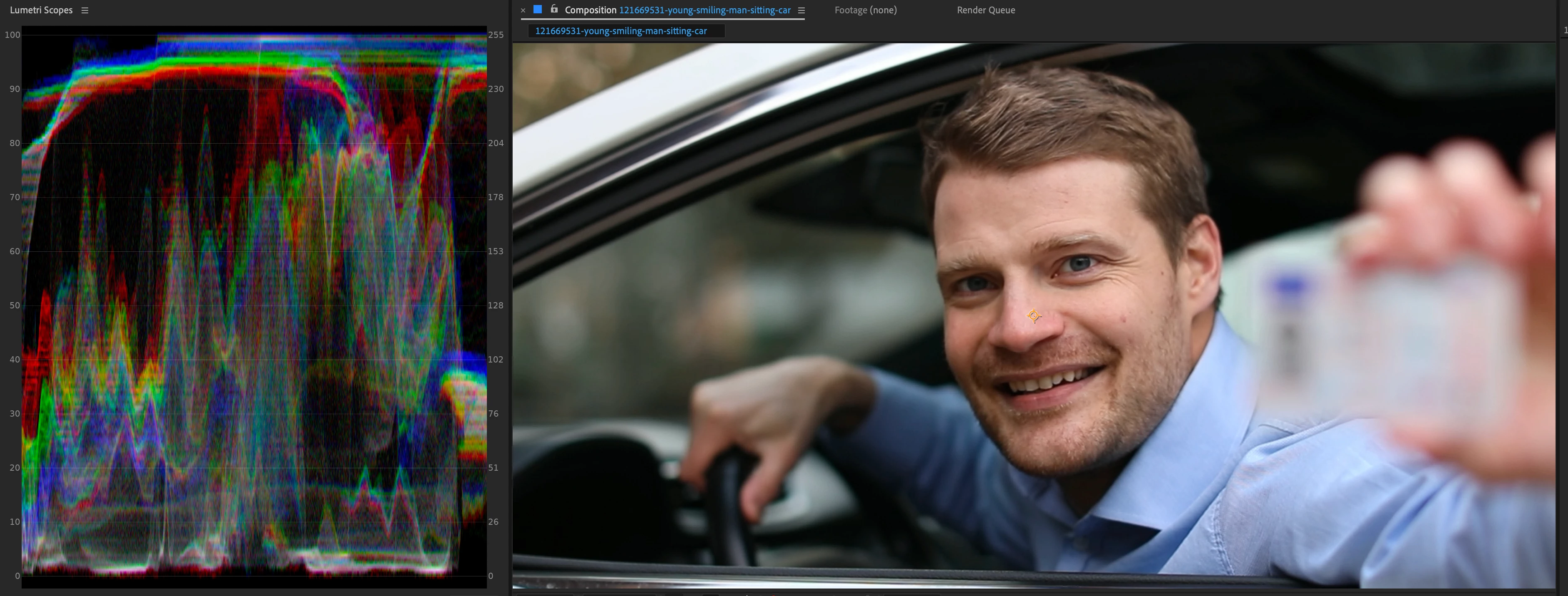
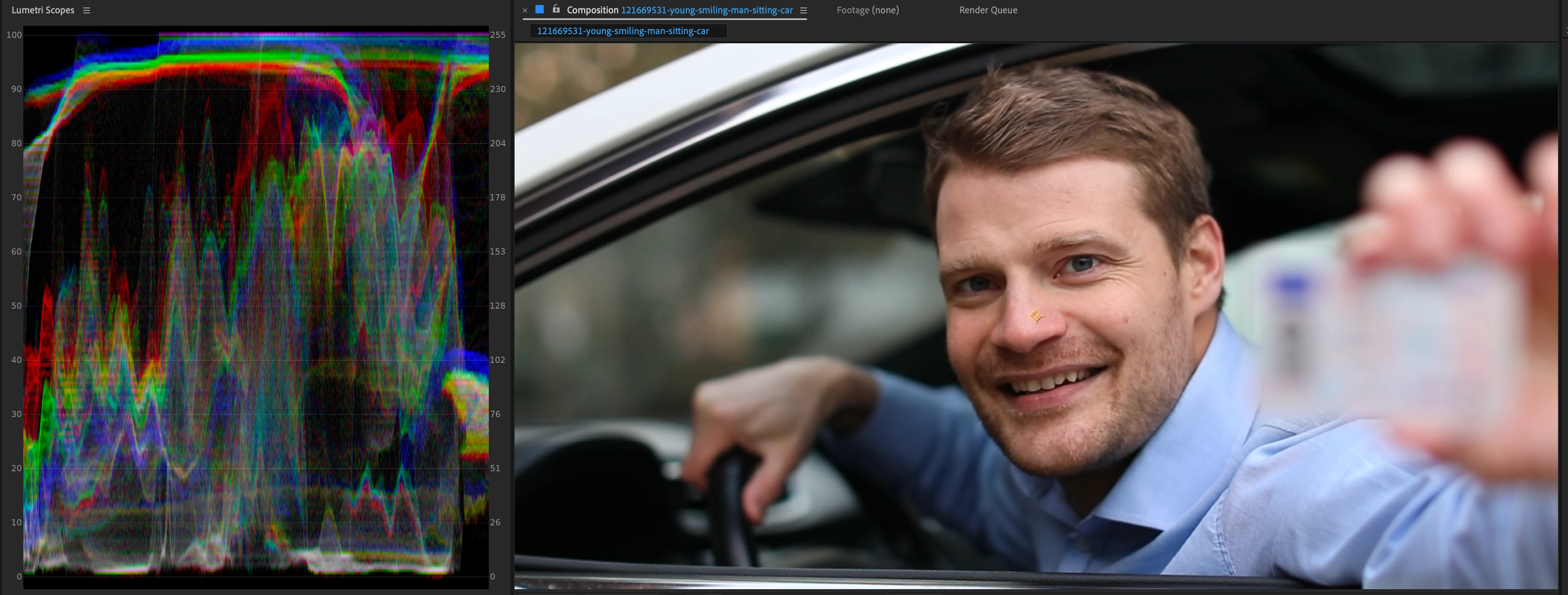
Working with ProRes 4444 files, color management turned off.  While playing back a clip the color will subtly shift for a few frames and then go back.  It will happen numerous times and seems farily random. I have posted two screenshot with the scopes turned on so you can see the difference.  It's so subtle it hard to catch (especially if you are working on LOG footage), but it's there and happens every project.


The only way to get it to behave normal is if I turn color management on.  This is a no-go for our workflow though as we've been roundtripping files in and out of AE for years and color management always leads to inconsistencies when bringing into other applications (in other words, please do not suggest we change our workflow in order to accomodate an obvious bug).


We've tried all the usual suspects...restart, clear memory and cache, turn GPU acceleration off, etc.


Sort of surprised that no one has posted about this yet as it's been happening ever since 22 came out.


Current set-up is After Effects 22.6.0.  System is:

MacBook Pro (16-inch, 2021)

Apple M1 Max

64GB
 

This topic has been closed for replies.

20 replies

Participating Frequently
November 10, 2022

Hi John,

This is still occurs with AE 23.0.0 (Build 59) on OSX 12.6.1 and M1 Ultra

In this case the ProRes footage is from a different source. 

Re-encoding to another HQ codec or ProRes in MXF container does work. Re-encoding to ProRes in QT container does not work.

thanks

Ken

jackthegiantkiller
Inspiring
October 24, 2022

Also curious, is this Lumetri Color specific? Or is this happening with every color correction filter using 444 ProRes?

jackthegiantkiller
Inspiring
October 24, 2022

Waiting for a project to clear before updating, but will let you know, thank you. I'm just surprised this isn't a wider issue, as indeed turning off "enable hardware accelerated decoding" allows the 444 footage to render on the M1 without the painful hue flickering. Unfortunately this issue cost me nearly two days of work when it first started as I tried every workaround, rendering various formats out until I finally found out about the preference setting here.

JohnColombo17100380
Community Manager
Community Manager
October 24, 2022

@jackthegiantkiller,

I'm not aware of any specific fixes for this issue, but there have been many improvements to footage handling on M1/M2 in the latest release of After Effects 2023. If you are able to install that version, please let us know if you continue to experience these issues with color shifting.


- John, After Effects Engineering Team  

jackthegiantkiller
Inspiring
October 21, 2022

Curious, as this has been an ongoing issue for some time now, is it fixed in the latest stable build?

jackthegiantkiller
Inspiring
October 18, 2022

I have a video showing the issue, but I can't seem to post video links using Adobe's own Creative Cloud service, the share links won't work in the field. Seriously? Wow. Here's the direct link: https://shared-assets.adobe.com/link/c7ee0d3f-80bb-48d0-5ba4-50db7b5d38c4

Notice the solid gray background flickering between green and magenta hues.

jackthegiantkiller
Inspiring
October 17, 2022

Sounds exactly like the same issue I reported. Terrible hue flickering when color correcting with Lumetri Color on all ProRes 444 footage unless I turn off Hardware acceleration.

JohnColombo17100380
Community Manager
Community Manager
October 17, 2022

Hi @silopostworks and @kbitz,

Thank you both very much for reporting this issue. Have either of you tried disabling "Enable hardware accelerated decoding" in Preferences > Import to see if that avoids the color shift?


Also, if possible, would you be able to submit a short clip that exhibits the issue for our team to take a look at?


Thanks for reporting this issue and for any further information you can provide, 

- John, After Effects Engineering Team 

Participating Frequently
October 8, 2022

My workaround is to transcode my QTProRes4444 footage to an MXF file but still using ProRes4444 as the compression format.

Participating Frequently
October 7, 2022

This same issue started 2 days ago for me. 

Also tried restart, clear memory and cache, turn GPU acceleration off, etc.


Deleteing/Reinstalling AE and reloading all plugins worked for a brief moment, but the issue came back within the hour.

The frames where the shifing colours occur are random and will change when trying a different color space, but I too need to work without a color space. 


Current set-up is After Effects 22.6.0.  

System is:

MacBook Studio

Apple M1 Ultra

128GB