

Thiago Guimarães
Participating Frequently
June 18, 2024

After Effects Freezes after some time with error: "Direct2D Drawbot Error. HRESULT:-2005270523"

I can't say for sure, but after two or three more recent versions of AE Beta I started to get a random error, after working for a few minutes the whole computer crashes and then this Direct2D Drawbot Error box. HRESULT:-2005270523 appears, but I can't close it, it keeps reopening endlessly and then I have to force close the program.


I've been using AE Beta since they redid the interface, it's just become another program! It's very fluid and enjoyable. I'm not using to use the retail version because he not received the interface update., but I can say that the problem is in the beta, because when i use the reail version there is no issue i don't have any errors or freezes.


Here's a picture of the error I get when I close.
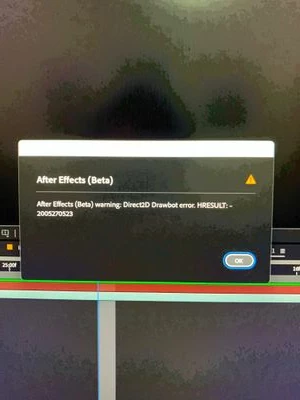


AE Beta V24.6.0 b23

Windows 11, i7 9750H, GTX 1660TI 6GB, 32gb de RAM, 512gb SSD.

Driver Nvidea Studio  555.99.


返信数 159

Lcpmartins
Participant
November 4, 2025

Tried EVERYTHING i read online, and that ChatGPT throw at me, in the end what solved it.... Disabling Windows Clear Type (Fonts - Adjust Clear Type). After that the error cleared, i turned back the Clear type again (doing the readjusting)

Participant
October 31, 2025

Windows 10 RTX 5090 AE 25.1 build 68 128gb ram AMD Ryzen 9 5950X

It just happens consistently after lots of ram previews and heavy comps.

Participant
October 11, 2025

it's, but it also decreases GPU performance 

Participant
October 7, 2025

EDIT from post above/below :  I did an update from 25.2.2 to 25.5 this morning*

Participant
October 7, 2025

Got the same issues as you all, since like a year (it was making the computer go all black screens and taking at least 10 to 30seconds to get back to a blocked pop-up, AND, it was making Windows10 itself 'jump' (just like you'd force close Windows  Files Explorer), changed computer entirely (from win10/2070super with 8gb VRAM to win11/4070TiSuper with 16gb of VRAM, both 64Gb of RAM)


Most of the time it's when i'm scrolling through fonts that it happens, it makes a hundred pop-ups error windows (i just keep Echap button pushed to get out if i can) and then I get stuck if i go back to font panel and i've to alt-F4 AE, I did an update from 25.2.2 to 25.2 this morning because i had some bugs, but it doesn't change anything.

So what I end up doing is deleting the font that seems to make AE lose it, it's really not a solution and i don't even know if that does something.

Only lost the HRESULT into the pop-up;  here is the error message from this morning;


cheers and good luck all

Participant
September 16, 2025

Premiere Pro - 2025


R7 7700X
RX 9060 XT 16GB
65GB RAM 

Participating Frequently
August 21, 2025

A little update on my video that someone mentioned here. (Video link: After Effects/Premiere Pro FIX "Direct2D Drawbot Error" and “Alt + Tab black screen”)

Switched to new rig with same videocard and had same probelm. Fix is working even on a new rig, Win 23H2. I'm still not sure what causing this: videocard, adobe software or windows. I think it's windows + adobe, but mostly windows. As i discovered, even on a clearly installed windows, GPU utilization in desktop with stock wallpapers is about 20-30%. That's not normal. Then i checked the Task Manager - BOOM! DESKTOP WINDOW MANAGER. It uses all the GPU. How i see this: When you are using Adobe software, your gpu util is about 15-50%, and when you Alt+Tab or even during work, Windows somewhy decides to use your GPU a lil bit more, it causes overload of GPU and black screen appears or Direct2D error.

Participating Frequently
August 21, 2025

I had a similar problem. My timeline pointer moved forward after pressing the spacebar, but jerkily. The video did not stutter. A complete reinstallation of Windows and formatting of all disks helped me. I read in guides that you need to enable rendering of the interface only by the CPU and all that, but only a COMPLETE and CLEAN reinstallation of the entire system helped. This may be especially relevant for you if you assembled a computer, but use disks from an old one.

Participant
August 20, 2025

Я приобрел новый пк, но я появилась проблема с рендером. После нескольких изменений слоя, когда я нажимаю на spacebar, timeline indicator перемещается на один кадр и больше никуда не идёт. Также перестаёт отображаться какие либо изменения, а если сохранить неотобразившиеся изменения, и перезайти, то всё отображается. Уже попробовал на версиях 25.1-25.4. Ничего не помогает

Win 11 Pro

Ryzen 9 7900x

64gb ram

RTX 5060Ti 16 gb (drivers up to date)

Participating Frequently
July 17, 2025

PLS CHECK that your motherboard BIOS is also up to date! Ryzen seems to be particularly sensitive here. The planets of Bios - WIN - GPU driver - AE software version - functional plugins if relevant - must all align properly for a decent AE experience. 
Evil tongues might whisper, that the price for NVs CC optimization is a lag in driver care for older generations... says a 2070super -guy looking, peeved, hard at the gpus of team red.