Exit
  • Global community
    • Language:
      • Deutsch
      • English
      • Español
      • Français
      • Português
  • 日本語コミュニティ
  • 한국 커뮤니티
2

Can't get past crash repair options.

Community Beginner ,
Oct 14, 2025 Oct 14, 2025

I need help fixing this ASAP...

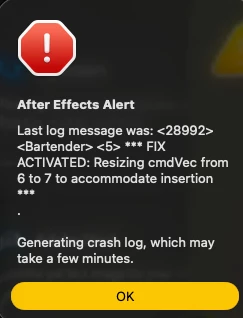
I cannot open the software. Every time I reboot it, it crashes on the crash repair options screen. I've uninstalled and re-installed, deleted all preferences, I don't know what else to do. I gotta do some work 😕

Last log message:

Screenshot 2025-10-14 at 20.06.42.png

Attention to this matter will be very appreciated as this is kind of an emergency.

Bug Unresolved
TOPICS
Performance , Troubleshooting
338
Translate
Report
Community guidelines
Be kind and respectful, give credit to the original source of content, and search for duplicates before posting. Learn more
community guidelines
7 Comments
New Here ,
Oct 20, 2025 Oct 20, 2025

I have exactly the same issue, just can't get passed that Crash Repair Screen. Did you manage to find a fix?

Translate
Report
New Here ,
Oct 20, 2025 Oct 20, 2025

Strangely, I am having the exact same issue too!

Translate
Report
New Here ,
Oct 20, 2025 Oct 20, 2025

I've just got around it by pressing enter on the keyboard instead of clicking. Although not sure if it's because it has fixed itself or that helped but worth a try.

Translate
Report
New Here ,
Oct 20, 2025 Oct 20, 2025

Well that's interesting! I'll give that a try when it Inevitably happens again.


I ended up deleting the crash logs to get it to start up without the Crash Report dialogue. Took me while to find the files I needed to delete though... Here are the steps I followed:

 
Navigate to: `/Users/your_username/Library/Preferences/Adobe/After Effects/version`
To access this hidden Library folder:
•Open Finder
•Click Go in the menu bar while holding the Option key
•Select Library from the dropdown menu
•Navigate to `Preferences/Adobe/After Effects/`
 
Delete the entire folder for your version of After Effects (e.g., “24.0” or “25.0”). This will remove all crash flags, preferences, and the crash recovery state.
Important: After deleting this folder, restart your Mac before opening After Effects again. This ensures all system caches are cleared.
Translate
Report
New Here ,
Oct 20, 2025 Oct 20, 2025

Well done on finding that I was searching for the same thing but was going in circles. Taking note of this for when, like you said, it inevitably happens again. Cheers!

Translate
Report
Community Beginner ,
Oct 25, 2025 Oct 25, 2025

Still not working for me. Deleted crash logs as well but to no avail. I got it to run once, randomly and miraculously, but after is still irremediably broken for me. Screenshot 2025-10-25 at 14.34.11.png

Translate
Report
New Here ,
Nov 12, 2025 Nov 12, 2025
LATEST

It started happening again... So I just hit enter on the keyboard as soon as the dialogue appeared, and it worked! No need to go around deleting preferences folders. Genius. Thanks!

Translate
Report