

ConstantinMaier
Inspiring
October 13, 2023

Frequent error: invalid clipboard format

  • October 13, 2023
  • 8 replies
  • 4770 views

Hi,


over roughly the last year, I'm frequently getting this error on all AE versions I have installed (latest on AE 24.0):
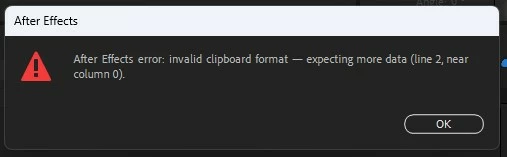


It seems to occur either when opening AE for the first time or when moving into AE from another application. Just to be clear: there's nothing other that causes this. I'm not trying to paste something in. It just suddenly comes up.


Generally, there's not much downside to it other than having to click 'Okay'. However, it's quite annoying as it can occur quite often during a session. Also, sometimes it seems to crash some docked scripts and they'll have to be reopened.


Why is this happening and can it be fixed?


Best wishes,

Constantin

This topic has been closed for replies.

8 replies

JohnColombo17100380
Community Manager
Community Manager
March 28, 2024

Hi all,

This error has been removed in the recently-released After Effects 24.3. Please let us know right away if you continue to see it when switching focus to After Effects.


Cheers,

- John, After Effects Engineering Team 

ConstantinMaier
Inspiring
March 21, 2024

@jenkmeister17177426 Sorry for letting you wait for so long. I finally was able to sit down and test it out. In the latest beta build, it seems to me the problem is gone. In my testing, I consistently get the error in the latest official release but none in the beta release. Now, I didn't do the testing extensively but as far as I can tell now, it's solved! Thanks a lot for implementing this fix! 🙂

ConstantinMaier
Inspiring
February 27, 2024

Thanks! Sorry for the late response (been away for a while).

I'll be working over the next few days on a project. I'll test it out and report back.

Jenkmeister
February 11, 2024

There is a fix for this in AE Beta 24.3x23. It would be awesome if you could help confirm the fix by installing and running that build and then reproducing the steps that cause the error to show up for you. Let us know if it's fixed for you.

Participant
February 11, 2024

I'm also facing this exact issues

Jenkmeister
February 5, 2024

A fix for this is currently in testing and we expect it to go into 24.3 beta builds soon.

surfacist
Participant
February 5, 2024

Hi, ressurecting this– I am also experincing this bug. I use a password manager that copies a " " (spacebar keystroke w/o formatting) to the clipboard by way of clearing it, and this consistently generates the error for me if I launch AE with this on the clipboard. 24.1.0 under Mac OS 14.0.

Jenkmeister
October 13, 2023

This occurs because AE will inspect the clipboard contents on startup and when switching from other applications. There is something on the clipboard, that to AE looks like it is an AE related copy/paste but then AE attempts to parse it and reports the failure. We should probably remove the error but in the meantime when it happens, see if you can remember the last thing you copied before it occurred and that may give us a clue as to what's going on.

ConstantinMaier
Inspiring
October 29, 2023

Hi,


thanks for the response! It would be great if you could remove the error message if it's not necessary in other ways. I also heard from another user he's frequently getting these errors.


I tried to see what's in my clipboard when the error occurs. When pasting into a text document, it seems I'm always having an empty string, so I think it may be something that it's rather some format that's only useful to another application?! I'll try to be conscious of this going forward and check what exactly I copied when I can.


Best wishes,
Constantin