
Exit
  • Global community
    • Language:
      • Deutsch
      • English
      • Español
      • Français
      • Português
  • 日本語コミュニティ
  • 한국 커뮤니티
1

Help menu links dont work

Community Beginner ,
Nov 10, 2023 Nov 10, 2023

Hi,

Using AE24.0.2

When I click on some of the buttons on the help menu, nothing happens. Unfortunately this also includes the F1 shortcut. I think they should open a link on the browser, but they don't work.
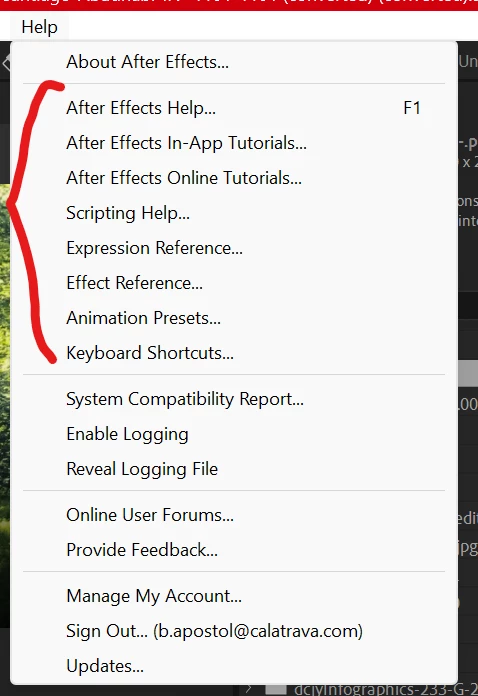
bryana89581678_0-1699679048615.png

I've tried resetting AE but that didnt fix it. The other selections work though, including "Online User Forums" and "Provide Feedback" that DO open a link in Chrome.

Help!

Bug Unresolved
TOPICS
Troubleshooting
171
Translate
Report
Community guidelines
Be kind and respectful, give credit to the original source of content, and search for duplicates before posting. Learn more
community guidelines

correct answers 1 Correct answer

Adobe Employee , Nov 10, 2023 Nov 10, 2023

This will be fixed in 24.1 or you can uninstall 24.0.2 and then reinstall 24.0.2 to fix it now.


There is a bug when updating from 23.6 to 24.0 when the checkbox to uninstall "old versions" is also selected. 24.0 is first installed then 23.6 is uninstalled and that uninstall is incorrectly removing a config file used by help. Uninstalling and reinstalling 24.0 will restore the config file. 

Translate
1 Comment
Adobe Employee ,
Nov 10, 2023 Nov 10, 2023
LATEST

This will be fixed in 24.1 or you can uninstall 24.0.2 and then reinstall 24.0.2 to fix it now.


There is a bug when updating from 23.6 to 24.0 when the checkbox to uninstall "old versions" is also selected. 24.0 is first installed then 23.6 is uninstalled and that uninstall is incorrectly removing a config file used by help. Uninstalling and reinstalling 24.0 will restore the config file. 

Translate
Report