
Inspiring
February 1, 2023

HTML dropdowns not working in extension panel after Aftereffects 23.1 update

  • February 1, 2023
  • 7 replies
  • 624 views

After the latest upgrade of Aftereffects to 23.1.0(Build 83), when we load our extension panel, the HTML dropdowns inside the panel are not working. Dropdowns don't show the values inside them at the click of the down arrow. This happens across different areas of the panel, none of the dropdowns are working when this problem happens. After clicking outside the panel tab, and coming back to the panel tab, the dropdowns start to work again. 


Able to reproduce the issue with a sample panel having only one dropdown
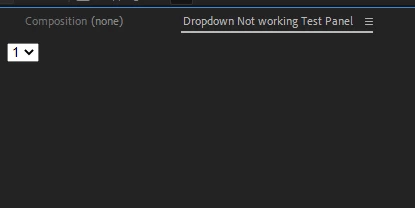
 

<!doctype html>
<html>
<body>
    <select ><option>1</option><option>2</option></select>
</body>
</html>
<CEFCommandLine>
					<Parameter>--enable-nodejs</Parameter>
					<Parameter>--disable-site-isolation-trials</Parameter>
					<Parameter>--disable-features=SameSiteByDefaultCookies,NetworkService</Parameter>
				</CEFCommandLine>
				</Resources>
				<Lifecycle>
					<AutoVisible>true</AutoVisible>
				</Lifecycle>
				<UI>
					<Type>Panel</Type>
					<Menu>Dropdown Not working Test Panel</Menu>
					<Geometry>
						<Size>
							<Height>500</Height>
							<Width>700</Width>
						</Size>
					</Geometry>
				</UI>


Os: macOs-Ventura 13.0/13.2
Aftereffects to 23.1.0(Build 83)

Issue couldn't be reproduced in Windows.

Issue couldn't be reproduced in AfterEffects 22.6 in Ventura 13.0

This topic has been closed for replies.

7 replies

Participant
May 4, 2023

Is working! Thanks! 

JohnColombo17100380
Community Manager
Community Manager
April 11, 2023

Hi @emam-dev,

Thanks again for reporting this issue. You should find that it has been fixed in the latest release of After Effects, version 23.3. Please let us know if you continue to see this behavior in that version or a later version.


Cheers,

- John, After Effects Engineering Team 

Jenkmeister
March 10, 2023

Beta versions of After Effects (and many other CC apps), can be found in the Beta section of the Creative Cloud Desktop application. 


For this particular issue, the fix is now checked in and we'll push an updated Beta build hopefully on Monday that contains the fix. 

Participant
March 10, 2023

Cool! Thank you for your answer. Can I also test the beta version when it comes out? If so, where can I find the beta version?

Jenkmeister
March 10, 2023

The team has identified the cause and are working on a fix for this. Hopefully something into beta early next week for folks to validate and then we'll get the fix out in the next non-beta release of AE.

Participant
March 9, 2023

@JohnColombo17100380 
Hi John,
Do you have some working solution to this bug with select/dropdown in AE 23.1? I tested simply html tags like this:

     <select name="pets" id="pet-select">
        <option value="">--Please choose an option--</option>
        <option value="dog">Dog</option>
        <option value="cat">Cat</option>
        <option value="hamster">Hamster</option>
        <option value="parrot">Parrot</option>
        <option value="spider">Spider</option>
        <option value="goldfish">Goldfish</option>
      </select>

And react-select. None of it works :(. 
Please share some information, this bug has a huge impact on our work

JohnColombo17100380
Community Manager
Community Manager
February 25, 2023

Hi @emam-dev,

Thank you for reporting this issue. We are able to reproduce it as well and have opened a ticket to investigate a fix for a future version of After Effects. Any potential fix will first be available in our Beta builds and we will update this thread when that occurs.


Thanks again for reporting this bug,

- John, After Effects Engineering Team