
Known Participant
December 18, 2024

Project File Created in AE 2023 Broken in AE 2024. Help Please.

  • December 18, 2024
  • 15 replies
  • 1769 views
Need urgent help please.
 
A project file that I am currently selling in a marketplace is now BROKEN in After Effects 2024 / 2025. It was created using AE 2020 / 2023, and still works fine in those versions.
 
I've spent many hours trying to figure it out, and not many answers.
 
The project is essentially a flip board, with a series of tiles that have a Start set of text animating to reveal an End set of text. It works great as designed in AE 2023, but in AE 2024/2025 the text in the tiles goes all wrong: the wrong letters appear in the tiles at seemingly random times; even empty tiles that should contain no letters will show letters in some frames. Or, letters will disappear then reappear.
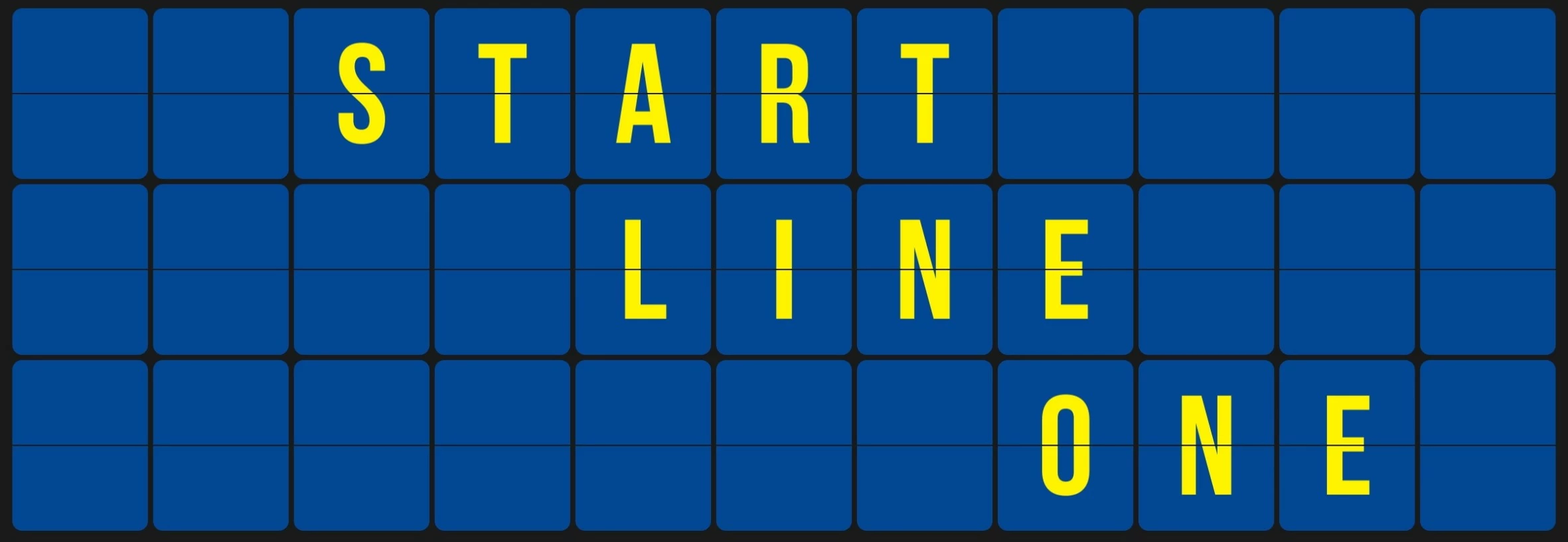
 
 
Using a Purge > Memory & Disk Cache seems to shuffle the problematic results. So it seems that the glitches are fairly random, and a cache purge will produce different problematic results.
 
I've provided a stripped-down version of the project with text already inserted. I've also provided two video files, one showing the correct render out of 2023, and one showing an example of the problems in 2024.
 
Adobe, please check out the project file in 2023 / 2024 and let me know what is going on. I need answers as quickly as possible so I know a path forward with the project on the marketplace. (Preview / render the "Flip_Board" composition).
 
Ae 2023 / 2024 / 2025
Windows 10
 
Thanks,
-Adam

15 replies

FizzrockAuthor
Known Participant
December 18, 2024

I have several other projects that use a similar framework, and all use single-characters in the results.

I'm just starting to look at these other projects, and already have another problematic project!

Same circumstances - they work as designed in AE 23, and are broken in AE 24/25.


The above images were rendered in AE 23, and rendered correctly. Compare these to the images below.


The images above were rendered with AE 24, and have major problems. 

Simply doing a memory/cache purge produces different incorrect-characters in the tiles.

These are the exact same frames rendered separately.

In this project, when the full videos are rendered, there a many fewer problematic characters in the tiles, but there are still a handful of problems. A couple of times, they rendered 100% correct...


So this project is showing the exact same problematic text issues, with the exact same versions of After Effects causing the issues.


I head back from the customer who is having the same problems, and he is using a Windows 11 laptop with integrated graphics, so different than my two workstations that are using Windows 10, one with dedicated graphics card, one with integrated - both Nvidia.


This is another project currently available to purchase on a marketplace.

This is a BIG problem!

I have at least FIVE other projects on the market that use similar frameworks, and I fear I'm going to see the same problems with all of them, which I will check shortly.


Thanks for taking this issue seriously, and PLEASE figure this out soon.


December 18, 2024

Looks like we have some folks on the team who can repro. Thanks for writing this up and providing the project. We'll work on fixing it.

December 18, 2024

The other reports have come in via enterprise support, so unfortunately nothing I can link for you in the forums. I'll have the team do some more testing with your project and see if anyone else can repro. 

FizzrockAuthor
Known Participant
December 18, 2024
Thank you for the quick reply.
 
I am at a loss as to why you don't see any problems.
The problem is apparent on my primary workstation, and on my laptop.
Both use Windows 10, and Nvidia graphics...
 
The problem was brought to my attention by a customer, and he has the exact same "incorrect text" problem. Perhaps I can try to find out his operating system, but not sure what else I can check for...  any suggestions?
 
All I'm doing is opening the same project file that is attached to this post, and the problem is there every time in 2024, and never in 2023.
 
I am currently making a big update to this project, and at some point in the process I saw some of the same weird incorrect-text (at that point, it was new to me - I hadn't tried my older version in 2024). It took me a day and a half to find an answer, and the answer I found was strange and not understood: I needed to put a useless slider / expression in some comp layers, that simply says 'timeToFrames(time)'. It's just a meaningless time counter, but my theory is that when no 'new' info was computed for some frames in pre-comps, the problems would arise; having the comp / layer always compute 'something' (time) forced it to refresh the frames, and not give me an incorrect cache image? This seems to have 100% fixed the problems in my new version, but trying the same tricks in the version provided in this post doesn't fix the problem, but can LESSEN the problematic frames.
 
I noted some of the 'rules' that applied to using the 'useless slider' timeToFrames(time) trick:
  • The layer with the 'useless slider' must have the slider Effect switch enabled, AND the master Effect switch for that layer must also be enabled
  • The layer with the 'useless slider' must have opacity larger than 0%
  • The layer with the 'useless slider' must have it's video switch enabled
  • The 'useless slider' could be added to a new layer, text layer, adjustment layer, etc.; it didn't need to be in a useful layer, or the layer with the problematic text.
  • The layer with the 'useless slider' MUST be something that “renders” even if not visible, like it can be an adjustment layer with only the 'useless slider', - or a text layer, with opacity at .001%, and scale of 0%... 
 
Other connections between circumstances that have the text problems are that expressions are used with time conversions / time remapping, and most of the time Character Offset is used... Often multiple lookups between expressions are used to find the needed characters for the tiles...
 
Can you give me some links to other complaints about problematic text that seem similar to mine? Perhaps I can help find a link...
 
Thanks.
December 18, 2024

I downloaded the project, opened it in AE 25 and I don't see any of the flashing text issues that you describe. I don't doubt you're seeing them as we have a couple of reports related to text appearing incorrectly. But we haven't been able to reproduce reliably the issue internally to figure out what is going on. 


Are there any other steps you're taking that we might not be doing?