
BRODZELi
Participating Frequently
August 20, 2025
Question

Protected Region Marker UI Bug

  • August 20, 2025
  • 2 replies
  • 122 views

Issue
When using Protected Region Markers on a composition, zooming into the timeline causes a UI bug where the highlighted marker section overlaps into the left-side timeline panel (layer controls).


Steps to Reproduce

  1. Create a new composition.
  2. Add a Protected Region Marker to the composition.
  3. Add at least one layer in the timeline.
  4. Zoom into the timeline and scroll horizontally.
  5. Observe the protected marker highlight behavior when scrolling.


Expected Result
The protected marker highlight should follow timeline scrolling but remain confined to the timeline area. It should not overlap into the left-side sections of the layer controls, such as Parent & Link, Track Matte, Mode, and Source Name.


Actual Result
The protected marker highlight shifts incorrectly and overlaps into the left panel of the timeline, covering UI sections like Parent & Link, Track Matte, Mode, and Source Name...


Screen Recording / Screenshot
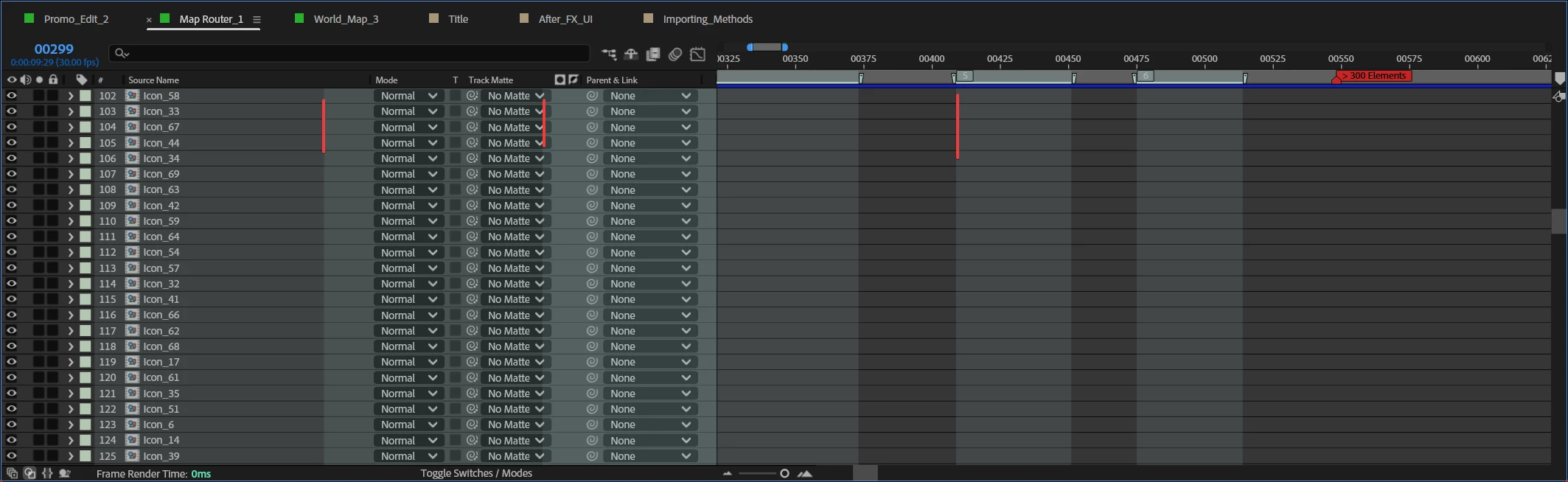
Video Example


Adobe After Effects Version: v25.4.0

Operating System: Windows 11


GPU Driver Version: Nvidia 576.88

2 replies

BRODZELi
BRODZELiAuthor
Participating Frequently
August 21, 2025

Hi Nishu,

I tested this in a new project as well, and I’m still getting the same UI bug.
I also tried starting After Effects in Safe Mode, and the issue still occurs.

To reproduce, please check the video I’ve provided — it clearly shows when and where the overlap happens in the timeline.

https://imgur.com/62ClFqI

Thanks for looking into this!

nishu_kush
Community Manager
Community Manager
October 7, 2025

Sorry for the delayed response, BRODZELi.

Are you still having the issue? If yes, can you try installing the latest version of the GPU driver and see if that brings any change?

Moving this thread from Bugs to Discussions for troubleshooting.


Thanks,
Nishu

Multipasser
Inspiring
October 27, 2025

I want to follow up on this. Because Ive seen he is using multiple protected regions. I am also for a project. But when I export a mogrt and I do CUTS before those regions (I know the timecodes) the stretching of the mogrt in Premiere does not work!!  It does not respect the protected regions. It just timestretches everything. Is that a bug??

nishu_kush
Community Manager
Community Manager
August 20, 2025

Thanks for writnig in, BRODZELi.


Is it happening in the new project as well or just a particular project? Can you try running After Effects in Safe Mode and see if that brings any change?

Here to help.


Thanks,
Nishu