This is probably not a bug. You have no Bezier handles on the keyframes because the default Keyframe Interpolation is set to Linear. Select all keyframes, click on one, right-click, or use the keyboard shortcut Alt/Option + Ctrl/Cmnd + k, or the Animation/Keyframe Interpolation menu to change the Spatial Interpolation to Bezier.
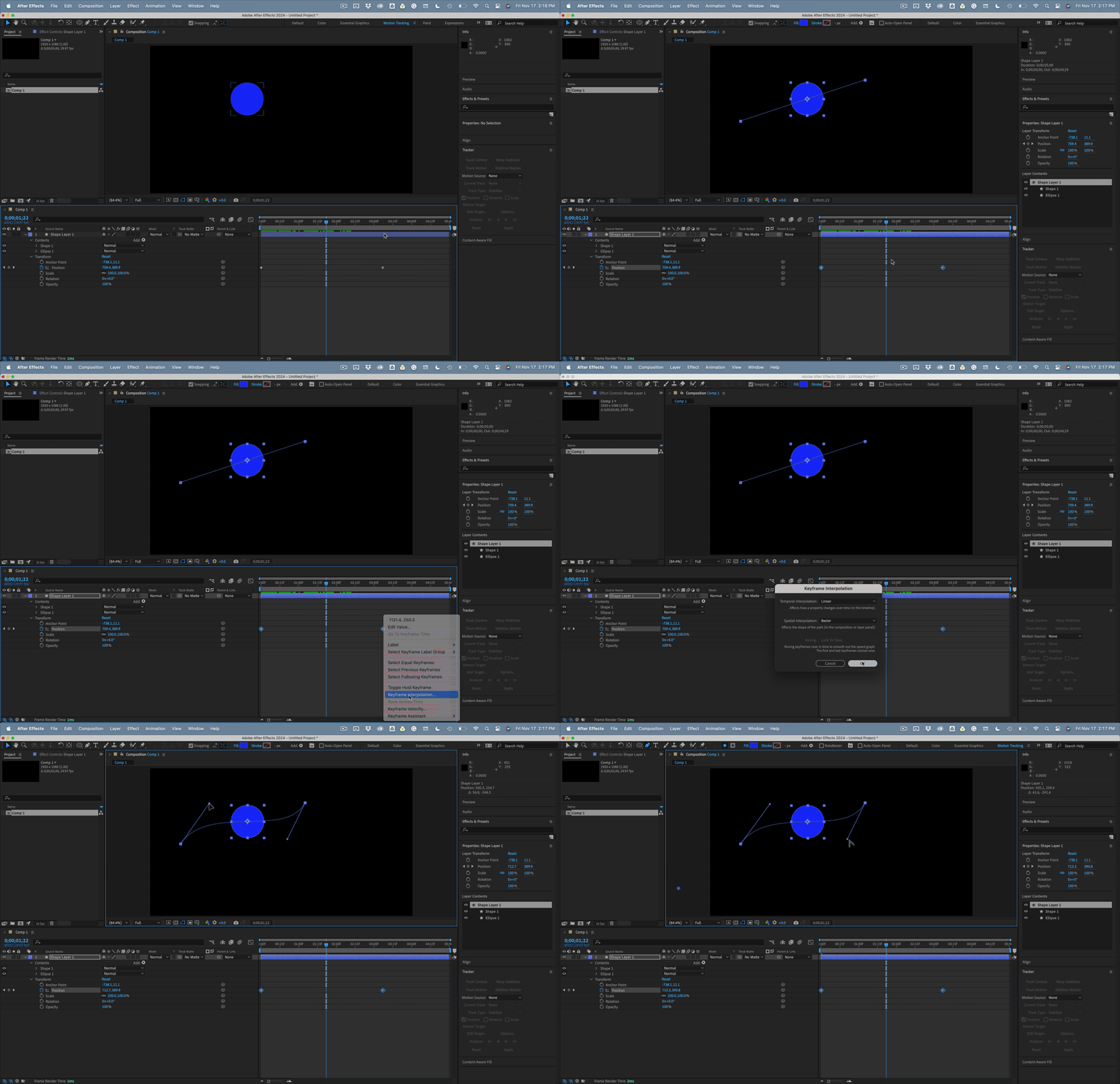
If that doesn't work (it should), Select the Pen tool (g) and move the CTI (time indicator) between the two keyframes. When the pen tool moves close to a position keyframe in the Comp Panel, it should change to the Convert Vertes tool (a sideways v pointing to about 11 o'clock) and drag out a bezier control handle from one of the points. If the Pen tool does not change to the Convert Vertex tool, hold down the Alt/Option key.
You can change the default setting for keyframes in the Preferences/General Panel. Look for the fourth option checkbox when you open preferences by pressing Alt/Option + Ctrl/Cmnd + ;

 AdChoices