RustyIdiot
Inspiring
December 11, 2018
Answered

0xc000007b error upon opening Adobe AE and Premiere Pro

  • December 11, 2018
  • 5 replies
  • 39786 views

I've had a look at most if not all forum posts regarding this specific error and nothing has fixed the problem.

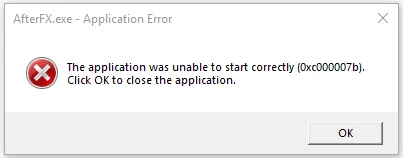
Both After Effects and Premiere Pro of any version (2019, 2017, etc.) can't open and present this error

This topic has been closed for replies.
Correct answer RustyIdiot

Hmm. Next step is to see if the Windows repair utility can find any issues; from Control Panel > Programs and Features, click each of the "Microsoft Visual C++...." entries in turn, and for each one that displays a "Change" option in the top toolbar, click it and select "Repair" in the popup window. The repair utility will verify if the files match the installation fingerprints. Note that the very old libraries (VC++ 2005 etc) don't have a Change option but After Effects isn't using those.

In rare cases the VC++ installer decides to completely ignore the x64 library. There is a manual workaround that involves halting the VC++ installer halfway through and copying the files from a temporary folder; see the reply here by Michelle.

Failing that, it's looking like a complete re-install. Sorry.


Repairing all VC++ versions that I could had no luck. (2010-2017)

In the post by Michelle, none of those images in the instructions appear, so it's a bit hard to follow.

I can't find the temp folder the VC++ installer creates in C drive.

Alright, scratch that, I did something different.

I went into system32, deleted MSVCP100.DLL, and reinstalled it using the VC++ installer. It worked.

Not entirely sure how that was different to having it uninstalled via Programs and Features, but I'm not complaining.

If someone could further explain maybe why this worked the way it has (for future reference / others with similar issue) that'd be great.

Will post here again if anything changes.

Thanks for the help Dave Merchant​. Would not have even known where to start without ya.

5 replies

Participant
February 5, 2024

Nothing is happening ithink it's time to say goodbye to adobe premiere pro 

melonika
Participant
January 15, 2022

I had same issue in January of 2022, Windows 10 - 64bit, with premier pro.

For me, doesnt work any solution what I found but finally I fixed it. 

In this case need to reinstall the VC++ Runtime Libary in windows system but in other way.


When you make a Premier Pro clean install, the installation process will detect IF you don't have any VC++ package in the system and will install the correct package automatically.


So uninstall the all VC++ package and uninstall the Premier Pro (or other app what is showing similar error). After install again the Premier Pro.

The Premier Pro install process will install the correct VC++ Runtime Libary in the background automatically.


When I tried to remove and reinstall the VC++ package manually, I got same error.

But In this way the problem has been solved.


The solution is same if the error messages showing that MSVCP110.DLL or MSVCR110.DLL are missing.

Participant
July 7, 2020

I just wanna say thank you, Rusty. After a tiring search, this post solved it for me! I'm on a win7 64bit system. The problem started after both my windows and adobe CC app updated (Not sure which one is responsible for the culprit). Maybe that info can be useful to others. Thank you for posting this!

Legend
December 11, 2018

Error 7b is STATUS_INVALID_IMAGE_FORMAT, which means that After Effects is trying to link to a shared DLL which is corrupt or the wrong version (e.g. 32-bit DLL on 64-bit Windows or vice-versa).

The most common culprit is the Microsoft C++ Redistributable library, which is a free download from the Microsoft website. Uninstalling and reinstalling After Effects might help if it's a library that the installer checks for, otherwise there are in-depth tests you can perform to see exactly which DLL is at fault.

RustyIdiot
Inspiring
December 11, 2018

I've uninstalled and reinstalled / repaired all versions of the Microsoft C++ Redistributable library and reinstalled after effects, none of which work sadly.

So, what are these 'in-depth tests'.

Thank you for the response.

Legend
December 12, 2018

You can use the free 'Dependency Walker' app from Microsoft's engineering toolkit to analyze what After Effects is trying to load as it starts up; that will usually reveal which file is triggering the error.

See https://blogs.technet.microsoft.com/askperf/2010/06/25/analyze-application-failures-the-easier-way-with-dependency-walker/

Mylenium
Legend
December 11, 2018

Impossible to say. You have not provided even the most basic bits of useful info such as actual system information, much less anything specific with regards to settings and configuration.

Mylenium

RustyIdiot
Inspiring
December 11, 2018

OS: Windows 10 64-bit

Sys Manufacturer: Acer

Sys Model: Predator G3-710

Processor: Intel(R) Core(TM) i5-6400 CPU @ 2.70GHz

RAM: 16 GB

DirectX 12

Graphics Card: NVIDIA GeForce BTX 1070 Ti

Let me know what else you'd need.