3D camera tracker just stops

Copy link to clipboard
Copied
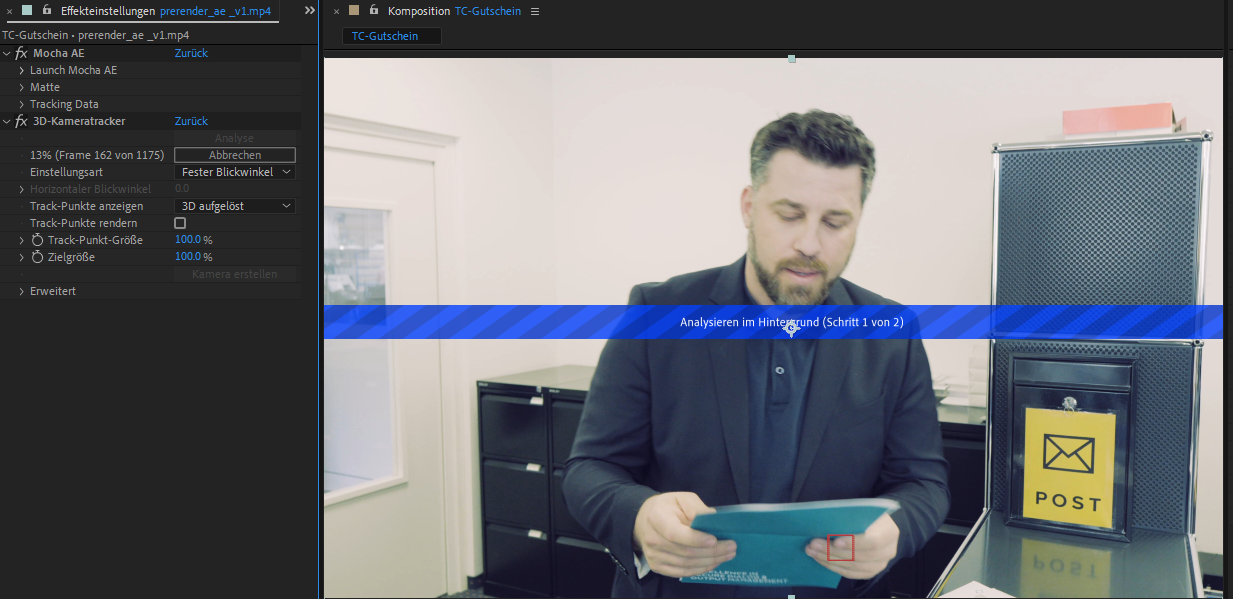
I have the problem that the 3D camera tracker suddenly stops. I select the video track that the tracker should scan. Then suddenly at 17% it just stops. When I want to repeat it, it doesn't start at all. When I restart After Effects it stops again. But then sometimes at 12% and sometimes at 23%. There is no error message. It just stops.
I have tested several After Effects versions. Everywhere the same problem.
My system:
- Win11 Pro
- Asus TUF GAMING Z690-PLUS WIFI D4
- Intel Core i7-12700K
- 64GB DDR4 3600MhZ
- Samsung 970 Evo Plus NVMe PCIe M.2
- nVidia RTX3080 10G


 11
Replies
11
11
Replies
11



Copy link to clipboard
Copied
Is it the same media each time? Can you give us the specs on the footage?
JVK | Editor/Designer/Software Instructor. Pr, Ae, Ch, Ps, Ai, Id
Copy link to clipboard
Copied
After Effects version: 23.2.1 (Build 3)
The current file 3840x2160 / 25FPS / 60Mbit
Stops at 13% (frame 162 of 1175) without an error message.
Only a section of 5 seconds was tried to be tracked.
So I could still work on the project I did it with Mocha AE which worked. However, I would like to use the 3D Tracker in certain situations.
Copy link to clipboard
Copied
Copy link to clipboard
Copied
What is the CODEC of the footage? That's very important; compressed files like H.264 or H.265 are very hard to decode on the fly.
Also the frane size of that second clip is very odd. How was it recorded? The first clip is standard 4K but the other one is nonstandard. Are these drone shots by any chance?
JVK | Editor/Designer/Software Instructor. Pr, Ae, Ch, Ps, Ai, Id
Copy link to clipboard
Copied
The first clip is from my SonyFX30 and was recorded in XAVC codec.
The second clip was recorded with a GoPro HERO10 in HEVC/H.265.
Especially drone footage I used a lot with the 3D camera tracker and it always worked very well.
Could it really be that a compressed codec is the cause? In my opinion this should have no influence apart from the fact that the computer simply needs more power for decoding.
Copy link to clipboard
Copied
Compressed codecs always tax the system. It's possible that the 3D tracker is using up all the avaialble RAM allocated to After Effects and that's why it's stopping.
Are you able to share either of these clips? I could try to test them on my Mac and see what happens.
JVK | Editor/Designer/Software Instructor. Pr, Ae, Ch, Ps, Ai, Id
Copy link to clipboard
Copied
Yes you can try it. I'm curious whether it works for you.
https://drive.google.com/file/d/1nYByoJsLb-soLeNP3U8zn828C2H6QEgE/view?usp=share_link
Copy link to clipboard
Copied
Hi, sorry for the delay but I had a lot of work the last couple of days.
I think there's something up with that clip. I tried it and the analyzing process stopped at a certain percent each time. I tried shortening the clip so that the In point was past the spot where it failed but then it just sat at "Analyzing." I was thinking the codec was the issue so I transcoded it to ProRes LT, but it still failed in exactly the same spot.
Do you have other footage from that camera you can test? I'm worried there's a bad frame or something in there. You could also try the Mocha plugin instead of the 3D tracker; if you set it to track Scale it shodul work about the same. You're just looking to replace that flat panel with another graphic, right? Maybe the tracker is getting overhwhelmed with trying to track the guy too and the rest of the shot.
JVK | Editor/Designer/Software Instructor. Pr, Ae, Ch, Ps, Ai, Id
Copy link to clipboard
Copied
No problem and thanks a lot! This shows me that it must be the codec. With Mocha it worked fine. But I will do some tests with different video formats. Thanks a lot!

Copy link to clipboard
Copied
Hi, thank you for your posts. I have the same problem with my drone footage (HEVC, 3840x2160).
I am flying over a golf course and I have to attach graphic elements on the ground (mostly distance markers).
I thought the tracker is maybe confused, because there is a lot of green and the video is long (1.5 - 2min).
I will try mocha now. Hope it will work.
Thank you.
The System I use:
MacBook Pro (13", M2, 2022)
Apple M2 Chip
24 GB RAM

Copy link to clipboard
Copied
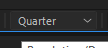
I just switched the quality from full to quarter and everything worked


Find more inspiration, events, and resources on the new Adobe Community
Explore Now
 AdChoices