


Participant
Jul 4, 2021 6:52 PM UTC
Answered

3D Camera Tracker "Create Text and Camera" changes video perspective instead of adding tracked text


Hi Everyone


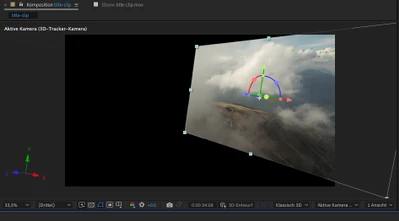
I just started using After Effects and have a problem with the 3D Camera Tracker. I want to add a text to my video, but when I choose right click --> "Create Text and Camera", my whole video changes the perspective as can be seen on the Screenshot below and moves around weirdly, as if the video would be tracked to the video itself. In all the tutorials I have watched, at that point the text would be added to the video.


What am I doing wrong?


Thanks for your help.


Rick GerardCorrect answer
Community Expert
Jul 4, 2021 10:15 PM UTC

The footage you track cannot be a 3D layer. Make it 2D. If the track is good you should be able to establish and set an origin and ground plane, then attach a solid to the same spot to verify the track. If the track is good, you should be able to identify surfaces and attach 3D layers to those surfaces. I'm not sure that your shot is a good candidate for Camera Tracking, but it will never work if the footage is a 3D layer.


Spend some time with the User Guide. There are a couple of tutorials on the basics of camera tracking.  One more thing. You successfully embedded an image in your original post but then started using the buggy and difficult to use Drag & drop here area to share screenshots. It's a pain for us to use so use the Toolbar or drag the images to the reply field in the future.


Also, if you click the More link at the bottom of your post, you can edit it. 

5 replies

Rick GerardCommunity ExpertCorrect answer
Community Expert
Jul 4, 2021 10:15 PM UTC

The footage you track cannot be a 3D layer. Make it 2D. If the track is good you should be able to establish and set an origin and ground plane, then attach a solid to the same spot to verify the track. If the track is good, you should be able to identify surfaces and attach 3D layers to those surfaces. I'm not sure that your shot is a good candidate for Camera Tracking, but it will never work if the footage is a 3D layer.


Spend some time with the User Guide. There are a couple of tutorials on the basics of camera tracking.  One more thing. You successfully embedded an image in your original post but then started using the buggy and difficult to use Drag & drop here area to share screenshots. It's a pain for us to use so use the Toolbar or drag the images to the reply field in the future.


Also, if you click the More link at the bottom of your post, you can edit it. 

Translate
Photo5FB5Author
Participant
Jul 5, 2021 5:14 PM UTC

Thanks a lot! That was exactly my problem. And yes, you are right, my clip does not seem to be optimal for the tracking... 🙂


Also thanks for the tips regarding the forum.

Translate
Photo5FB5Author
Participant
Jul 4, 2021 6:55 PM UTC
Bildschirmfoto_2021-07-04_um_20-53-04.png
Translate
Photo5FB5Author
Participant
Jul 4, 2021 6:58 PM UTC

See below for the result of "Create Text and Camera"

Translate
Photo5FB5Author
Participant
Jul 4, 2021 6:54 PM UTC

Here an additonal picture showing my complete workspace. 


Translate