
Participating Frequently
October 21, 2018
Question

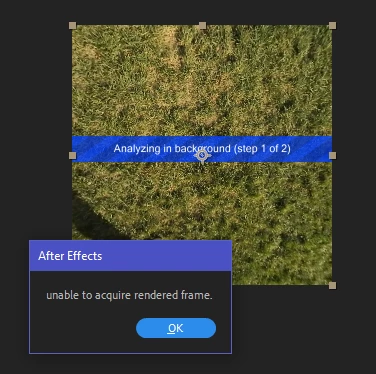
3D Camera Tracker: unable to acquire rendered frame

  • October 21, 2018
  • 25 replies
  • 36512 views

I can't stabilize any 360 footage using the 3D Camera Tracker from VR Comp Editor. 95% of the time, I run the analysis to create the camera for stabilization, it fails with the incredibly non-descriptive and undocumented error message "unable to acquire rendered frame." The error appears for videos of any length and any resolution. It also appears at various progress stages of the process and even within the same file (it can be at 5%, or at 55%, or at 98% completion).

At this point, I've exhausted any possible solution I could find:

  • Reduced the Comp width down to 260 pixels and aspect ratio to 1:1: it speeds up processing but doesn't guarantee success even with a 6-second video
  • Converted the video to sequences of JPEGs and PNGs: the success rate is slightly higher (the process is likely to complete than not) but this slows down the process exponentially (a 20-second video takes 5+ minutes to get converted into images then takes longer to analyze and re-encoded)
  • Played with every combination of settings when creating the 3D Edit
  • Disabled the antivirus (Windows Defender)
  • Turned off all cloud syncing and took the computer offline
  • Moved the source files to an M.2 SSD from RAID0 (2x7200rpm WD Black drives)
  • Moved disk cache to the M.2 SSD
  • Increased paging file size to 16GB
  • Tried changing from CUDA to OpenCL and back

The source camera is Nikon KeyMission 360. The videos are stitched in-camera and exported as equirectangular 2:1. Tested video resolution was 3840×1920 and 3840×2160.

Computer specs: Dell XPS 8930, i7-8700, 32GB RAM @ 2667MHz, GeForce GTX 1070 8GB, AE 16.0.0 build 235 with 429 plugins.

Every single tutorial talks about how easy this feature is and has no tips for troubleshooting. I'm hoping an actual Adobe (or Mettle) developer chimes in on this.
This topic has been closed for replies.

25 replies

Participant
May 4, 2019

I have same problem and I realize that due to hight resolution quality video. When I reduce from 4k to 2k, then the tracking run good. Anyway many years pass away and After Effects is still suck for the 3D thing - bad 3D space composition, bad AOVs pass, very slow, and now is suck old 3D camera tracking. Adobe has so many technicians and staff but I don't know what they really do.

megacinn
Inspiring
May 4, 2019

@ Rameez

well, I could provide samplefootage and projects as well.

But as mentioned, we are talking about 4K or even 5,4 K 360 clips with ProRes422 or Cineform codec.

That makes them huge.

The smallest to reproduce , I found, has around 2GB.

How/where can I provide the correct people at adobe only, the material.

Providing a link in the forum makes it visible for the whole world..... keep in mind we have european-data-protection-laws so that no one visible in official content has to be shown without his permit.....

Rameez_Khan
Legend
May 6, 2019

megacinn, if the engineer isn't able to repro this with the sample footage we have on this webpage, I'll ask you for your footage and other details. To share it with me, you can send me a private message.

Thanks,

Rameez

Rameez_Khan
Legend
May 3, 2019

Hi all,

Sorry for your frustration.

We have a bug written on this but unfortunately, the After Effects team is unable to reproduce this problem. Would anyone be willing to share a sample project along with the footage so that I can share that with them? System information on the machines that you're using would also be helpful. Here is how you can save System Info: About System Information on your Mac - Apple Support

Thanks,

Rameez

Participating Frequently
May 4, 2019

Hi Rameez Khan

Here's a link to a test project that produces the error every time for me. I included a screen recording of the bug in action as well as my system specs.

I'm using sample footage from this Adobe tutorial: Stabilize and track 360/VR footage with VR Comp Editor |

Dropbox - unable to acquire rendered frame.zip

Thanks,

Aaron

Rameez_Khan
Legend
May 6, 2019

Thanks for providing the screen recording and the files, Aaron. I tested it on my Windows 10 machine but it worked fine without any issue. That said, I've sent it to an engineer for review.

I appreciate your willingness to work on this together.

-Rameez

Kevin-Monahan
Community Manager
Community Manager
May 3, 2019

Hi,

Convert any Long GOP VR footage to ProRes or the like. The 3D Camera Tracker can be subject to errors with H.264/265 footage. Try it and report back.

Regards,
Kevin

Kevin Monahan - Sr. Community and Engagement Strategist – Adobe Pro Video and Audio
Participant
May 3, 2019

Hi,

I converted a GOP VR footage to ProRes (1min) and added the 3D Camera Tracker to the footage and hit the analyze button just once and its started tracking like it should. No errors nothing…. Thanks Kevin!

So the only downside is that you end up with a large ProRes file, but hell it worked out for me!

JohnTeichman
Participant
April 29, 2019

I have the same issue. Tried different file types, shorter clips, different computers using the same footage, multiple trackers, nothing worked.

Ended up downloading AE 2018 and the 3D Tracker worked without any issues. Seems like Adobe took a step backwards here and it is very frustrating.

Participant
April 26, 2019

Hi there,

I got the same problem in AE CC 2019. I tried all kind of suggestions and non of them worked out for me.
Then I start just hitting the analyze button over and over again after it gave the error. I noticed that the analyzing got further and further with every try I made. Believe it or not but finally it managed to get through this part and got my tracking points.

megacinn
Inspiring
April 30, 2019

@Rameez , Rick

it's now 6 month since this thread started .

The problem is common since more then 6 years (see other threads).

08th of jan you wrote to check internally and update the thread.......

....where ist the promised answer . At least a hint what the error message means .

Adobe : If you can't solve it, or if you are not able /willing , please give us a hint /information from the devolpers what the message is pointing to !

Is there a problem with cachefiles ... is AE writing caches after analyzing and cannot read them ?

It must be somewhere in this area...because I can see that there is absolutely no diskaccess at the moment when AE is stuck or freezing.

So it is not a readerror of the sourcefile, nor the cachefile ... is there a readerror from memory ??

But my system memory is only 50%used (16GB out of 32GB)...

so what ...

I just gave it several tries with the newest version 16.1.1 and total different files and compressions (ProRes422 / Cineform...) ...the result is always the same ...

...either freezing (turning wheel)

or ....unable to require rendered frame...

tried exaclty thr same with version 15.0.1 .... works without problems ....

don't tell us again about problems on the use / sourcematerialside .... solve it !! ..or at least give us some hint .....

and btw

IMacPro 32GB

just upgraded from OSX 10.13.4 to 10.13.6 (because of resolve 16)

Problem persists (before and after OSX upgrade)

Participant
May 2, 2019

I want to add on to this thread. I have been running into this issue and I can't get it to work. I have to repeatedly click analyze or ad a new camera which only advances it about 10 frames per time. Considering the stuff I am shooting is a couple of hundred frames this is very impractical. I really don't want to have to find a new system to use to edit 360 videos but it appears I need to since this hasn't been solved or really looked at in 6 months...

Swarby
Inspiring
April 4, 2019

I just upgraded to v16.1 and saw this problem for the first time.  It's also the first time I've ever tracked 4K footage with the AE 3D Camera Tracker, so I think the issue is related to the increased pixels it has to deal with in combination the effect being on a precomposed comp containing a garbage matte (matting out a person in the foreground).

So far on my current job, I'm getting this error with every shot, I'm on the third shot now.  The solution mentioned earlier to add 2nd and 3rd Camera Tracker effects worked on the first 2 shots, but my third shot got the error even after 6 Camera Tracker effects added.

My solution was to export my clip to ProRes4444 with an Alpha (because of the matte).  It tracked perfectly after that.  I'm not sure exporting with an alpha is necessary, but I assume the tracker needs to see alpha data to ignore that area right?  If it's a black matte shape, then it will just try to track those edges no?

bsinedAuthor
Participating Frequently
March 21, 2019

The latest update to AE hasn't solved this issue.

Participant
March 19, 2019

On my basic creeper dolly shot of a book shelf I'm getting this error. 

My 3D tracker was working great all day.   Then I watched a few tutorials on masking out objects that will throw off your track.  Figured this is a great way to improve my shot.  I pre-comped and masked out a portion of my video and now the thing is saying....

"unable to acquire rendered frame"

I've made it to frame 710 out of 720 and I've made it to frame 10.  

9 min Analyze time and I've tried 8 times already......

Let's get the ball rolling Adobe, we have clients waiting for us to deliver. 

OSX Mojave 10.14.2

The worst computer I've had from apple in 25 years, 2018 MBP i9 32GB Ram

CC 2018 Version 16.0.1

bsinedAuthor
Participating Frequently
March 13, 2019

Guys, given the lack of response by Adobe and the new 360 cameras having built-in stabilizers, I'm starting to think that Adobe will never resolve this haunting bug. They would rather have us pay the subscription fees and upgrade our hardware than to live up to their end of the bargain and fix their product.

Dave_LaRonde
Inspiring
March 13, 2019

bsined  wrote

They would rather have us pay the subscription fees and upgrade our hardware than to live up to their end of the bargain and fix their product.

Hey, how do you expect Adobe to make any money?  It's a business, not a charity!

Never mind that keeping the customer first is ALSO a keystone of running a business.......

Participating Frequently
January 24, 2019

Pretty confident this is a new bug in Adobe After Effects 2019. We were able to reload 2018 onto our machines and render this out without a problem.

megacinn
Inspiring
March 10, 2019

unfortunately I can join the party of affected user ...exactly the same here .

The most and super annoying about this is, that a google-search braught up that this error still exists since CS6. There, of course, in combination with other plugins, but the reason behind , and an appropriate solution was never provided by adobe.

Sometimes it mysteriously disappeared ..then reappeard

One thing is 10000%sure ... it is the same core-reason like so many other extremely show-stopping issues in premierepro.

It was the fatal switch/break in the developmentbranch which took place in the April 2018 release a.s.o .

Since then , they have totally changed and messed up the "gpu-acceleration" and everything related to it .

The PPro-forum is daily flooded by superangry users who cannot work, or even loosing their expensive machines .

I tried to 3D-track at least 6 different 360 - GoPro-fusion clips in CC19 .... 19 out of 20 different attempts failed . One worked , but was not reproducable (2nd triy failed).

Then switched to my luckily still existing CC18 (BEFORE April18 = Jan 2018 !!) version, and voila, withoutout any problem ....all of them worked immediately!

Another remarkable conclusion: CC18 (Jan edition) ist multiple times faster then the CC19 !!

The same clip , exactly the same settings , absolutely identical .....  3min (CC18) <-> 21min (CC19).

Abolutely the same problem as nearly 90% of all current userissues .... gpu-acceleration totally broken .... don't tell us anything about drivers !!... because win-users with nvidiacards are affectred the same way as us mac-users with ati-graphics.

is there any hope left that adobe is even willing to provide a solution ? ... or are they only interested in rush and caracteranimator users !?