
Inspiring
February 23, 2023
Question

3d layer , strange icon , behaving different
  • February 23, 2023
  • 2 replies
  • 6090 views


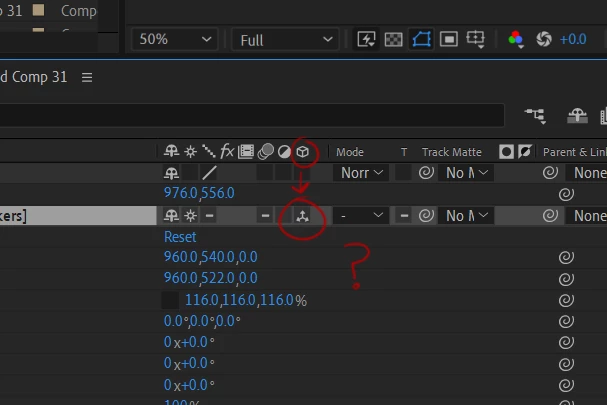
im changing a layer to a 3d layer here,  but it is giving me an icon i havent seen before, with 3 arrows instead of the usual one with a little cube

when i rotate the layer it also doesnt seem to behave the same,  as in,  the comp will rotate, but the images inside the comp remain fixed as though they were not 3d 


any ideas?

2 replies

Participant
February 24, 2023

I was having the same issue, found this post and saw Mylenium's note about "collapsed transformations" being enabled. I dug and dug to learn more about collapsed transformations, what that means and how to disable them, and still don't really know what they are and why my comp has them, but I discovered that if you toggle the little star icon to the right of the shy icon, it will turn your 3D arrow icon into the cube icon you're looking for.

ShiveringCactus
Community Expert
Community Expert
February 25, 2023

Collapsed Transformations is a really powerful feature of 3D layers. 

Imagine creating a precomp which is an entire room made of 2.5D layers. Then in your main comp, you have a camera, the precomp set to 3D and a "house model" also made of 3D layers, you can animate the camera to go inside the house and look around the room.  Without Collapse Transformations, you be stuck treating that precomp as if it were a 2D picture of the room.

Mylenium
Legend
February 23, 2023

3D animation settings


The rest would require more info about your project structure, as apparently you have enabled collapsed transformations, which has its own repercussions. Cropped screenshots are useless for a deeper diagnosis since we can't see the actual layer structure and comp window.


Mylenium