
GateOfTimeDNF
Participant
March 31, 2019
Beantwortet

3D Layers: Z axis doesn't work as it should.

  • March 31, 2019
  • 3 Antworten
  • 4247 Ansichten

Hello.

I'm trying to arrange a couple of 3D layers using the Z axis. However, the layers don't seem to respect their position on the Z axis and instead appear as they are ordered in the composition layers.
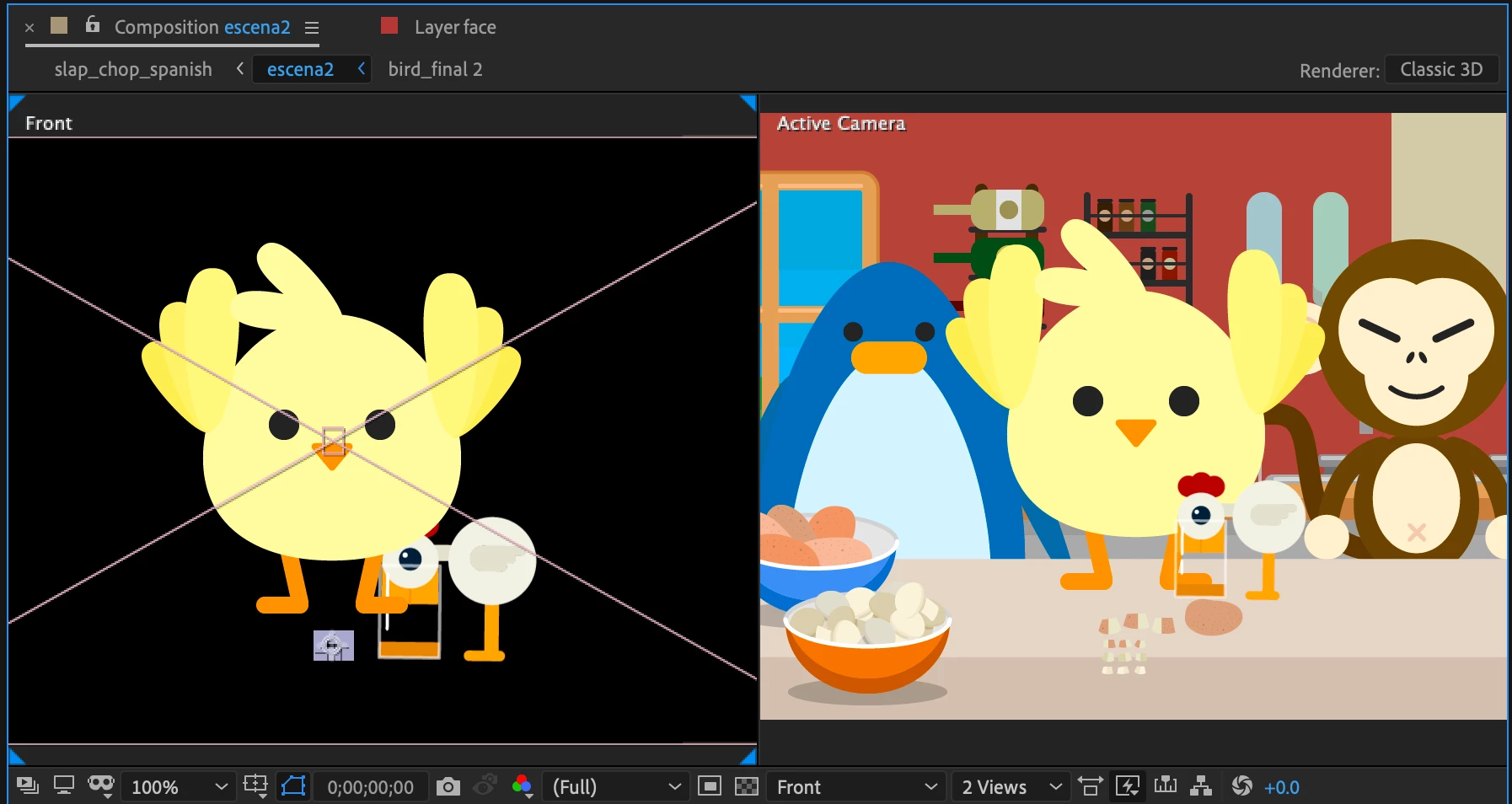
The bird should appear in front of the chicken, but the Active Camera keeps putting it behind despite it being in front of it on the Z axis. Does anybody know what might be causing this issue?

Any help is very much appreciated.

Dieses Thema wurde für Antworten geschlossen.
Beste Antwort von Roland Kahlenberg

You most likely have a 2D layer between the bird and the chicken - this breaks the 3D space into multiple 3D spaces. IOW, when 3D Layers sandwich a 2D layer, the two sets of 3D Layers become two distinct 3D spaces such that 3D space between the two 3D layers are precluded. When this happens, AE will render each 3D space separately while adhering to their placement within the layer hierarchy.

3 Antworten

Dr. Ayman Raafat Ph.D
Inspiring
March 31, 2019

1st be sure that all the selected layers are in 3D , then try to check the positions for each of them from the top view , and it will be solved ISA.

have a nice day

Ayman

GateOfTimeDNF
Participant
March 31, 2019

I did that, but it was actually the 2D layers in between the 3D layers that were causing the issue. Thanks for the help!

Have a nice day too!

Community Expert
March 31, 2019

Select all layers, press the U key twice to see all modified properties, and then go through the comp a layer at a time until you find the problem. I agree with Roland, you probably have a 2D layer in the mix that is fouling up the calculations. We would know for sure if your screenshot showed us what was going on with the layers.

GateOfTimeDNF
Participant
March 31, 2019

It was exactly that! There were 2D layers in between the 3D layers. It works now! Thank you!

Roland Kahlenberg
Legend
March 31, 2019

You most likely have a 2D layer between the bird and the chicken - this breaks the 3D space into multiple 3D spaces. IOW, when 3D Layers sandwich a 2D layer, the two sets of 3D Layers become two distinct 3D spaces such that 3D space between the two 3D layers are precluded. When this happens, AE will render each 3D space separately while adhering to their placement within the layer hierarchy.

Very Advanced After Effects Training | Adaptive & Responsive Toolkits | Intelligent Design Assets (IDAs) | MoGraph Design System DEV
GateOfTimeDNF
Participant
March 31, 2019

You were totally right! I arranged the layers so that no 2D layers are in between them and it looks great! Thank you so much!