Participant
October 10, 2019
Answered

3d Tracking Points Showing on Exported Video

  • October 10, 2019
  • 3 replies
  • 4945 views

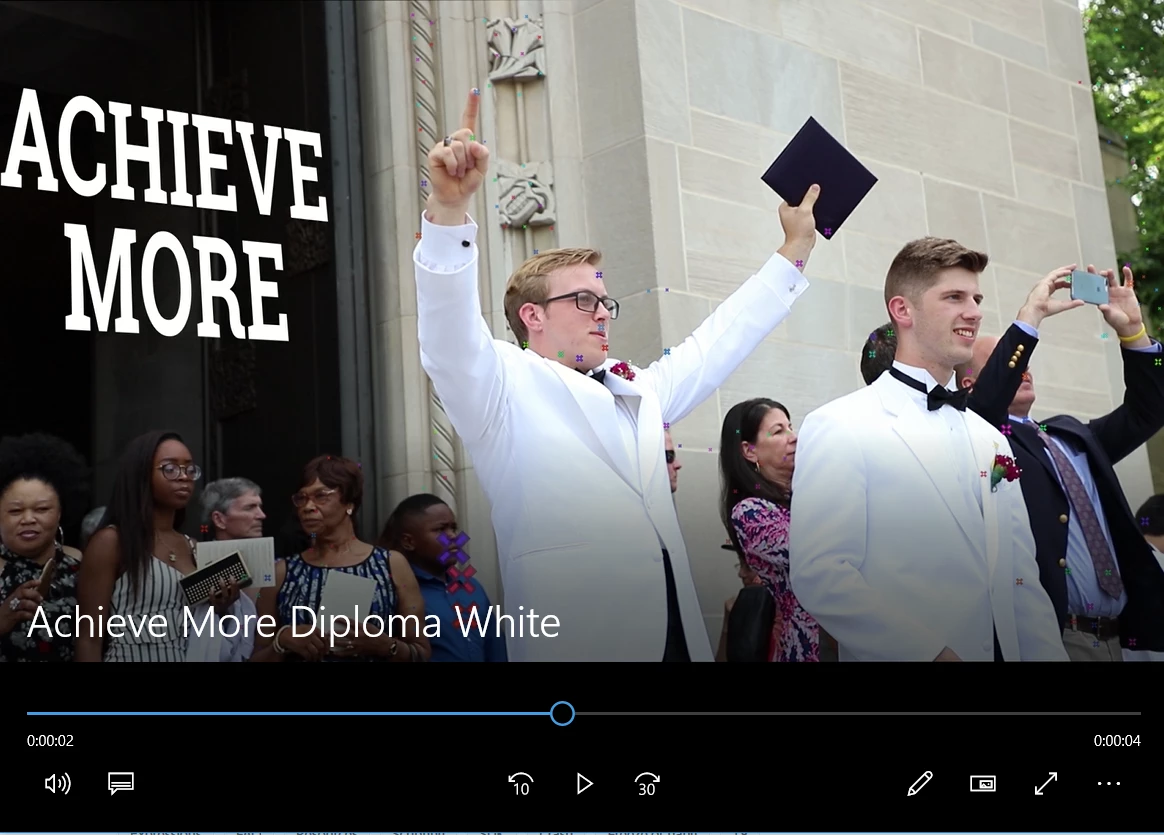
I created 3D tracking points to apply an effect to some text, however, when I export the video, all the tracking points are still showing up.  How do I remove them but still keep the effect?

    This topic has been closed for replies.
    Correct answer Justin Taylor-Hyper Brew

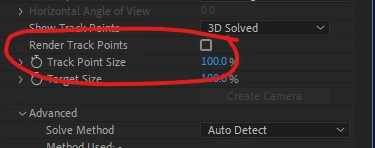
    Uncheck "Render Track Points" in the effect settings:


    3 replies

    Participant
    August 9, 2021

    This was so helpful thank you so much 🙂


    Justin Taylor-Hyper Brew
    Community Expert
    Community Expert
    October 10, 2019

    Uncheck "Render Track Points" in the effect settings:


    Participant
    October 10, 2019
    That was it! Thanks! When I uncheck it, I do get a message that pops up on the preview that says "3d Camera Tracker: Layer size must match composition and use default transform values." I was able to export it successfully, but how do I get that message to go away?
    Justin Taylor-Hyper Brew
    Community Expert
    Community Expert
    August 9, 2021

    Did you try following the instructions? Put the footage in a comp of the same res + framerate, and reset Position, Scale, and Roation.

    Community Expert
    October 10, 2019

    I would try re-setting preferences then re-exporting. With the application closed you would hold down ctrl/alt/shift on Windows or cmd/option/shift on Mac and click on the icon to open the app.

    Confirm that you would like to re-set preferences and then file open the project and try re-exporting.

    Community Expert
    October 10, 2019
    Justintaylor gave the correct response. Well done Justin.