
A bunch of horizontal green lines won't go away on my Composition screen when i open up any video
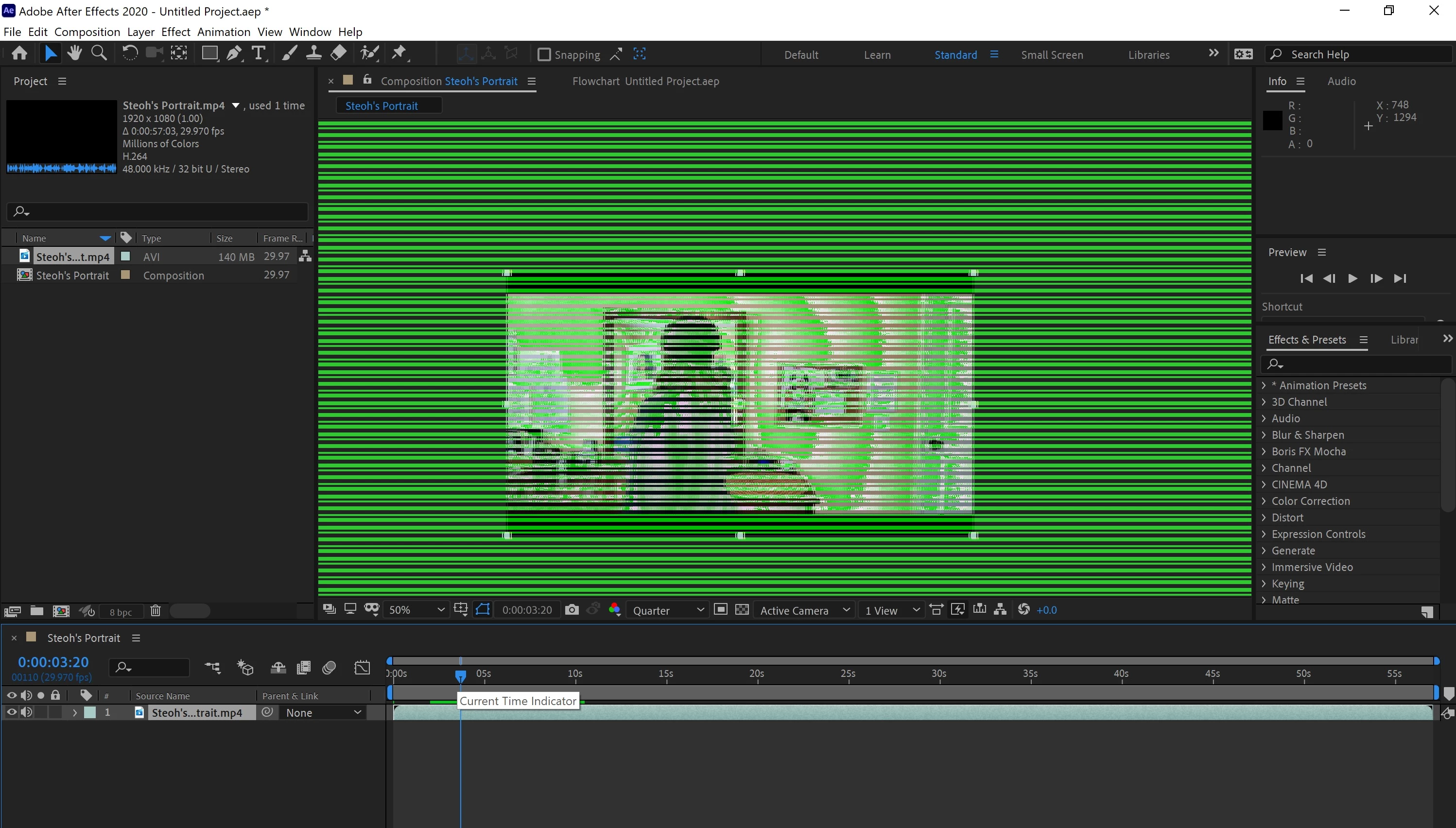
These horizontal green lines appear on any mp4 file I upload on my After Effects and I have no idea how to remove it or what the main issue is. It never was like that before whenever i edited videos. I looked online if anyone had the exact same issue as me, but nothing particularly like this.
I went to project settings to change the "video editing and effects" from "GPU mercury acceleration" to "Mercury Software only" yet it does not work for me. I updated the software, restarted my computer multiple times, cleared the RAM and disk cache, and even cleared up space in my computer if that did anything, but the problem is still the same.
It doesn't look like it's the video, but the composition window itself.
I've been at it all day and it's not going away. I've always solved problems from minor issues with any of my adobe programs, but this by far has been pretty stressful haha. Would anyone know what might be the problem? Perhaps I did something i didn't know I did. I'd really appreciate the help, thank you.
 AdChoices