
Participant
December 22, 2022
Answered

a line to reveal shape

  • December 22, 2022
  • 3 replies
  • 1596 views

Hello, I'm relatively new to After Effects. I'm trying to make animation similar to this one here in this video


https://www.youtube.com/watch?v=TJRw0CKoxqQ


I've tried to trim the path of the heart and then rotate the line but I wasn't able to get them synchronized.

I've tried morphing the a line (rectangle) to heart and didn't work. I tried fiddling with vegas effect and also didn't work for me. Please could someone show me how or guide me to what to search for exactly
This topic has been closed for replies.
Correct answer Rick Gerard

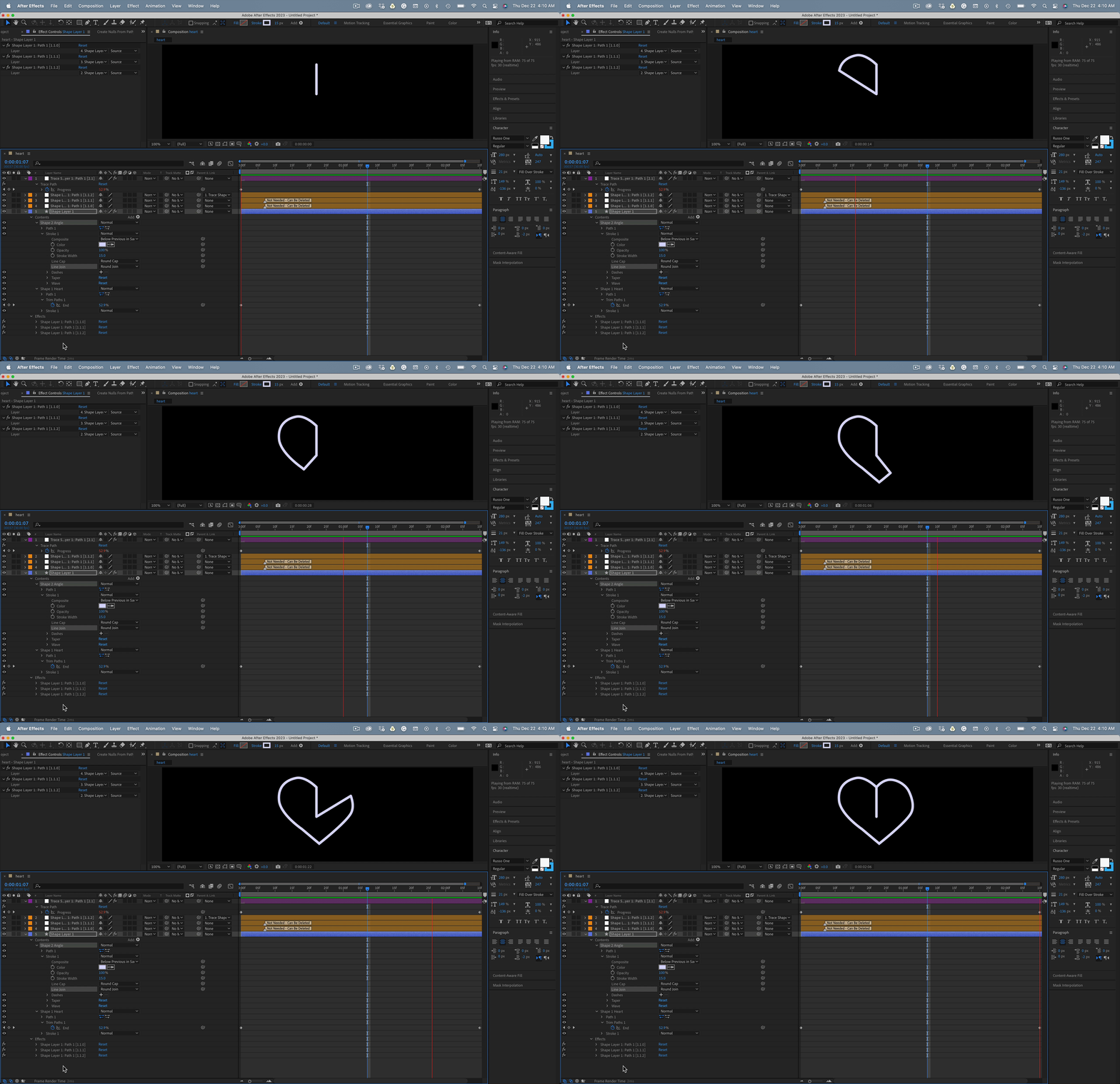
I would use two paths and the Create Nulls From Paths script. Follow these steps and you'll be done in about 5 minutes.


  1. Draw the heart with round caps on the stroke.
  2. Add Trim paths to the heart path and set up the reveal.
  3. Draw the V shape with the middle point at the heart's center.
  4. Open the Create Nulls From paths script, select the Heart Path and choose Trace Path from the options.
  5. Use Create Nulls From paths again on the V shape but choose Points Follow Nulls from the options.
  6. Shift Parent one of the end nulls from the V shape to the Trace Paths null
  7. Fine-tune the position of the other end of the V and set the path to Round Cap and Round Join
  8. Turn off Loop and adjust the Trace Path Effects Controls and adjust the position of the ending keyframe


There you go. The heart reveal has been recreated using only one shape layer, two paths, and one of the most useful scripts included with AE.


3 replies

Rick GerardCommunity ExpertCorrect answer
Community Expert
December 22, 2022

I would use two paths and the Create Nulls From Paths script. Follow these steps and you'll be done in about 5 minutes.


  1. Draw the heart with round caps on the stroke.
  2. Add Trim paths to the heart path and set up the reveal.
  3. Draw the V shape with the middle point at the heart's center.
  4. Open the Create Nulls From paths script, select the Heart Path and choose Trace Path from the options.
  5. Use Create Nulls From paths again on the V shape but choose Points Follow Nulls from the options.
  6. Shift Parent one of the end nulls from the V shape to the Trace Paths null
  7. Fine-tune the position of the other end of the V and set the path to Round Cap and Round Join
  8. Turn off Loop and adjust the Trace Path Effects Controls and adjust the position of the ending keyframe


There you go. The heart reveal has been recreated using only one shape layer, two paths, and one of the most useful scripts included with AE.


S_ A
Inspiring
December 22, 2022

Hello @Rick Gerard 


I am trying to create this too as am an avid learner. I find this very interesting. I asked myself If I could answer this question! The answer is NO! so I am learning from your answer!  But no way I can match the two nuls as you do, My tracing null and points follow nuls are oceans apart! how can you syncronize these two?  I mean how did you math their anchor points?  Thank you.

S_ A
Inspiring
December 22, 2022

OH MY GAWWD!! I understood what you mean by point 8. I can create exactly as you do! I am so happy! 


@Rick Gerard  one question. What do you mean by turn off the loop? 😢

ShiveringCactus
Community Expert
Community Expert
December 22, 2022

There's something about this animation that suggests to me it's not be done using trim paths, but actually may have been done by using a Radial Wipe effect and layer styles.  Whether that's the technique used, I can reproduce it that way:

Participant
December 22, 2022

I appreciate your effort and time 🙂

Mylenium
Legend
December 22, 2022

I'm afraid based on your generic and vague description nobody can tell you much. What does "wasn't able to get them synchronized" even mean? You have to show us what you actually have with proper screenshots and a better explanation of what you want to do.


Mylenium 

Participant
December 22, 2022

Thanks for you answer. I'm sorry I wasn't able to explain clearly what I want