Participant
May 16, 2024
Question

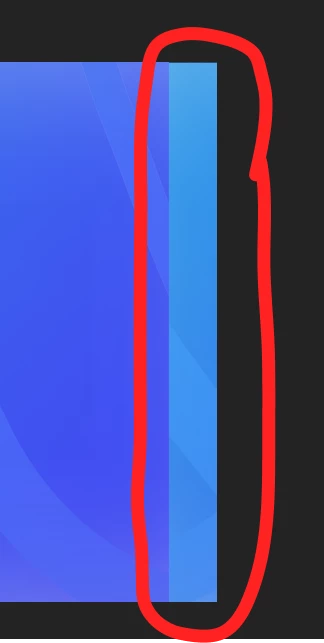
A Strange extra renderd part to the right of my video
  • May 16, 2024
  • 1 reply
  • 964 views

the Highlighted part is not in the vidoe but the adjusment layer back on pr shows it I would love to know what the cuz of this and if thers a solution

This topic has been closed for replies.

1 reply

Inspiring
May 20, 2024

It look like your adjustment layer might have gotten shifted. Go into the Effects Controls panel and check the position coordinates of your adjustment layer. Or just temporarily disable it to see if it is the cause.

Participant
May 23, 2024

Hi, thanks, but the issue is not related to Posation because I didn't even touch that. As I created the adjustment layer, I replaced it with an After Effects composition. Also, when I export using Media Encoder, the issue is there, and when I export using Pre-render in After Effects, the issue is not there.

 
Participant
October 9, 2024

I just want to make sure I understand correctly, are you saying the issues isn't there when you export from After Effects, but it is if you export from Premiere to AME? Or the issue isn't there if you export directly from Premiere, but it is when you queue from Premiere to AME?


As a test, what if you create a new sequence in Premiere, rebuild just this portion, and try exporting?


I used chatgpt to help me phrase my problem better: 

I'm experiencing a glitch in Adobe Media Encoder when attempting to export compositions as PNG sequences. The issue manifests when I select the PNG sequence option; the preview glitches, resembling a visual distortion where a portion of the frame appears shifted (for example, an 8px slice from the left side of a red square is incorrectly patched to the right side).