


Participant
February 8, 2024
Answered

Add keyframes every single frame between two key frames

  • February 8, 2024
  • 1 reply
  • 999 views

So, i'm using after effects to export animations to a game, and the tool exports the bezier curves completely wrong (i'm fully aware thats the plugin's fault not after effects), the only way to get it right is to get keyframes every frame of the timeline, i have been doing it manually this last years and it starts to get annoying.


So this is what i have
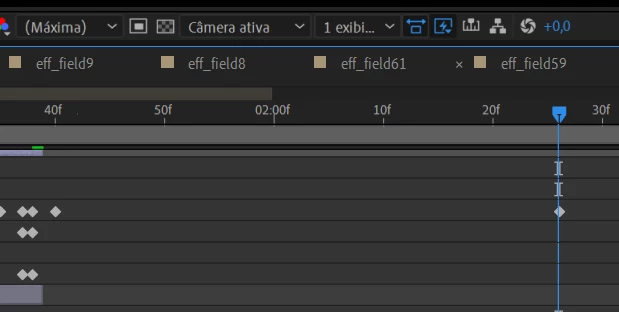
This is what i want
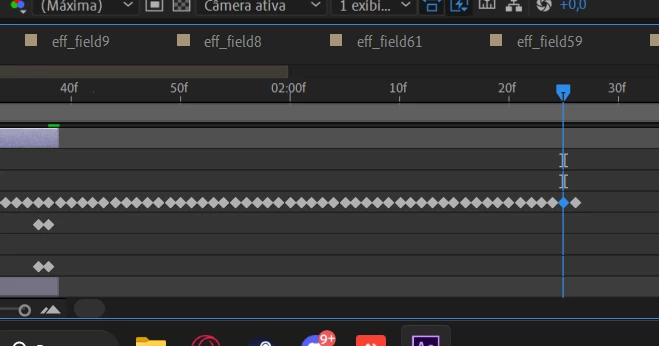
 

Thank you for your time 🙂

This topic has been closed for replies.
Correct answer Airweb_AE

I've made a script for this:

KeyframeEveryFrame.jsx


1 reply

Airweb_AECorrect answer
Legend
February 8, 2024

I've made a script for this:

KeyframeEveryFrame.jsx


Participant
February 9, 2024

This will save a lot of time for me, you don't know how much this is helpful for me... seriously thank you. 
There was just a slight problem, take a look at the anexed videos, one shows the original and the other one with the script, it slightly moves, ik that animation in specific doesnt need bezier curves but there are some that uses it, and if there is no way to fix it in the script its fine, this already helps a lot


Participant
February 9, 2024

Actually, i just checked, it happens in some animations using Linear curves