Participant
December 9, 2023
Answered

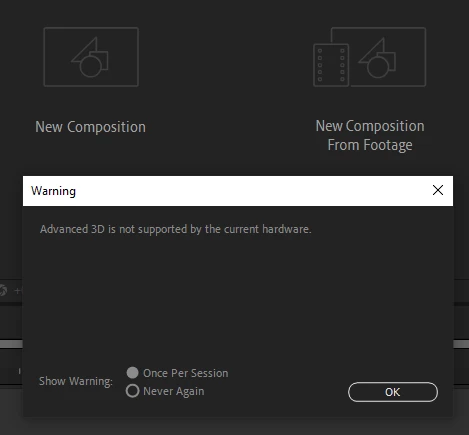
Advanced 3D is not supported by the current hardware

  • December 9, 2023
  • 7 replies
  • 28144 views


I have this error when I installed the beta featuring the new 3d rendering. My specs are GPU: Nvidia GeForce RTX 4070 Ti and I have already updated my GPU drivers. (I installed the Pilot Studio Ready and Game Ready Pilot given by Nvidia). I am on windows 11 of course.


Could someone enlighten me ?

Correct answer Motion by Dim Rusev

I was facing the same issue and somehow they were fixed!
I'll share all the steps I tried.

First, I tried the suggested link from nishu_kush:
https://www.youtube.com/watch?v=RZ_9rDQtRD4&ab_channel=AdobeCare
https://www.youtube.com/watch?v=DVwfR2832o4&ab_channel=AdobeCare


Then I restarted After Effects and my laptop, but I still had the error and was missing the Advanced 3D renderer.
Then I checked if my Nvidia drivers and Windows updates were up to date, updated my Windows 10 updates, and restarted my laptop, but I still had the error.

Then I thought that the problem might be my Graphic card:
("NVIDIA® GeForce GTX 1650 Laptop GPU" with 4GB GDDR6 Memory)
So I contacted Adobe support to ask if that Graphic card supports the Advanced 3D rendered, but they did not have an answer so they offered to help me by accessing my computer remotely.

I shared my PC with the agent, he opened After Effects, we faced the error and the missing Advanced 3D renderer.
Then I chatted a bit with him about what may be causing the problem, nothing specific.
And finally, without doing anything more I restarted After Effects, opened it again and THE ERROR WAS GONE!

Now I can use the new Advanced 3D Renderer in After Effects 2024!


--- --- ---

Here are the 2 links that probably somehow helped (Thank you - nishu_kush !):

7 replies

Participant
May 14, 2024

Hi all ! 
Easy 1 minute Fix for NVIDIA USER :

I got the same issue (pop up message "Anas341554791mtr") and after checking which GPU was identify, it was my Intel one and not my Nvidia RTX.


To force  and fix :
Just OPEN Nvidia PANEL-> 3D manager -> software setting -> select AFTER EFFECT then FORCE the graphic proc to your DEDICATED GPU, it's done. 

if not, try a reboot.

this solve my issue.


Motion by Dim Rusev
Motion by Dim RusevCorrect answer
Participating Frequently
January 11, 2024

I was facing the same issue and somehow they were fixed!
I'll share all the steps I tried.

First, I tried the suggested link from nishu_kush:
https://www.youtube.com/watch?v=RZ_9rDQtRD4&ab_channel=AdobeCare
https://www.youtube.com/watch?v=DVwfR2832o4&ab_channel=AdobeCare


Then I restarted After Effects and my laptop, but I still had the error and was missing the Advanced 3D renderer.
Then I checked if my Nvidia drivers and Windows updates were up to date, updated my Windows 10 updates, and restarted my laptop, but I still had the error.

Then I thought that the problem might be my Graphic card:
("NVIDIA® GeForce GTX 1650 Laptop GPU" with 4GB GDDR6 Memory)
So I contacted Adobe support to ask if that Graphic card supports the Advanced 3D rendered, but they did not have an answer so they offered to help me by accessing my computer remotely.

I shared my PC with the agent, he opened After Effects, we faced the error and the missing Advanced 3D renderer.
Then I chatted a bit with him about what may be causing the problem, nothing specific.
And finally, without doing anything more I restarted After Effects, opened it again and THE ERROR WAS GONE!

Now I can use the new Advanced 3D Renderer in After Effects 2024!


--- --- ---

Here are the 2 links that probably somehow helped (Thank you - nishu_kush !):
Inspiring
February 18, 2024

I am having the same issues..what do i need?

Motion by Dim Rusev
Participating Frequently
February 19, 2024

Hey, Tina.
Did you try all of the steps I tried, including the videos suggested by nishu_kush ?
I'm not sure how exactly the problem was solved for me, but I shared everything that I tried.

nishu_kush
Community Manager
Community Manager
December 11, 2023

Hi Anas341554791mtr,


Please check out the following videos and see if they are helpful:

https://www.youtube.com/watch?v=DVwfR2832o4

https://www.youtube.com/watch?v=RZ_9rDQtRD4

Let us know how it goes.

Note: Moving this thread from Bugs to Discussions for troubleshooting.


Thanks,

Nishu

Motion by Dim Rusev
Participating Frequently
January 11, 2024

Thank you, Anas341554791mtr for opening this Discussion, and nishu_kush for providing these 2 links!
In the next Reply, I shared how probably these 2 links helped me.

Community Manager
December 11, 2023

At this time, no way to specificy which GPU, AE will generally pick up the first GPU it finds and use that. Can you disable the card and test to see if that gets Advanced 3D working? 

Participant
December 9, 2023

After some personal research , the further I have managed to try to solve the problem is this window 

It is now 100% certain that the AMD is being picked up. However there do not seem to be a window where the picked GPU can be altered (as far as I was able to reach ofc). Are there some internal files that needs to be altered in order for it to happen?


Participant
February 2, 2024

Hey! Did you ever find a resolution to this?


I only have one GPU and its still showing the same error as yours! 


So frustrating!

Motion by Dim Rusev
Participating Frequently
February 2, 2024

Hey, TomJay.
Did you try all of the steps I tried, including the videos suggested by nishu_kush ?
I'm not sure how exactly the problem was solved for me, but I shared everything that I tried.

Participant
December 9, 2023

Yes I do indeed! AE is probably picking up the AMD Radeon.

Is there a way for me to switch GPU's in After Effects?

Community Manager
December 9, 2023

Do you have an intel integrated GPU by any chance? We are working on updating the message to help further, but in the mean time, I suspect you may have a second GPU that AE is picking up.