
Participant
March 12, 2022
Answered

Advise on creating the Logitech MX effect

  • March 12, 2022
  • 1 reply
  • 333 views

Hi all,

I would love some direction or guidance in creating the MX text that appears on the Logitech commercial that I have linked below [between 0:04 - 0:08]

https://www.youtube.com/watch?v=JDLKTUWVDbk

Can it be done in After Effects? Or do I need to compliment it with other software?

Thank you in advance.
This topic has been closed for replies.
Correct answer ShiveringCactus

I think this was most likely done with something like C4D's MoGraph deformers to create a jumble of shapes changing scale, position and colour using an Random effect.  

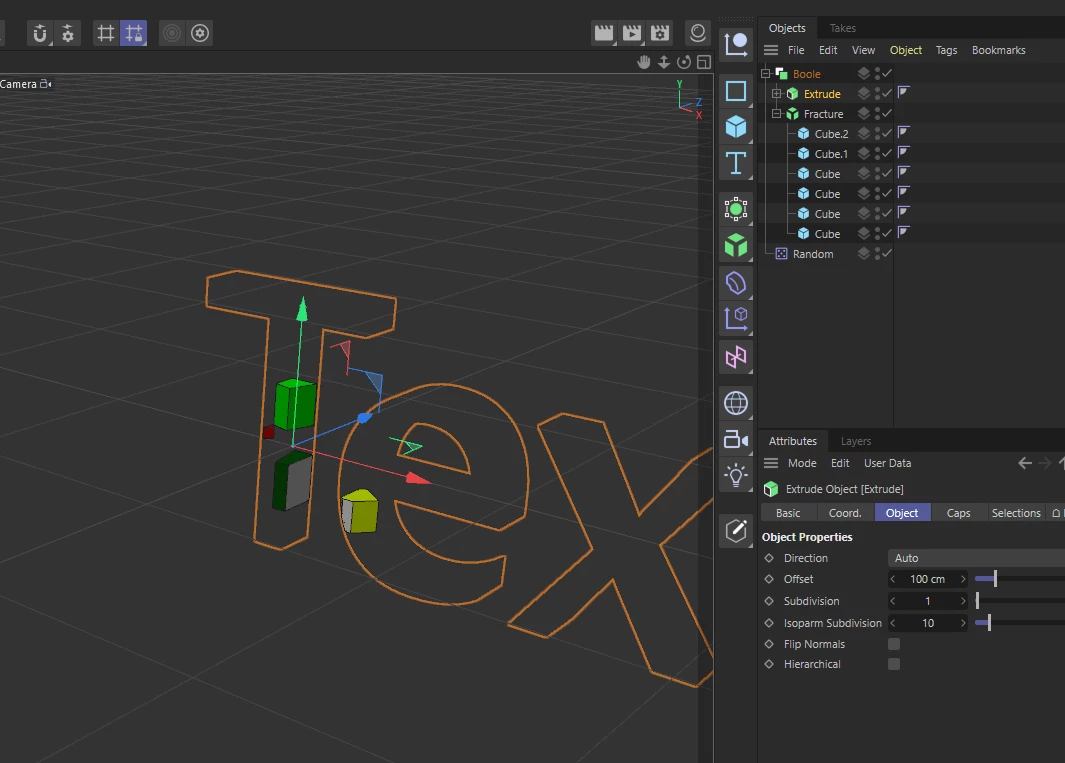
Arranging them into the letter's space is a little trickier.  You can use the Text spline primitive to create the text and an Extrude emitter to give it solidity.

Finally, you can place both the mograph objects and the Text object into a Bool, setting the option for Intersect.

There'd be a lot of manual placing and keyframe animation (I think), but you can achieve all that with AE's included C4D Lite, just not directly in AE itself.

1 reply

ShiveringCactus
Community Expert
ShiveringCactusCommunity ExpertCorrect answer
Community Expert
March 13, 2022

I think this was most likely done with something like C4D's MoGraph deformers to create a jumble of shapes changing scale, position and colour using an Random effect.  

Arranging them into the letter's space is a little trickier.  You can use the Text spline primitive to create the text and an Extrude emitter to give it solidity.

Finally, you can place both the mograph objects and the Text object into a Bool, setting the option for Intersect.

There'd be a lot of manual placing and keyframe animation (I think), but you can achieve all that with AE's included C4D Lite, just not directly in AE itself.