
JBrown321
Known Participant
April 3, 2025
Answered

AE 25.2 Customize panel background colors stuck

  • April 3, 2025
  • 4 replies
  • 608 views

I noticed once I've changed this, It will not allow me to change it back to default, or any other preset for that matter. 


*update I can change this setting via the composition settings, but it does not work from the view menu once it's been activated there.


*update* Ok, my appologies I feel like an idiot now. I have my workspace setup to where my composition is on it's own monitor, so I had the timeline selected and not the comp window! 
Correct answer David.Arbor

Hi there @JBrown321

I just tried to reproduce the issue in 25.2.0x131 (the version that was released this week) and I'm unable to. 


The panel background color can't be changed from the Composition settings, so I'm wondering if you're talking about two different things. 


The new feature is that you can change the color of the actual panel's background, the color outside your composition. 


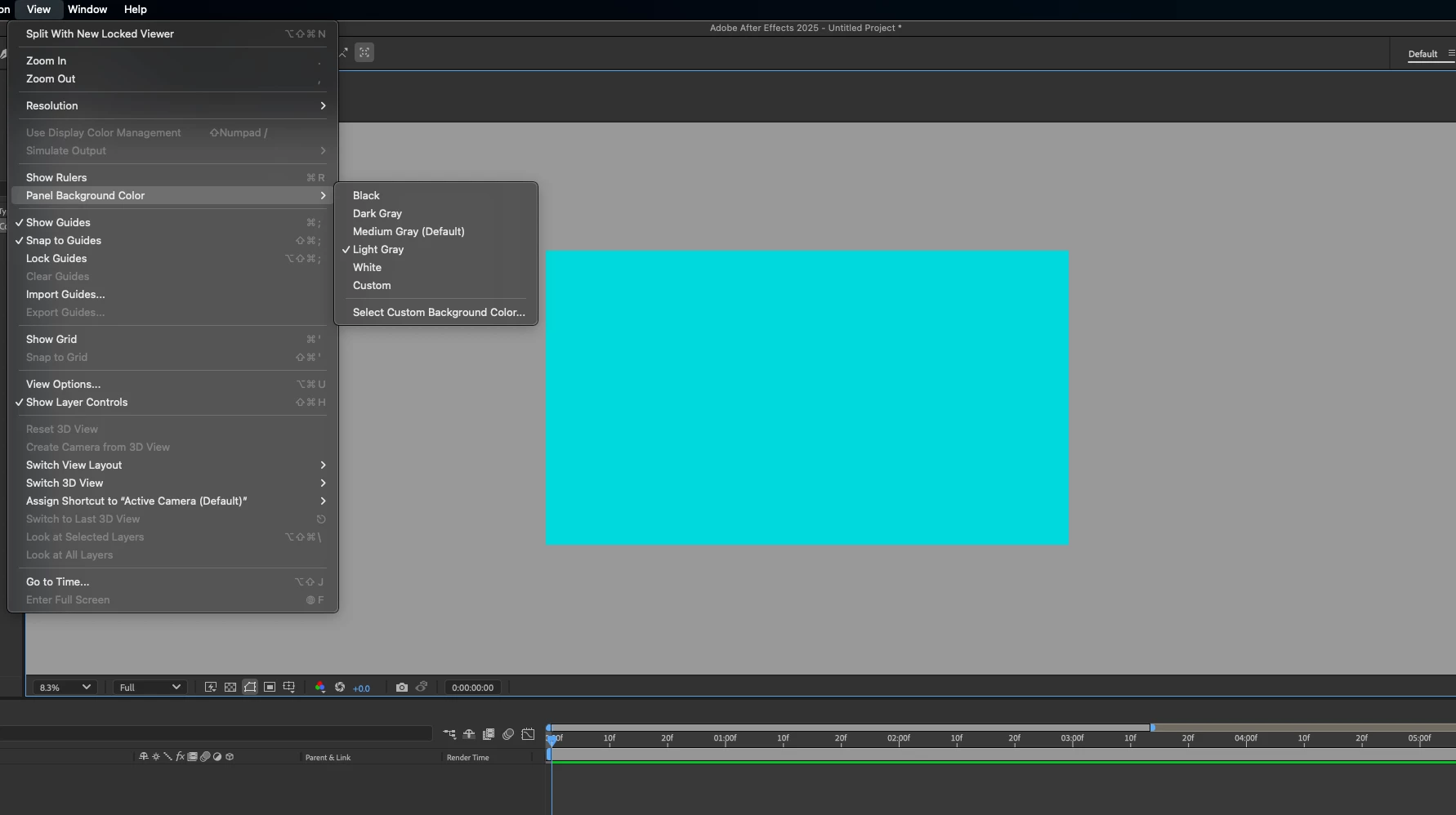
In this first screenshot, you can see that I changed the Composition panel's background color to Light Gray. 


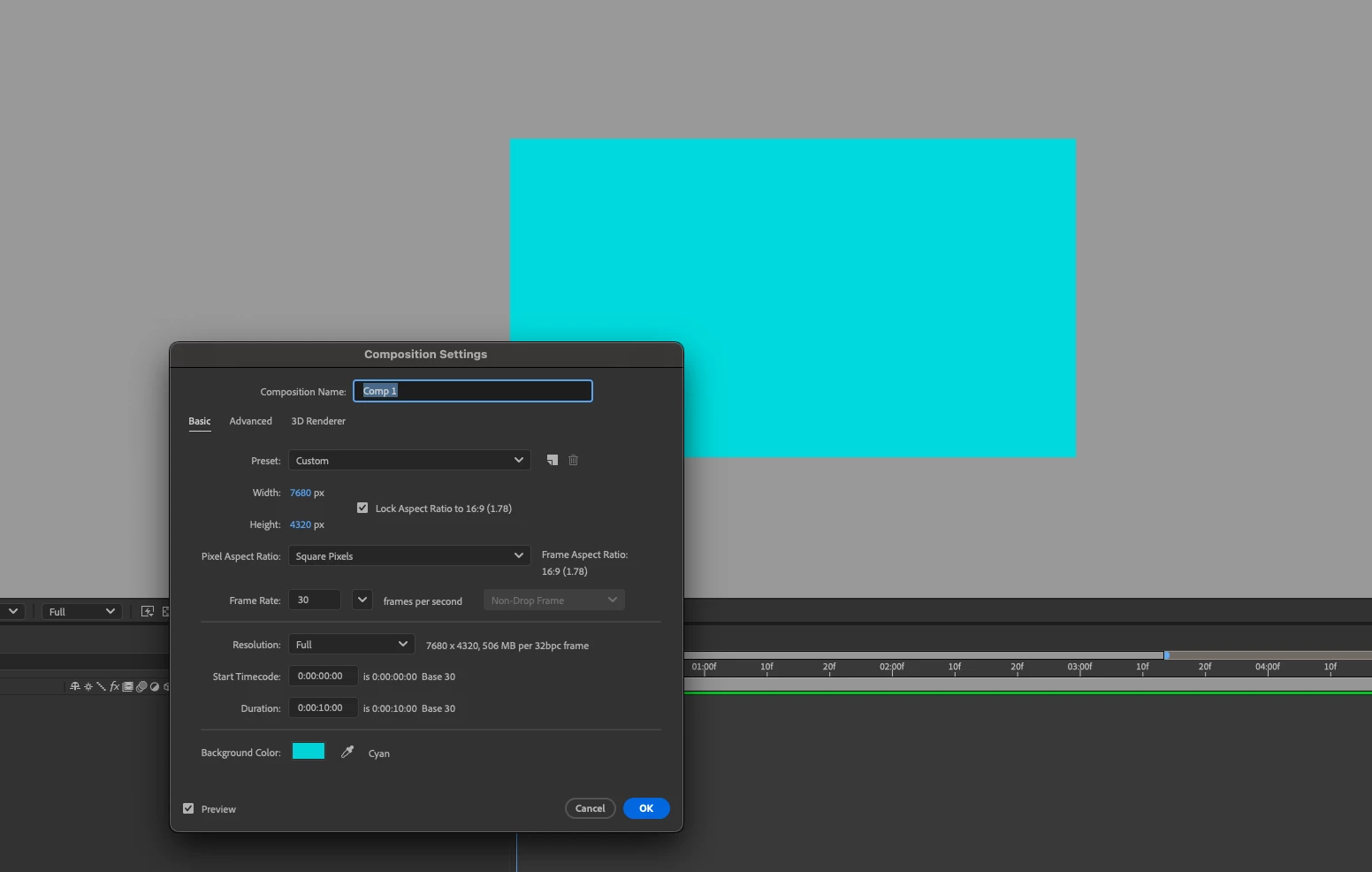
In this second screenshot I changed the background of the Composition itself, not the panel.


Is this perhaps what you're seeing?


Thanks,
- David, After Effects Engineering Team


4 replies

David.Arbor
Community Manager
Community Manager
April 3, 2025

Hey, no problem! I'm glad it was just the wrong setting, but also glad to hear that you're exploring the new features! If you have any feedback on it or anything else that just launched in 25.2, feel free to make s new post.


Thanks,
- David, After Effects Engineering Team

JBrown321
JBrown321Author
Known Participant
April 3, 2025

Ok, my appologies I feel like an idiot now. I have my workspace setup to where my composition is on it's own monitor, so I had the timeline selected and not the comp window! I appologize for this and for making you all take the time to look into this. I trully appreicate it!
Community Manager
April 3, 2025

Hi JBrown


To confirm, you're changing the panel color background from the three-line menu in the tab at the top of the composition panel? And you've chosen the option that says "(Default)" in the name? Could you possibly upload a video of this issue?

David.Arbor
Community Manager
David.ArborCommunity ManagerCorrect answer
Community Manager
April 3, 2025

Hi there @JBrown321

I just tried to reproduce the issue in 25.2.0x131 (the version that was released this week) and I'm unable to. 


The panel background color can't be changed from the Composition settings, so I'm wondering if you're talking about two different things. 


The new feature is that you can change the color of the actual panel's background, the color outside your composition. 


In this first screenshot, you can see that I changed the Composition panel's background color to Light Gray. 


In this second screenshot I changed the background of the Composition itself, not the panel.


Is this perhaps what you're seeing?


Thanks,
- David, After Effects Engineering Team