
Inspiring
January 15, 2019
Answered

AE CC 2019 – After Effects error: unable to open resource file (3 :: 54)

  • January 15, 2019
  • 1 reply
  • 3692 views

I've just upgraded to AE CC 2019 and every time I launch the app I get this error prompt:
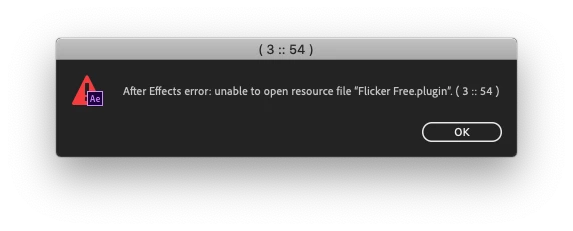
After Effects error: unable to open resource file "Flicker Free.plugin". (3 :: 54)

The plugin name suggests I have an old install of Digital Anarchy's Flicker Free installed, but I cannot find it in the AE Plugins folder so that I could delete it.

Any ideas?

This topic has been closed for replies.
Correct answer PotholePrelude

Hi samulj,

Can you check if you're able to locate it here? /Library/Application Support/Adobe/Common/Plug-ins/7.0

Let us know.

Rameez


This tip from Digital Anarchy solved my problem:

Delete the two Digital Anarchy folders found here:

MacHD>Library>Application Support>Adobe>Common>Plug-ins>7.0>MediaCore>Digital Anarchy

MacHD>Library>Application Support>Digital Anarchy

1 reply

ToolfarmJP
Community Expert
Community Expert
January 16, 2019

Hello,

Please see and delete it in the plug-in folder of the older version of After Effects if they still remain in your PC.

Inspiring
January 17, 2019

I cannot find the plugin in any of my AE versions' plugin folders. I've tried the usual Mac route (Application/Plug-ins/Effects plus all the other subfolders to Plug-Ins.

PotholePreludeAuthorCorrect answer
Inspiring
January 24, 2019

Hi samulj,

Can you check if you're able to locate it here? /Library/Application Support/Adobe/Common/Plug-ins/7.0

Let us know.

Rameez


This tip from Digital Anarchy solved my problem:

Delete the two Digital Anarchy folders found here:

MacHD>Library>Application Support>Adobe>Common>Plug-ins>7.0>MediaCore>Digital Anarchy

MacHD>Library>Application Support>Digital Anarchy