Participant
December 18, 2023
Question

AE constantly needing more RAM

  • December 18, 2023
  • 2 replies
  • 904 views

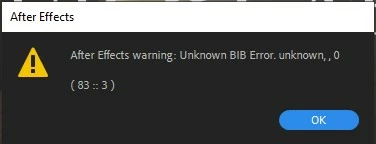
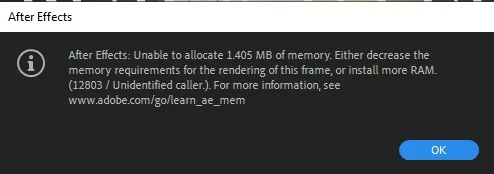
For some reason After Effects is telling me I need more RAM despite having 32gb installed and allocating 29gb to after effects. I have no idea why this is happening. I've cleared my cache in the application (edit purge), my temp folder AppData\Local\Temp, and the AppData\Roaming\Adobe\Common\Media Cache Files folder. What else can I do to make this work? All my work is completely halted until I can figure this out. I have made much larger projects in the past, so I'm not sure why it's having difficulty with text on a 10 second video.  I'm attaching screenshots of the errors. 
 

This topic has been closed for replies.

2 replies

Participant
December 19, 2023

My graphics drivers are updated and turning off that setting crashed the whole application. 


nishu_kush
Community Manager
Community Manager
December 19, 2023

Hi @Liz254002907ihm ,


Sorry for your issue.

Do you mind sharing more details on your project? Are there any media files in use? If so, what's there resolution? Are there any effects or third-party plug-ins used? What's the resolution of your comp? Try disabling the effects for testing and see if that brings any change.

Looking forward to your response.

Note: Moving this thread from Bugs to Discussions for troubleshooting.


Thanks,

Nishu

Participant
December 19, 2023

I have 2 videos being used at 1080p. One is 3 seconds and the other is 5 seconds. I have text layers on top with no animations. I am not using any third party plugins or effects. I only have 2 keyframes set. I just started assembling this project and have done things significantly more complicated in the program before. I can't find a reason that it should be acting this way. 


Mylenium
Legend
December 19, 2023

Update your graphics driver and/ or turn off hardware accelerated rendering.


Mylenium