
Celestia B.
Known Participant
June 5, 2017
Answered

AE continues to import Photoshop layers incorrectly

  • June 5, 2017
  • 1 reply
  • 8347 views

I searched the discussions a bit, but unfortunately couldn't find an answer for this specific problem.

I have never had a problem importing Photoshop layers into AfterEffects before. Today I tried to import a few layers using the File>Import option in AE. They came over just fine after I selected the preferences I normally use (Composition and Merge layers into footage). I double clicked the file as usual so that a new composition with all the layers would show up in the timeline and that's where things went awry. All of my layers only lasted 4 frames each and I couldn't lengthen them as I normally can. Also, rather than the Photoshop icon appearing next to each layer in my timeline, there was this weird image of a landscape where the Photoshop icon should be. I tried creating a new composition that was 52 seconds in length, but they were all still only four frames each and I couldn't get them to budge.

I then tried simply dragging the Photoshop file into AE and double clicking it to start a new composition with all the layers and everything was just fine. The layers were in their proper places and at editable lengths of time and the Photoshop icon was back in place.

I don't mind so much right now since I know that dragging the file still works, but what if that ends up doing the same thing, too? Does anyone know what is happening? Why is AE suddenly doing this when everything was just fine before?

Thanks in advance!
This topic has been closed for replies.
Correct answer Roei Tzoref
I have not checked or unchecked anything since my last import, and I do not see "Import as a Photoshop Sequence"

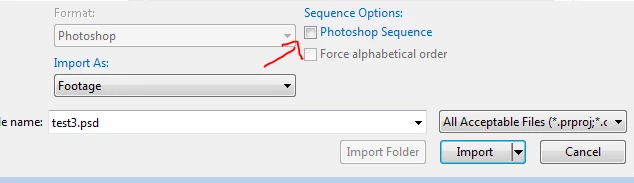
if you have file with a name convention such as 1,2,3 in the same folder, Ae will assume automatically that you want to import them as a sequence and will check it for you. on the import dialog box you should see it in the bottom right

on Mac you many need to expand the import dialog to see it.

My layers are not being combined into one, nor are they playing one after the other; they are still all separate layers.

if you are importing a multilayered file as a sequence by mistake, it won't play as a sequence, you will simply get a composition as a merged layers sequence or a layered composition when each layer is imported as a sequence (depending if you choose footage or composition in the first dialog box)

1 reply

Community Expert
June 6, 2017

It sounds too me like you have import as a Photoshop Sequence checked. It's a common rookie mistake.

Celestia B.
Known Participant
June 6, 2017

Thank you for responding.

I have not checked or unchecked anything since my last import, and I do not see "Import as a Photoshop Sequence" anywhere in my Preferences to uncheck. Upon looking up what an image sequence is, I don't think that's what's happening. My layers are not being combined into one, nor are they playing one after the other; they are still all separate layers. They are simply being placed (as separate layers) to only last four frames (each beginning at 00:00) and I'm unsure of why this is. I am also unsure why the Photoshop icon doesn't appear next to their names as usual.

Everything looks exactly as it should when they are imported, but the layers only last four frames no matter how much I lengthen or shorten the composition and they do not have the Photoshop icon. I can upload a picture if it may help.

Thank you again.

Roei Tzoref
Roei TzorefCorrect answer
Legend
June 6, 2017
I have not checked or unchecked anything since my last import, and I do not see "Import as a Photoshop Sequence"

if you have file with a name convention such as 1,2,3 in the same folder, Ae will assume automatically that you want to import them as a sequence and will check it for you. on the import dialog box you should see it in the bottom right

on Mac you many need to expand the import dialog to see it.

My layers are not being combined into one, nor are they playing one after the other; they are still all separate layers.

if you are importing a multilayered file as a sequence by mistake, it won't play as a sequence, you will simply get a composition as a merged layers sequence or a layered composition when each layer is imported as a sequence (depending if you choose footage or composition in the first dialog box)