
Participant
July 1, 2024
Answered

AE Crash: <23936> <prefetch> <5> RequestPrefetchedFrame frame not in async list!

  • July 1, 2024
  • 10 replies
  • 7382 views

When AE tries to cache frames for previewing mith Multi-Frame Rendering turned on, it will crash and give me the following area: 
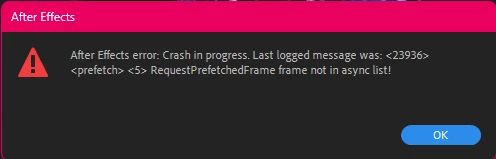
Is this a known issue? My computer shouldn't have a problem with Multi-Frame Rendering. My specs are:

Processor: Intel i9-14900K

RAM: 128 GB usable

OS: Windows 11 64-bit

GPU: NVIDIA GeForce RTX 4080

Dedicated Storage: 256 GB
Correct answer RAMESH30768198p6mh


Bios updated problem solved

10 replies

Participant
November 13, 2025

Its nothing to do with your bios or disabling virtualization. Its either your firewall or vpn settings or both. if u look at the error log it gives u the clue. AE is trying to access and failing to connect to http url. The solution is to reset firewall settings for AE and allow AE through your vpn with split tunneling or disable your vpn entirely prior to loading AE.

Participant
November 7, 2025

Its your firewall settings. reset settings for afterfx.exe

Participant
July 5, 2025

Lol notjing to do much more just change the every comp frame rate same as the main comp you are working its will work fine then.


Participant
December 1, 2024

I am having the same issues now. have you found a solution?

Participant
December 3, 2024

update BIOS 

Participant
November 1, 2024

Exact same issue here as people describing

Participating Frequently
November 4, 2024

I have exactly the same problem for a week now, I can't work on projects. I have tried all versions of After Effects and reinstalled Windows several times and even changed my RAM and processor and GPU...

Windows 11 - 64-bit

Intel i9 - 14900K

NVidia GeForce RTX 3080 TI OC, after i replaced with 4080 Super

32GB RAM, I also replaced it with a new one at 64 GB

4 TB free space, I tried installing the program on both my SSDs and even on my hard drive, but that doesn't help either.

and in all projects, even those that work on my laptop, the same thing happens on the computer with different error codes


Participating Frequently
November 4, 2024

I solved this problem:

Disabled virtualization in BIOS
And also updated BIOS to the latest version

MSI MPG Z690 EDGE WIFI DDR 5

intel Core i9 14900K

MSI RTX 4080 super

2X32 Gb 6400 MHz G.Skill TRIDENT Z5 RGB Black (F5-6400J3239G32GX2-TZ5RK)

SSD: Samsung Pro 990 2TB and Samsung Pro 980 2TB

Participant
October 27, 2024

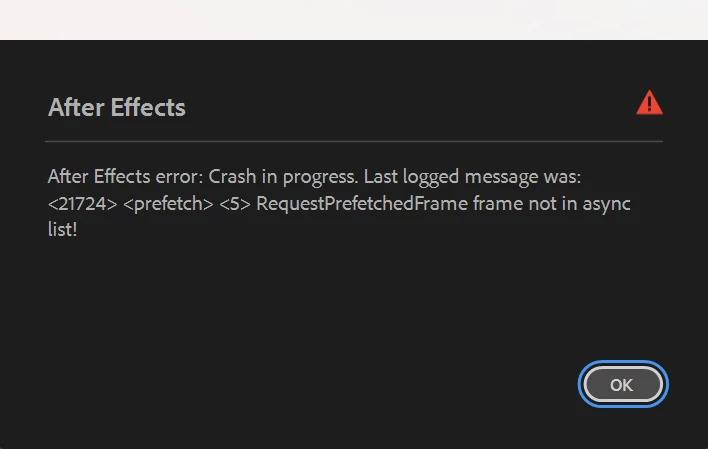
I’m experiencing a similar issue with After Effects crashing during preview when Multi-Frame Rendering is turned on. In my case, it shows the error:

This happens even when I start AE in Safe Mode. Like you, I also have high-end specs, so performance shouldn’t be the issue:

  • Processor: Intel i9-14900K
  • RAM: 128 GB usable
  • OS: Windows 11 64-bit
  • GPU: NVIDIA GeForce RTX 4090


Participant
October 28, 2024

Same issue here.
Started in Safe Mode. Disabled all [2] third-party plugins. Even disabled multi-frame rendering.

I don't have quite as much RAM as everyone else, but that's never been an issue when it came to rendering.


For some reason, sending the comp to Media Encoder did allow it render, which is honestly unexpected since this same composition would previously cause ME to crash.


Windows 11 - 64-bit

Intel i7 - 13700K

NVidia GeForce RTX 4060

32GB RAM

1 TB free space

schnudiesounds
Participating Frequently
October 30, 2024

Updating the video card drivers helped on my side 😉

Heitor F
Participant
September 26, 2024

I'm having the same issue, impossible to work, it crashes after each little action.

Multi-frame rendering is already disabled.


Laptop

Intel Core i9 14900HX

64 GB RAM

GeForce RTX 4080 Laptop

Participant
September 8, 2024

Same problem while using multi-frame rendering. 

My specs are:

Processor: Intel i9-14900K

RAM: 128 GB usable

OS: Windows 11 64-bit

GPU: NVIDIA GeForce RTX 4090

nishu_kush
Community Manager
Community Manager
September 26, 2024

Are there any error crash reports? It'll help us to find the root cause. 


Thanks,
Nishu

uli91919
Participant
July 9, 2024

I do have the same issue with almost the same setup.

After Effects keeps crashing during RAM preview calculation. Sometimes it works, most of the time not.
My fans are also running very fast, when I start calculating the RAM preview and then the crash happens. As if my computer wants to say: This is too much for me, I'm outta here.

nishu_kush
Community Manager
Community Manager
July 11, 2024

Are you getting the same issue in all the projects or with a particular one? Can you test After Effects in Safe Mode and in a new project? Also, does disabling Multi-Frame Rendering helps?

Let us know.


Thanks,
Nishu

Participant
September 4, 2024

I have a very similiar set up aswell,  Intel i9-14900K with 64GB of Ram and I am alse getting similiar messages.

nishu_kush
Community Manager
Community Manager
July 2, 2024

Not that I am aware of. What if you disable the Multi-Frame Rendering? Does it stop crashing? Can you try running After Effects in Safe Mode?

Let us know if it helps. Moving this thread from Bugs to Discussions for troubleshooting.


Thanks,
Nishu

Participating Frequently
November 4, 2024

I solved this problem:

Disabled virtualization in BIOS
And also updated BIOS to the latest version

MSI MPG Z690 EDGE WIFI DDR 5

intel Core i9 14900K

MSI RTX 4080 super

2X32 Gb 6400 MHz G.Skill TRIDENT Z5 RGB Black (F5-6400J3239G32GX2-TZ5RK)

SSD: Samsung Pro 990 2TB and Samsung Pro 980 2TB


RAMESH30768198p6mhCorrect answer
Inspiring
December 3, 2024


Bios updated problem solved

Ramesh