
Participant
November 11, 2022
Answered

AE often does not playback the full work area

  • November 11, 2022
  • 4 replies
  • 1340 views

This is pretty frustrating, and I don't know if I'm missing something, or if it's a normal glitch.


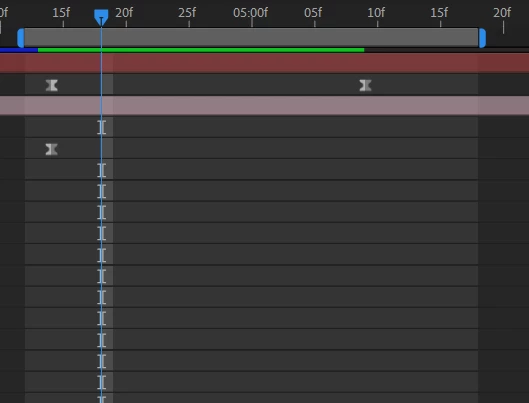
When I play back a small section of the project, AE will often just render a chunk of if (in green). I need to see the full animation, but I'm only getting about 70%. I can sometimes pause and hit spacebar again, but sometimes it still refuses to render the whole bit. This is only about 2 seconds of animation.


How can I get it to playback the whole work area?


This topic has been closed for replies.
Correct answer Mylenium

That's just how RAM previews/ cached previews work. The duration is defined by the available memory and how many frames AE can squeeze into that. You may want to read the online help on some basics:


https://helpx.adobe.com/after-effects/using/previewing.html


The rest we can't know. You have not provided any info about your system, your project, preview settings, cache and hardware acceleration settings and so on. Cropped screenshots are basically useless and AE reverting to RAM previews instead of realtime playback most definitely has a rational reason behind it liek a specific effect being used.


Mylenium

4 replies

Topher Welsh
Participating Frequently
November 17, 2022

If you want to be able to get longer previews like that, you will either have to allocate more space on a drive for your Media Cache.  Also, if you clear your cache by going to Edit > Purge > All Memory and Disk Cache you will most likely get longer previews as well.  Until it fills up again lol

--------Topher Welsh
Warren Heaton
Community Expert
Community Expert
November 16, 2022

Try reducing the current Resolution (View > Resolution> Full, Half, Third, Quarter, Custom).


If at Full, try Half.  If at Half, try Quarter.  If at Quarter, try Custom 8-by-8.


nishu_kush
Community Manager
Community Manager
November 11, 2022

Hi Sam,


Thanks for writing in.

I second Mylenium. Here are more details on how the After Effects preview work: https://community.adobe.com/t5/after-effects-discussions/faq-why-doesn-t-after-effects-preview-in-real-time-like-premiere-pro/td-p/10690804

You can lower the resolution to Half or Quater to get more preview time.

Let us know if there are any other questions.


Thanks,

Nishu

Mylenium
MyleniumCorrect answer
Legend
November 11, 2022

That's just how RAM previews/ cached previews work. The duration is defined by the available memory and how many frames AE can squeeze into that. You may want to read the online help on some basics:


https://helpx.adobe.com/after-effects/using/previewing.html


The rest we can't know. You have not provided any info about your system, your project, preview settings, cache and hardware acceleration settings and so on. Cropped screenshots are basically useless and AE reverting to RAM previews instead of realtime playback most definitely has a rational reason behind it liek a specific effect being used.


Mylenium