Participant
November 11, 2016
Answered

AE RAM preview is pixelated and sometimes doesn't work at all

  • November 11, 2016
  • 1 reply
  • 19196 views

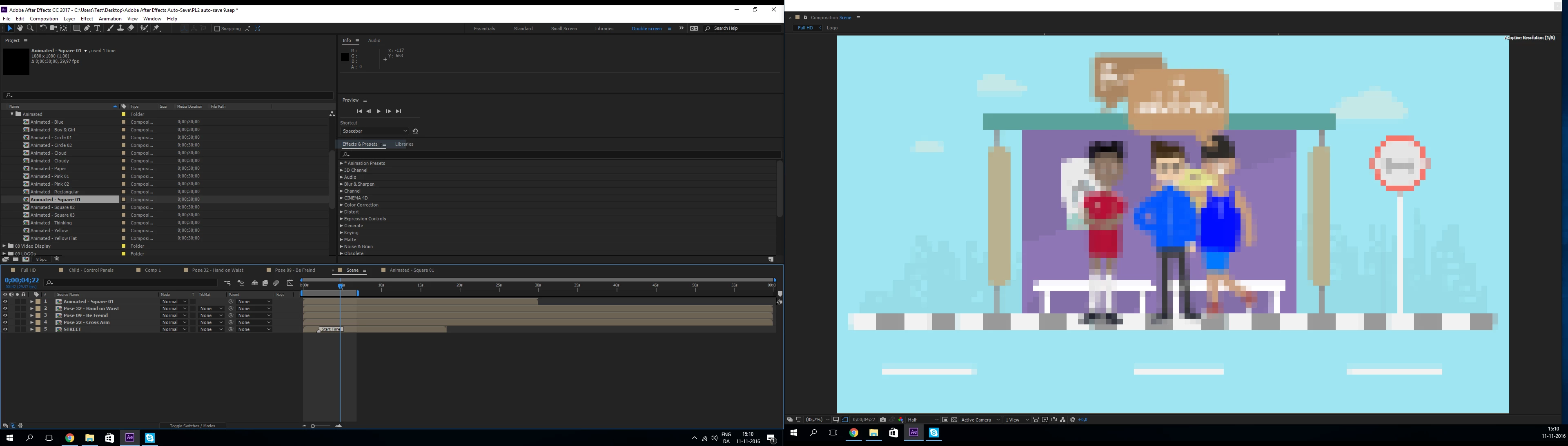
This shows what I mean.

It's set to half the resolution, yet, it looks like something that has come out of an 8 bit machine. (The comp is 1080i)

PC specs: i7-4790K 4.00GHz, 16GB DDR3, GTX770 and it's all running on an SSD.

It's a completely new install of Windows and After Effects, (as I switched to another SSD). Any idea what could cause RAM preview to run so slow and buggy?
Correct answer Roei Tzoref

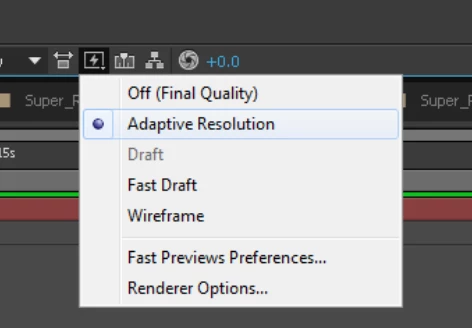
check your fast preview options

if adaptive resolution degrades your image too much, you can set it's preferences in the renderer options. in some cases you would want to set it to Off (final quality).

see if that works for you.

I would also try to purge the memory: edit->purge->all and see if the new preview image looks better.

1 reply

Roei Tzoref
Legend
November 11, 2016

about the pixelated view: check your preview panel settings. there is no RAM preview anymore, in the sense that there is no special designated keyboard shortcut to do that. you can set to preview your composition in any of the shortcuts with much flexibility. check your preview panel. this how I set mine for Numpad 0 - this how old RAM preview (prior to CC2015) worked

notice the resolution popup - when it's set to auto, it takes the information from the resolution popup of your composition. probably what you want.

if you have made a mess (it's easier to mess the preview panel than ever before) just click the reset button

Participant
November 11, 2016

I didn't only mean the RAM preview. It's also when I look at every single frame, it's either pixelated or completely grayed out with the background.

Roei Tzoref
Roei TzorefCorrect answer
Legend
November 11, 2016

check your fast preview options

if adaptive resolution degrades your image too much, you can set it's preferences in the renderer options. in some cases you would want to set it to Off (final quality).

see if that works for you.

I would also try to purge the memory: edit->purge->all and see if the new preview image looks better.