Videocutter
Participant
July 4, 2017
Answered

AE - Replace placeholder with footage depending to in and out points

  • July 4, 2017
  • 3 replies
  • 3258 views

Hi,

i have a question - maybe so easy - maybe not possible.

I have a comp in ae with some solids with a couple of keyframes, so animated placeholders (fullscreen - full hd).

Now i import a real footage clip and want to replace the placeholder with the imported clip.

BUT not the entire real footage clip, i just want to have the clip start at a certain time, so with an in point and end after a certain time, so with an out point.

Now, when i replace the placeholder (solid) with the clip (footage) i have sill all the keyframes, so far, so good, but the clip start with the very first frame from the clip it self, that is not what i want.

So in fact, i replaced the placeholder with the whole clip (duration), but again i just want to have the middle part of the realfootage clip, so the in and the out with keeping the keyframes and the entire animation of the placeholder (solids).

How can i shorten the clip and than replace or how can i replace with in and out points from a clip in after effects without to tweak the keyframes after replacing.

How can i do that?

THX and regards.

Yan.
    This topic has been closed for replies.
    Correct answer Roei Tzoref
    BUT not the entire real footage clip, i just want to have the clip start at a certain time, so with an in point and end after a certain time, so with an out point.

    1. replace the footage with the placeholder as usual

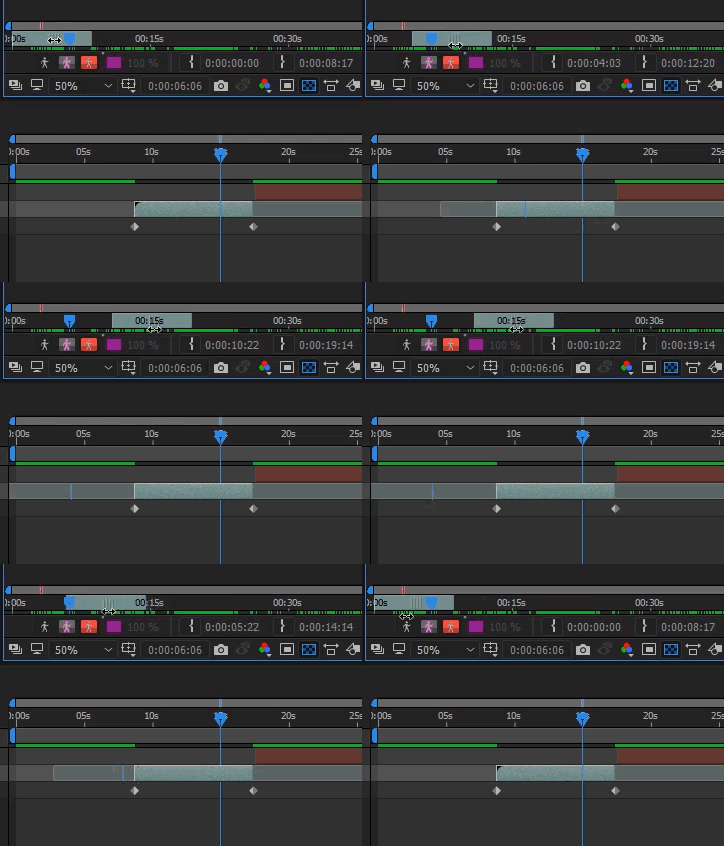
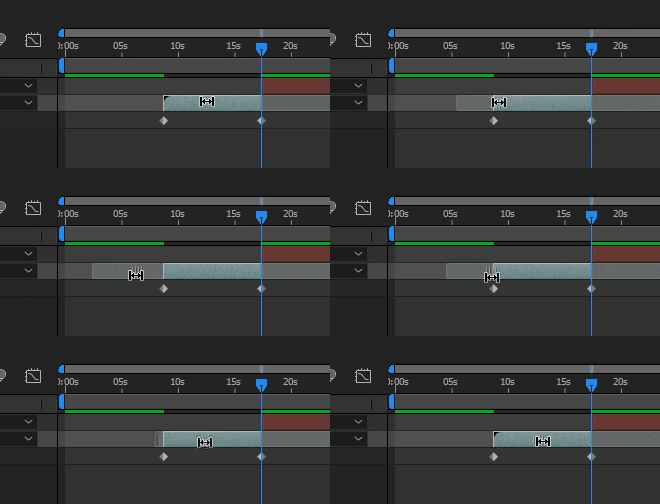
    2. activate the slip edit function for the layer by hitting Y. make sure your keyframes are not selected. now you can move the source video inside a given in and out points

    if you want, you can also do this by clicking twice on the layer in the timeline and opening the layer window. you can then drag the clip by clicking in the middle of the bar and moving it.

    more information here: Selecting and arranging layers in After Effects

    3 replies

    Roei Tzoref
    Roei TzorefCorrect answer
    Legend
    July 4, 2017
    BUT not the entire real footage clip, i just want to have the clip start at a certain time, so with an in point and end after a certain time, so with an out point.

    1. replace the footage with the placeholder as usual

    2. activate the slip edit function for the layer by hitting Y. make sure your keyframes are not selected. now you can move the source video inside a given in and out points

    if you want, you can also do this by clicking twice on the layer in the timeline and opening the layer window. you can then drag the clip by clicking in the middle of the bar and moving it.

    more information here: Selecting and arranging layers in After Effects

    Andrew Yoole
    Inspiring
    July 4, 2017

    Roel's advice here is exactly what you need.

    Mylenium
    Legend
    July 4, 2017

    You will need to write a script that replaces the footage and sets the in- and outpoints. Though it is admittedly in no way clear how you even plan to define those points. The actual info would alredy have to be stored somewhere in the file and that process by all means has always been limited and unreliable. So rather than trying to force things that may not work, it might be smarter to adapt to how AE works and use pre-comps, so stuff can be replaced and trimmed inside the pre-comp without affecting the keyframed parent comp.

    Mylenium

    Videocutter
    Participant
    July 4, 2017

    @mylenium

    That with the precomps is not so bad from the idea, but if i have to replace a lot of clips, it´s better to replace in a row and not to open every single placeholder comp. But in fact that maybe would solve the problem, even if its against a chill workaround.

    Thx.

    Any other Ideas, cause script sounds a bit like there will be to many bugs or too complex to write for each situation.

    tmyusuf74
    Inspiring
    July 4, 2017

    I have seen your post. My analysis says this is impossible issue and time lost subject. At first, you answer me why you replace footage. 

    Videocutter
    Participant
    July 4, 2017

    For example there are two placeholder, so two solids and they slide over the screen, delayed to each other and with a quick stop.

    After replacing you have two different clips, for example city in daylight and city in moonshine sliding over the screen.

    All with mask or alpha. So that you can see two from the clips, sometimes also side by side and so on.

    But the clip sun is for example interesting after 10 seconds and then just for 15 seconds. The rest ist shaky and not useable or just not intresting, same than for the moon but after 12 seconds an then for 20 seconds.

    Understandable?