
DKins
Known Participant
February 27, 2021
Answered

AE's tracker: show current points but hide the others

  • February 27, 2021
  • 4 replies
  • 2230 views

I'm using the built-in AE tracker with 4 points. The layer window is getting terribly cluttered with all of the other points and their connecting lines. I looked under "View" but none of the options give me what I need. I'm figuring there probably isn't an easy way to hide/show those rotten buggers but if somebody knows a secret, please share.


Thanks,

- DK
This topic has been closed for replies.
Correct answer Mathias Moehl

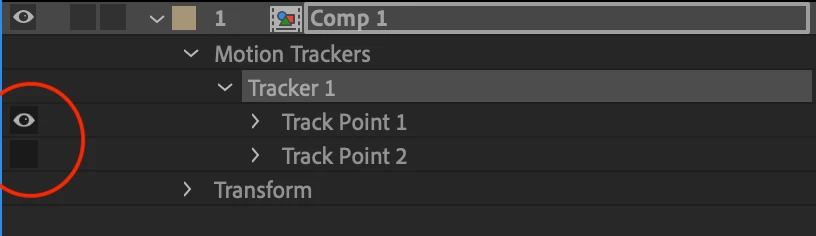
Each trackpoint has its own eyeball icon. Switch it of, to make the points in the comp viewer invisible

4 replies

Mathias Moehl
Community Expert
Community Expert
February 28, 2021

... and as an additional remark: In general, I highly recommend to use the mocha Plugin that is bundled with Ae for any serious tracking tasks. If you want to track four points, most  likely you want to do something like a corner pin. For this, mocha will give you much better results that Ae's point tracker.

Mathias Möhl - Developer of tools like BeatEdit and Automation Blocks for Premiere Pro and After Effects
Mathias Moehl
Community Expert
Mathias MoehlCommunity ExpertCorrect answer
Community Expert
February 27, 2021

Each trackpoint has its own eyeball icon. Switch it of, to make the points in the comp viewer invisible

Mathias Möhl - Developer of tools like BeatEdit and Automation Blocks for Premiere Pro and After Effects
Participant
April 20, 2023

But this also removes the tracker itself from the view, which makes it a bit pointless if you're simply trying to double check that a tracker is set correctly while fixing the track point on that frame.

Community Expert
February 27, 2021

When I use AE's point tracker I almost always turn off all keyframes so the Layer panel stays uncluttered. I change preferences all the time. I also change workspaces all the time. It is a more efficient way to work.

Roland Kahlenberg
Legend
February 27, 2021

Goto AE's Preferences - and head into the Display Section. The Motion Path Section at the top allows you define the time duration of keyframes you want to view.


BTW, if you're using 4-point tracking in AE, there's a very high probability that you will obtain better tracking results with the bundled BorisFX MochaAE planar tracker.

Very Advanced After Effects Training | Adaptive & Responsive Toolkits | Intelligent Design Assets (IDAs) | MoGraph Design System DEV