
fireKeeper
Participant
May 28, 2018
Question

AE - Shatter Effect - just a big blue circle...

  • May 28, 2018
  • 2 replies
  • 2885 views

Hello!

I have a problem with the shatter effect (AE CC 2018) and hope somebody can help me (I've googled and researched, but nothing helped..).

I have watched several tutorials, they always make a text layer and then apply the shatter effect to the text layer and it works. When I do that, I get a big blue circle in the middle and the bricks on the outsode (shown in the picture below). When I set it rendered, the text disappears. Does anybody know what I can do?

    This topic has been closed for replies.

    2 replies

    Roei Tzoref
    Legend
    May 28, 2018
    When I set it rendered, the text disappears. Does anybody know what I can do?
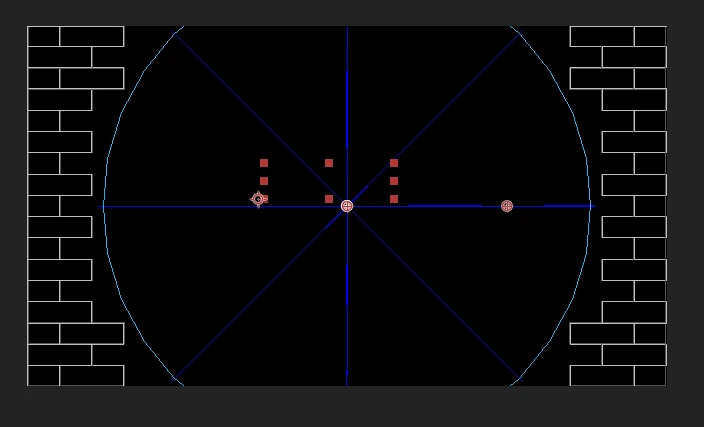
    Shatter starts at the beginning of the layer, you may have trimmed your layer so by the time you are seeing the effect, it's already passed that.

    if it's a text layer, you need to trim it back to the true in Point. you will see a dash sign on the layer bar like this:

    or you could simply create a new text layer and make sure you don't trim it from the beginning.

    fireKeeper
    Participant
    May 28, 2018

    First thanks for your kind answer!

    Unfortunately it doesn't work. Also when I create a new textlayer, without trimming anything, it does the same.. Only if I start a whole new project it works. So I would have to combine two projects and render it seperately I think..

    Roei Tzoref
    Legend
    May 28, 2018

    show a full screenshot of your Ae interface when you are placing the CTI (current time indicator) on the beginning of a text layer and with the composition and timeline fully visible so we can see what's wrong.

    Roland Kahlenberg
    Legend
    May 28, 2018

    The FIRST property in the Shatter Effects Control Panel is View and it has a Menu. The default is set to Wireframe & Forces  - change the menu selection to Rendered.

    Very Advanced After Effects Training | Adaptive & Responsive Toolkits | Intelligent Design Assets (IDAs) | MoGraph Design System DEV
    fireKeeper
    Participant
    May 28, 2018

    I've done this, but then the text disappears..