

AE unable to read data from an external JSON file using .sourceData
Hi all - I'm trying to create a data-driven animation in AE, but am having issues using the .sourceData attribute to read the data from my JSON file (the very first step, argh!).
I'm trying to use values from the JSON to set the size property of an ellipse path.
When I start my expression off with this line:
myData = footage("impact_scores.json").sourceData;
I get this error message:
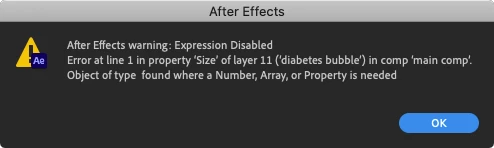
I can't see that there's anything wrong with my JSON (it's just a simple array of objects - attaching to the post), and I can't seem to find anybody online having the same issue.
Has anybody experienced this problem before or have any ideas on how to troubleshoot? I've tried both expressions engines (javascript & legacy - with legacy the error message is 'Object of type Object found where a Number, Array, or Property is needed'), and I've tested a bunch of different JSONs with the same result.
Here's the expression I want to write once I can get the JSON to link:
myData = footage("impact_scores.json").sourceData;

val = myData[1].01_01_2020

[val,val]
...and I've just updated my AE, so am running version 17.1.1.
Any help would be greatly appreciated!
 AdChoices