
Participant
January 19, 2025
Answered

AE2025 Purge cache and memory takes forever or freezes altogether

  • January 19, 2025
  • 3 replies
  • 1594 views

I'm using After Effects 2025 (25.1.0 Build 68) on a MacOS (Sonoma 14.7.2).


I use an external SSD for the cache and I haven't had any problems for over 2 years using AE 2023 and 2024. Of late, whenever I try to 'Purge all memory and disk cache' After Effects either freezes or moves extremely slow. The 'Cancel' button is also grayed out, so the only option is to Force Quit the application.


Attaching a screengrab when I tried to clear the cache when it was approximately 30 gb (Cache is actually set to 200 gb):
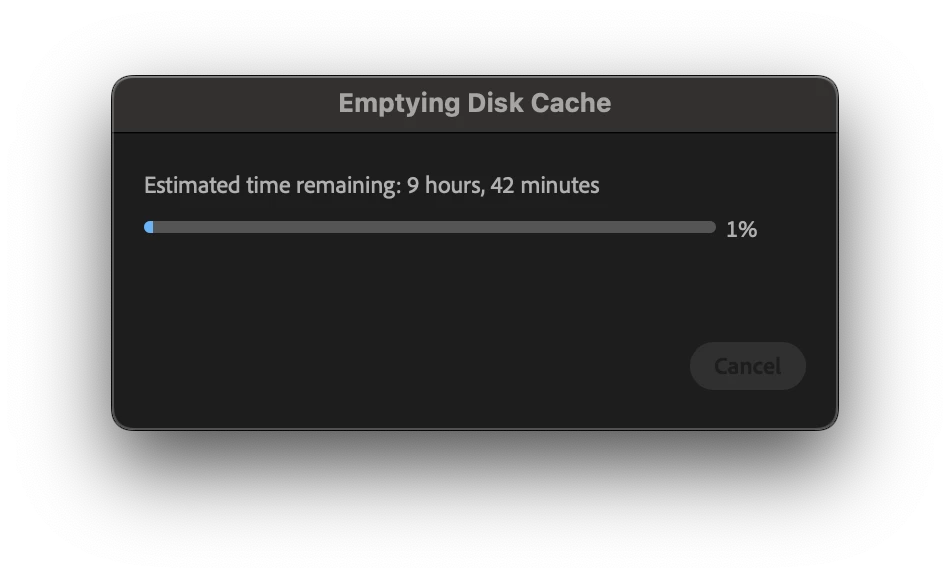
Here's what I've tried so far, without any improvements:

1. Restarted both the system and After Effects

2. Created a new folder and chose that as the new cache location.

3. Manually deleted the cache folder. This actually led to another interesting complication — when I try to empty the trash, that operation also moves extremely slow even with all Adobe applications closed.


Correct answer Matt@FanDuel

Just following up here - some other Adobe employees reached out to me via email and we made an educated guess after I formatted the HD I was using for the cache that the HD was probably corrupt, which was why I was having the issue to begin with - because I haven't had an issue since doing that reformatting.

3 replies

jackthegiantkiller
Inspiring
September 16, 2025

Timeline was bugging out so I empty my cache (on a very fast SSD) and while a 2.5 hour wait is acceptable when compared to a 9 hour one, for some odd reason I'm still a wee bit frustrated when my deadline is in an hour. Why is this so painfully, ridiculously slow?


The dialogue box also won't let you cancel this at all. 'Cancel' remains permanently greyed out the entire time, perhaps the Adobe team can explain this? Was 'Cancel' ever functional or is it just there for some placebo effect? How are we supposed to test if unchecking "All Versions" makes a difference if we are already forced to sit through this entire process?


nishu_kush
Community Manager
Community Manager
September 23, 2025

What are your system specs? If on macOS, can you try providing full disk access to After Effects? Here's how: https://adobe.ly/3IB3nNe


Thanks,
Nishu

Participant
February 18, 2025

I happened to switch to a new external SSD so this went away for a while but I'm facing this issue intermittently (and I've updated to MacOS Sequoia 15.3).


The workaround I'm using right now is that I have the AE cache on a separate partition on the external SSD. Whenever this issue happens, I erase the partition and update/relink the cache location in AE, because manually deleting the cache folder via the Mac is also extremely slow. Not sure what the downsides are to this approach.


Hope more people encountering this issue upvote the thread!

Participant
January 21, 2025

Same issue here - and it'll say it'll take 180+ hours to clear... I've uninstalled and reinstalled AE, plus I've tried manually deleting with the same long lengths. Machine is practically unuseable now when AE is open. 


nishu_kush
Community Manager
Community Manager
February 14, 2025

Thanks for writing in and sorry for your issue. Are you still encountering this? 

I am using MacOS Sequoia 15.3 and I don't have this issue. If possible, update your OS and check if the issue is still there.

Moving this thread from Bugs to Discussions for troubleshooting.


Thanks,
Nishu

nishu_kush
Community Manager
Community Manager
September 23, 2025

Just following up here - some other Adobe employees reached out to me via email and we made an educated guess after I formatted the HD I was using for the cache that the HD was probably corrupt, which was why I was having the issue to begin with - because I haven't had an issue since doing that reformatting.


Glad to hear that. Thanks for updating the thread. 


Thanks,
Nishu