
lewise30623605
Participant
February 4, 2017
Answered

AEGP Plugin No-Download ANYWHERE??

  • February 4, 2017
  • 4 replies
  • 101673 views

Ive recently bought AE and i want to render in WMV format for my editin software but when i go to click on add to media encoder queue it says this:
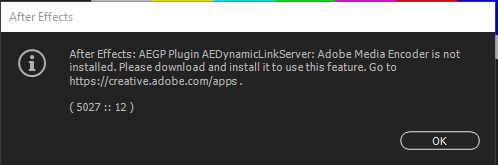
https://gyazo.com/f3d60ba0543461f95a3a32e35589201d

And when i type in the link it says there is no download link for that plugin.

PLEASE CAN SOMEONE PROVIDE ME WITH A DOWNLOAD LINK OR HELP ME

Thanks Lewis

    Correct answer Ned Suohevets

    In my case, though the warning clearly stated that the plugin was not installed (and even gave a link to where to obtain it), the actual problem turned out to be a mismatch between the versions of After Effects and Premier that I was using.  Updated the older one, and it works fine.

    Hope that works for you.

    4 replies

    Participant
    June 30, 2024

    easy solution :
    1- save your peojet in after effect and close it
    2- open media encoder and preess + . or import
    3- select in typre to import all or aep . and then select your peojet
    4- this give you litle windown of composition in the projet . chose what comp you render
     and booom . congratulation

    Ned Suohevets
    Ned SuohevetsCorrect answer
    Inspiring
    August 8, 2018

    In my case, though the warning clearly stated that the plugin was not installed (and even gave a link to where to obtain it), the actual problem turned out to be a mismatch between the versions of After Effects and Premier that I was using.  Updated the older one, and it works fine.

    Hope that works for you.

    Participant
    March 13, 2021

    Thank you

    this is absolut nonsens that you have to solve this isue by your self.

    It hepled me

    Kevin-Monahan
    Community Manager
    Community Manager
    March 3, 2017

    Hi Lewis,

    Did you follow Mylenium's advice and did it assist you? Please let us know if you solved your issue or not, and if you still need help.

    Thanks,
    Kevin

    Kevin Monahan - Sr. Community and Engagement Strategist – Adobe Pro Video and Audio
    Participant
    August 27, 2017

    I need help for this issue.....

    Mylenium
    Legend
    February 5, 2017

    You need to install and run AE with sufficient privileges and no external influences interfering. DynamicLink not working means that some other process on your system is messing around and blocking the required local ports/ sockets. You are completely misunderstanding teh warning.

    Mylenium

    jackthegiantkiller
    Inspiring
    March 23, 2021

    You know as well as EVERYONE on your team that this crap breaks ALL THE FREAKING TIME after even a minor update. I am absolutely sick of Adobe laying their failures at the feet of their customers who are paying to be beta testers. My AEDynamicLink just went down AGAIN. AGAIN. AND AGAIN. OVER AND FREAKING OVER. FIX YOUR MISTAKES, ADOBE.

    Participant
    October 24, 2023

    Concordo plenamente, por isso fiz o cancelamento da assinatura, pois pagar por algo que funciona quando quer, e ainda quando funciona, funciona travando, os programas frees da internet rodam redondo e sem travas, por exemplo, o Premier fica travando o tempo todo no preview, ai penso que o problema são os arquivos gravados, quando rodo esses mesmo arquivos no capcut ele roda sem nenhum problema. Desisti da Adobe, pra mim acabou.