
Muasien
Participant
January 27, 2020
Question

Affter Efects CC 2020 CUDA is not working (Windows 10)

  • January 27, 2020
  • 2 replies
  • 927 views

Hello All!

How I can enable CUDA on Windows 10 Pro for workstations?

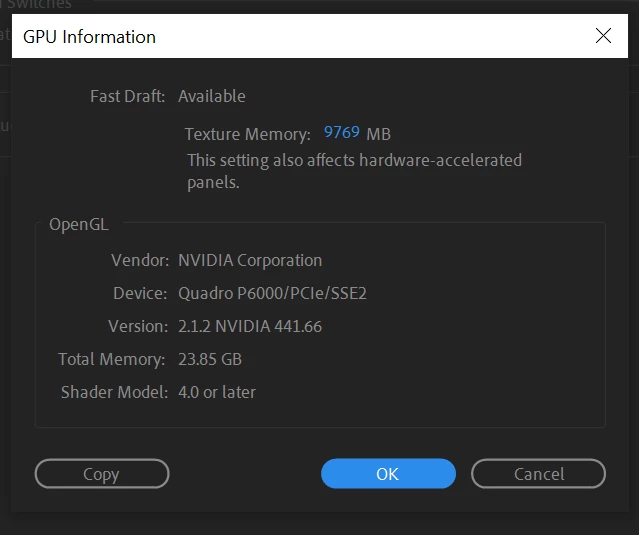
My GPU - Quadro P6000 (driver 441.66 )

I learned many topics about this problem, but is not solved it.

I installed new Nvidia driver in custom mode (driver only) and add my GPU in list raytracer_supported_cards.txt

Nothing Solved the Problem

Render is VERY SLOW!

Maybe I must can istall special CUDA driver on Windows?

But I heard that installing "CUDA Toolkit " can make a big problems.


This topic has been closed for replies.

2 replies

Szalam
Community Expert
Community Expert
January 28, 2020

The ray-traced renderer is only used to create 3d geometry (extruding text and making shapes) - most people aren't even using that feature - it's not used to make anything else go faster. Plus, it's deprecated in the newest version of AE. So, adding your GPU to the .txt file won't do any good. Besides, your GPU is too new for that txt file trick to work anyway. Those tutorials showing that are so outdated! (If you were using the ray-traced renderer to extrude text or shapes, you'd need to update your Optix library and a few other things on your GPU, but, again, it's an obsolete feature that has been deprecated.)


What do you have going on in your composition? The GPU might not even be a factor.

Participant
January 27, 2020

Hello,

I had this problem too! I moved from a Mac to a PC and my Comp wouldn't export at all.

What I did to fix this was in my COMP Settings under 3d Render I changed it from Ray-tracer 3D to Cinema 4D.

That might be an option for you unless you want to keep using raytracer.