eliasx53554450
Participant
December 9, 2020
Question

Affter Effects too slow

  • December 9, 2020
  • 1 reply
  • 200 views

Hello,


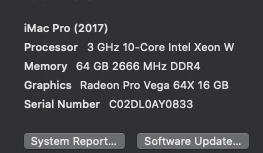
Someone will guess that the specs of this computer will be sufficent to run After Effects efectively but Apple and Adobe have different plans.


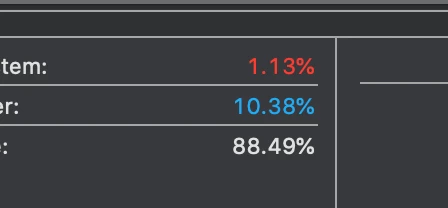
Can someone explain why is not utilizing the full cpu,ram and why is taking forever to render a 5 min composition. Yeah it has a lot of fx but not 15 hours or render time. 


Thanks.



This topic has been closed for replies.

1 reply

Community Expert
December 9, 2020

Just to know, what effects does it have? How big is your composition? How deep of color is it? How many layers does it have? You should know that 5 minutes is already a lot for After Effects and time is relative to the amount of processes you need to perform in the render. I also see that it has barely been a little more than 1 minute after you launched the render and it may still be analyzing the entire composition to get a slightly more approximate time estimate, after a few minutes it continues the same time?

Byron.
eliasx53554450
Participant
December 10, 2020

Its quite heavy in effects i know. It has 2 lumetri, keylight, key cleaner, spill supressor, sharpen, choke, 3d composition in 3d element etc etc etc. 20 layers  deep. 8 bit color.  It stayed like that for the whole time. Even after 1 hour it still had the same usage. One week ago the same project with the same effects the same time it was taking 4-5 hours to export and was using at least 70% of ram, 30-50 % cpu. For some reason this changed. I did went back to the previus version of AE and still the same. Restore preferences the same. Unistall and install again still the same.


Community Expert
December 11, 2020

15 hours for your heavy composition is a reasonable time, the problem is that if you do not see progress then something happens there. Did you try updating the operating system whatever version you are using? Ae is stuck only with this composition or have you tried others? Ae is stuck only with this composition or have you tried others? Also, try launching the render to the Adobe Media Encoder to compare render times.

Byron.